QwenWork Public Beta: How Qwen3.8-Max Turns Prompts Into Deployable Work
Alibaba opened the public beta of QwenWork, known in Chinese as 千问办公, on August 3, 2026. The product is positioned as an all-in-one workplace AI agent platform for individuals and
QwenWork Public Beta: How Qwen3.8-Max Turns Prompts Into Deployable Work
Introduction
Alibaba opened the public beta of QwenWork, known in Chinese as 千问办公, on August 3, 2026.
The product is positioned as an all-in-one workplace AI agent platform for individuals and enterprises. It combines capabilities from Alibaba's earlier agent products Qoderwork, Mulerun, and Wukong, then connects them to the newly released Qwen3.8-Max model.
The important part is not simply that QwenWork can write text or answer questions. Its central promise is that one request can produce something people can immediately use: a working webpage, a document, a spreadsheet, a presentation, an image set, a video, a scheduled workflow, or a task completed through connected business systems.
QwenWork is currently available in China through a web interface and desktop client. Alibaba is also integrating it into DingTalk, while a standalone mobile app and international edition are planned for later.
This guide follows the original hands-on sequence: first, what QwenWork can create; then how it fits into company workflows; how reusable organizational skills work; what Qwen3.8-Max contributes underneath; and finally, what users should know before trying the public beta.
QwenWork Is Designed to Deliver, Not Just Generate
Many AI tools stop at the draft.
They write copy, suggest code, generate an image, or outline a report. The user must still move the output into another tool, build the interface, configure hosting, connect a database, assemble the final document, and verify that everything works.
QwenWork attempts to absorb more of that unfinished work into the agent itself.
Alibaba describes the platform as supporting:
- Content creation
- Data analysis
- Professional research
- File processing
- Presentation generation
- Document creation
- Video editing
- Interactive webpage development
- Browser automation
- Scheduled tasks
- Business-system connections
- Reusable skills and expert kits
Its website-development workflow is especially central to the product's positioning.
A user can describe the desired application in natural language. QwenWork can then create an HTML-based experience, provide a hosted address, connect data storage where needed, and verify the result through browser interaction.
The goal is to narrow the gap between "AI generated something" and "the work is ready to open, share, or use."
Test 1: Turning a Long Interview Into an Interactive Signal Map
The first test in the source article used a recent interview with Sam Altman from the Invest Like the Best podcast.
The request was not simply to summarize the video. QwenWork was asked to turn the full interview into an explorable and verifiable "signal map" in which readers could navigate claims, evidence, quotations, and timestamps.
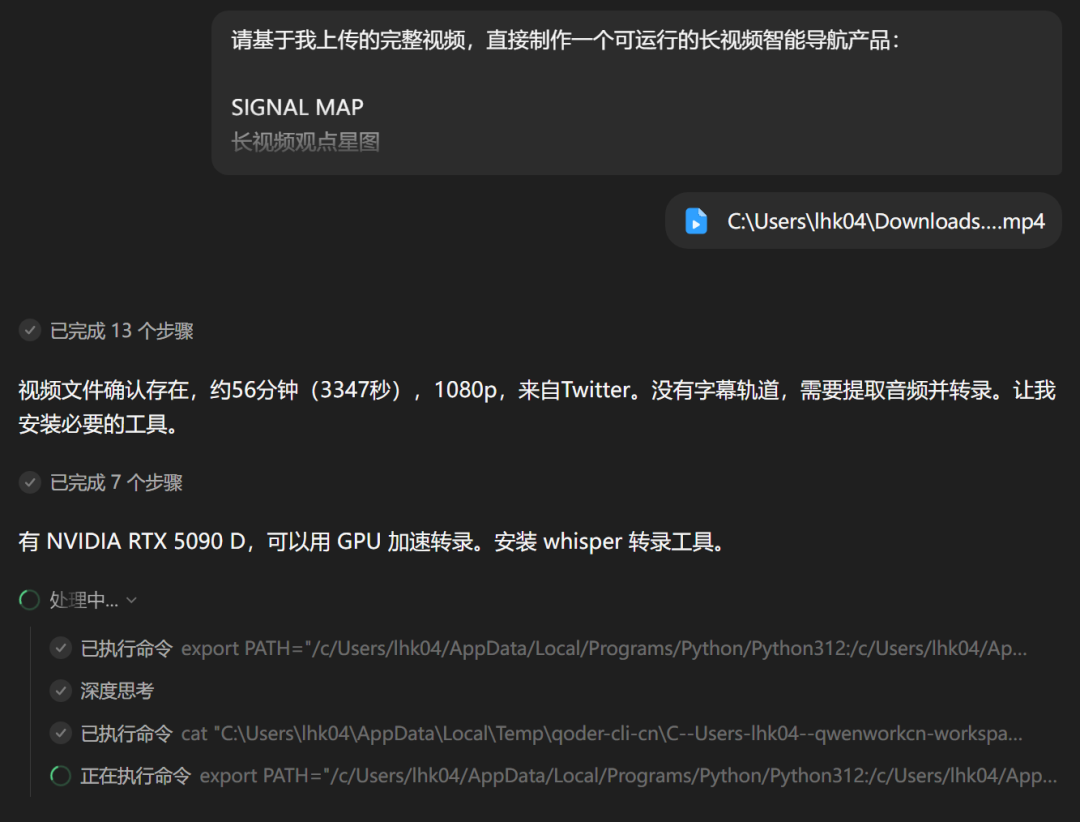
After receiving the video, the agent reportedly:
- Extracted the audio track.
- Installed a transcription model.
- Downloaded the required CUDA libraries.
- Ran the transcription on a local NVIDIA GPU.
- Analyzed the transcript.
- Designed and built a webpage.
- Started the service.
- Opened the result in a browser for validation.
The completed experience divided the interview into 15 chapters.
Each chapter presented the main conclusion first, followed by supporting evidence. Selecting a chapter, quotation, or claim moved the video player to the corresponding timestamp.
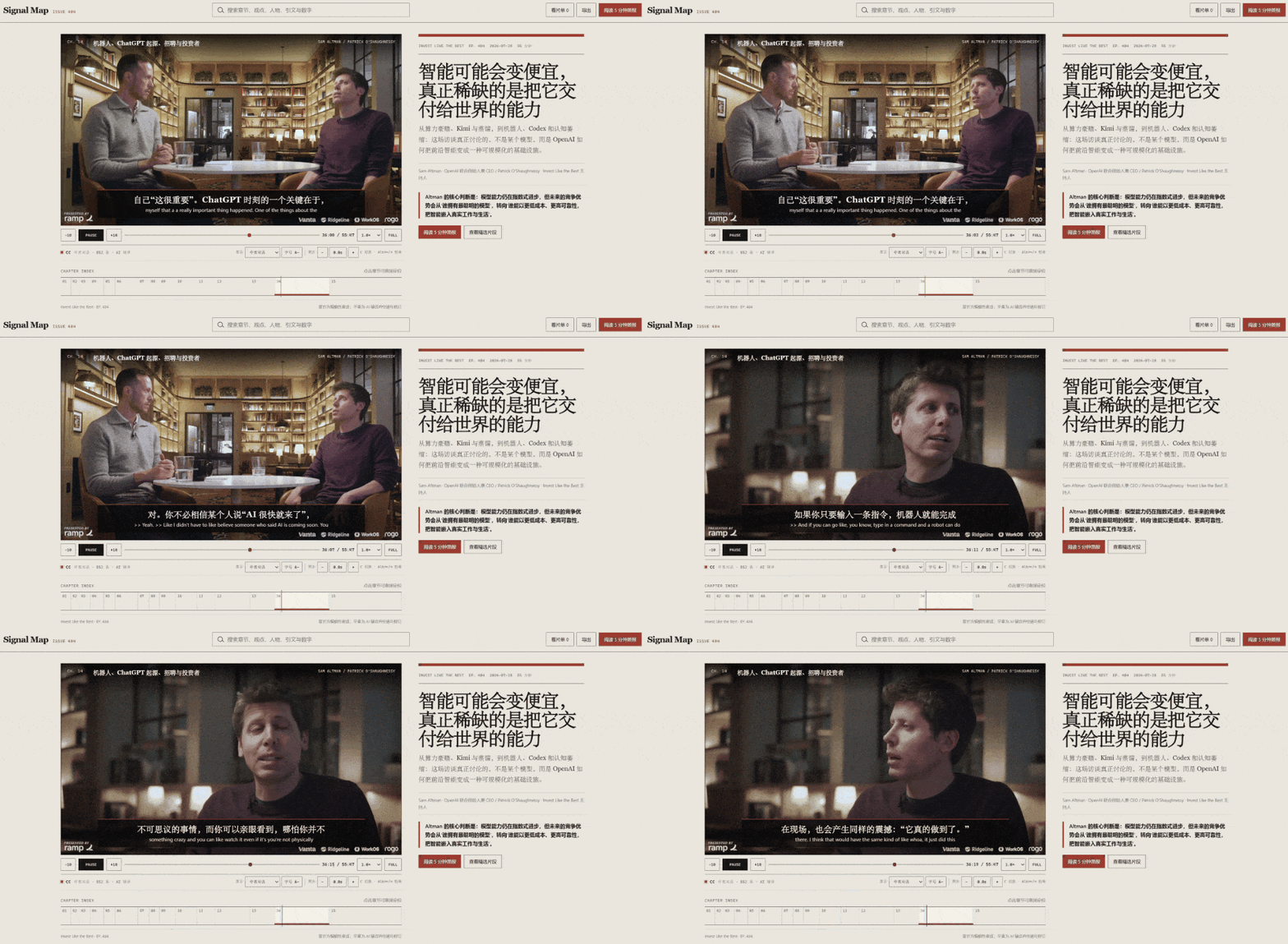
The output also included:
- A searchable index of people, claims, and numbers
- A comparison of opposing arguments
- Ten selected highlights
- A personal playlist
- Export controls
- A five-minute briefing mode
This is a useful example of QwenWork's product philosophy.
A conventional summary removes the need to watch the full video but also removes much of the evidence. The generated interface preserved the original media and made it easier to inspect.
The result was not merely a paragraph of analysis. It was a small information product.
Users should still review generated quotations, timestamps, and interpretations before publishing them. A polished interface can contain transcription errors or overconfident analysis.
Test 2: Building an Interactive Turbofan Engine Demonstration
The next test increased the technical complexity.
QwenWork was asked to build a Three.js demonstration explaining how a high-bypass turbofan engine works. The specification reportedly ran to several thousand Chinese characters and included requirements for planning, visual behavior, interaction, and delivery checks.
The agent returned approximately 1,200 lines of code.
The published result displayed a cutaway engine with visible components including the inlet, fan, compressor, combustion chamber, turbine, core shaft, bypass duct, and exhaust system.
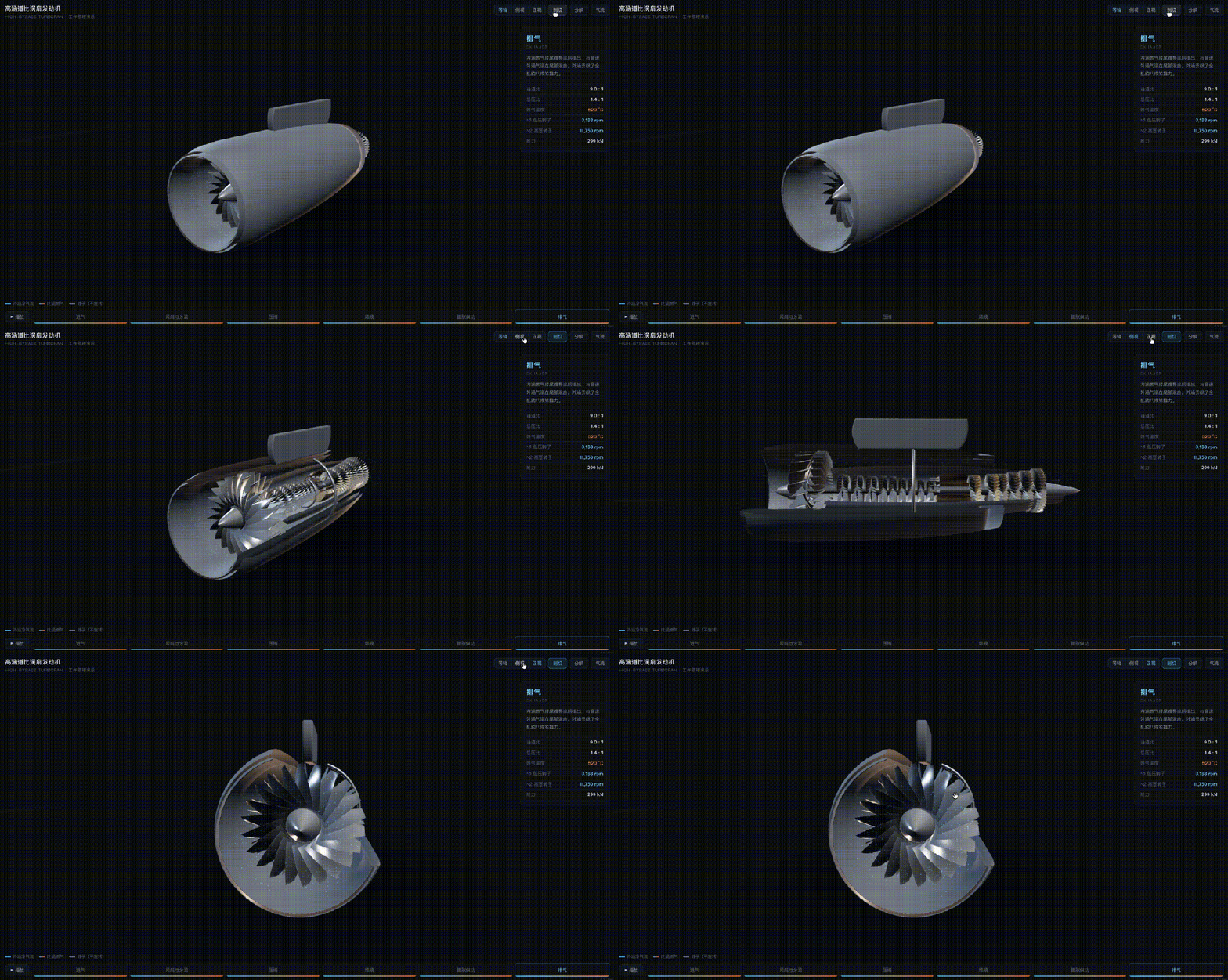
When the animation played, the shafts rotated at different speeds. Air particles entered the engine and split at the bypass section. Most traveled through the outer stream, while the remaining air entered the core, passed through compression and combustion, and exited through the nozzle.
The interface also supported an exploded view with labeled components.
This type of output is useful for education, technical sales, training, and product explanation because the user can interact with the concept instead of reading a static
description.
It also exposes an important limitation: visual coherence does not guarantee engineering accuracy. A subject-matter expert should verify the geometry, rotation, temperatures, bypass ratio, airflow, labels, and explanatory text before the page is used for technical instruction.
QwenWork Can Produce Multimodal Campaign Assets in One Task
The third demonstration focused on a fictional oat cold-brew coffee product called Daywake.
A conventional launch campaign might involve a strategy team, copywriters, designers, social-media operators, and video editors. The test asked QwenWork to produce the campaign package as one coordinated task.
The delivery overview included:
- A launch-communications plan
- A product article
- A main visual poster
- Three social-media images
- A 30-second promotional video
- An audio advertisement
- Copy for several social channels
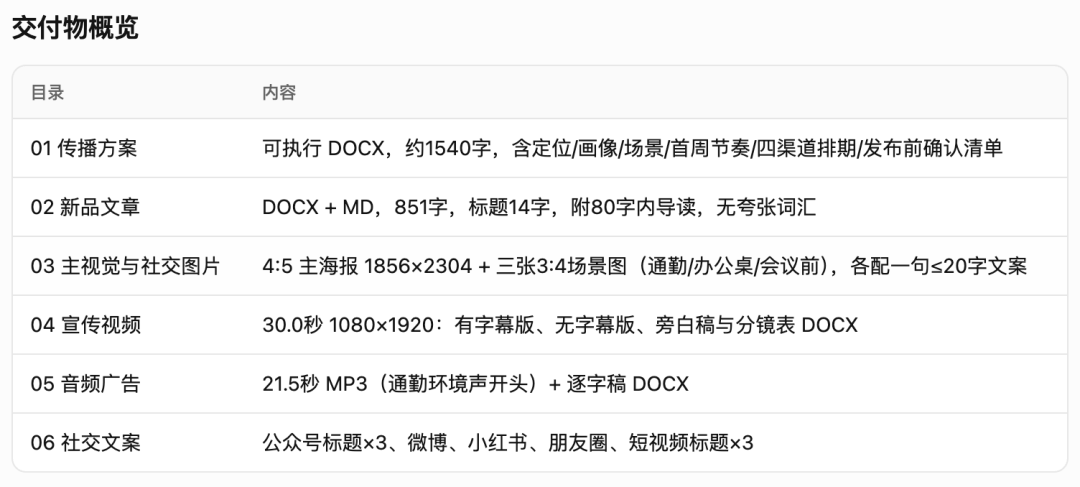
The copy was adapted for channels including WeChat, Weibo, Xiaohongshu, Moments, and short-video platforms.
This matters because multimodal generation is often fragmented. A user may write in one tool, create graphics in another, move to a third system for video, and then reformat the message for every platform. QwenWork tries to keep the strategy, language, visual identity, and production tasks inside one agent session.
A real product launch still needs checks for product claims, ingredients, trademarks, platform rules, visual consistency, music licensing, translation quality, and legal requirements.
QwenWork can compress the production cycle. It does not transfer accountability away from the organization publishing the material.
Office Documents Are Part of the Same Workflow
QwenWork also supports workplace deliverables such as Word documents, presentations, spreadsheets, PDFs, Markdown files, reports, data visualizations, and published webpages.
The official product documentation says desktop users can work with approved local files, analyze PDFs, polish Word documents, extract Excel data, generate presentations, edit video, and save results back to a selected folder.
The practical benefit is continuity. A research task can begin with source collection, continue through analysis, produce a spreadsheet and presentation, and finish with a shareable webpage without restarting the project in several isolated tools.
QwenWork Is Also an Enterprise Agent Platform
The larger difference appears when the agent enters a real organization.
Most company context does not live inside an AI chat window. It is distributed across instant-message threads, calendars, documents, knowledge bases, email, approval systems, databases, reporting tools, team structures, and internal applications.
A general AI assistant sees only the information manually
copied into the conversation.
QwenWork's enterprise approach is to connect the agent to collaboration and business systems so it can act on organizational context rather than isolated prompts.
Alibaba's official launch highlights DingTalk integration. Users can ask the agent to create documents, summarize group chats, schedule events, send messages, and work with emails while remaining inside the collaboration environment.
The source article's beta test counted 25 enterprise-level capabilities covering areas such as IM, approvals, calendars, documents, knowledge bases, and email. That number should be understood as a launch-period observation rather than a permanent product specification because integrations and entitlements can change.
From Group Chats to Executable Context
Consider a weekly reporting task.
A user could ask QwenWork to collect the previous week's meetings, open to-do items, OKR progress, decisions from project groups, delays, blockers, and upcoming deadlines.
The agent can turn that information into a weekly document and archive it in the company knowledge base.
The difference is not the ability to write a report. Many models can do that.
The difference is reducing the manual work required to assemble the context before writing begins and to move the result back into the company system afterward.
The same pattern can be applied to:
- Sales summaries
- Project updates
- Contract reviews
- Meeting preparation
- Recruitment coordination
- Finance reports
- Customer-feedback analysis
- Market monitoring
- Research digests
Enterprise value appears when the agent can reliably move from source data to an approved output inside the company's existing workflow.
Scheduled Tasks Turn the Agent Into a Recurring Worker
QwenWork supports one-time, interval-based, hourly, daily, weekly, and monthly scheduled tasks.
A user can describe the schedule in natural language:
Every weekday at 9:00, collect the latest AI agent discussions from approved sources,
summarize the five most important changes, save the report as Markdown,
and send the result to the DingTalk research group.
The official documentation advises users to run a complex task manually before converting it into a schedule. This allows the prompt, data sources, output format, and expected credit use to be tested first.
A scheduled run can use the same capabilities available in a normal session, including skills, connectors, browser automation, MCP tools, and permitted file access.
One operational detail is easy to miss: desktop scheduled tasks are run by the local client. If the computer is asleep or switched off at the scheduled time, the task may not execute automatically.
Users should also monitor credit consumption because every scheduled run creates a separate task and can invoke models, tools, search, and multimodal processing.
Organizational Skills Turn Experience Into Reusable Process
One of QwenWork's more important enterprise concepts is the organizational skill.
A skill packages a repeatable way of doing work. It may contain:
- Instructions
- Decision criteria
- Templates
- Tool choices
- Data connections
- Output
requirements
- Review steps
- Domain knowledge
The source article gives the example of a partner at a law firm who completes the organization’s first merger-and-acquisition due-diligence report through repeated work with QwenWork.
After the process is refined, it can be saved as an organizational skill and shared.
A new assistant can then invoke the skill, select the appropriate execution path, and produce a report using the firm’s established process rather than beginning from a blank prompt.
The value is not only faster output.
The organization converts tacit knowledge—how an experienced person actually approaches the task—into a resource that can be inspected, reused, and improved.
Expert Kits Cover Specific Roles and Industries
During the beta period, the source article reported more than 70 individual skills and over a dozen expert kits.
The visible catalog included areas such as product design, investment research, contract management, corporate legal work, corporate finance and tax, consulting delivery, wealth management, technology-service consulting, equity investment, and litigation workflows.
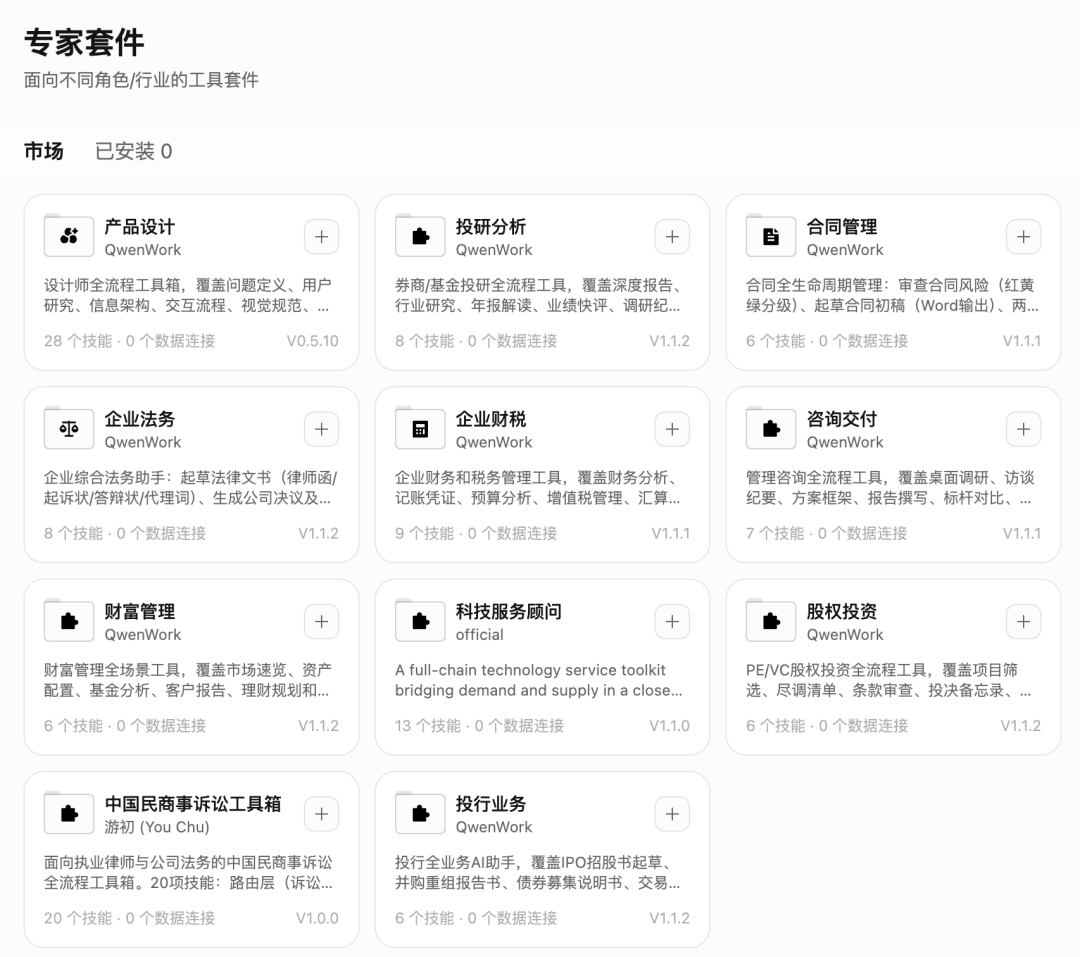
Official QwenWork documentation describes expert kits as packages that combine professional knowledge, workflows, and judgment standards for a particular role or industry.
This is different from a general prompt library.
A useful expert kit should encode not just what to write, but which questions to ask, which evidence to collect, which risks to flag, which structure to follow, which outputs to produce, and which decisions require human review.
Organizations should inspect and validate these kits before relying on them for legal, financial, compliance, medical, or other consequential work.
Connectors Extend QwenWork Beyond Its Own Interface
QwenWork connectors link the agent to external tools, accounts, data, and applications.
The launch-period interface shown in the source included integrations or connector categories involving browsers, local computer control, macOS applications, Microsoft 365, DingTalk, Feishu, Slack, LINE, Notion, and Linear.
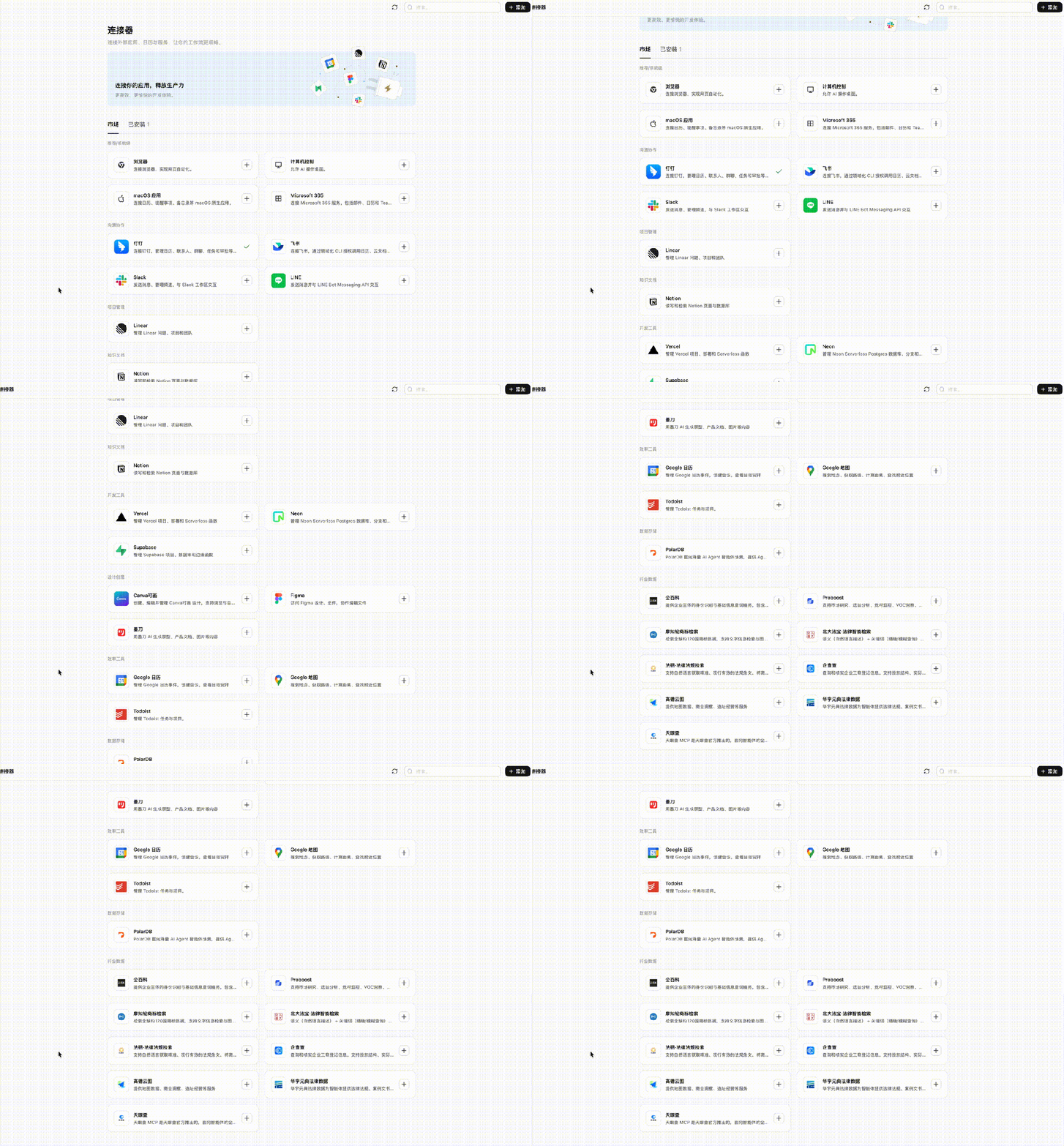
Current desktop documentation also lists IM-channel support for DingTalk, Feishu, Lark, WeChat, WeCom, Slack, and WhatsApp, although exact availability can depend on version, organization settings, region, and administrator approval.
Connectors make the agent more useful, but they also increase risk.
Each connection should follow least-privilege
principles:
- Grant only the data access needed for the task.
- Separate read permissions from write permissions.
- Require approval for consequential actions.
- Log tool calls and external changes.
- Review third-party data handling.
- Remove unused connections.
- Test failure and rollback behavior.
An agent that can draft an email is different from an agent that can send one. The permission boundary should make that distinction explicit.
Qwen3.8-Max Is the Model Underneath the Flagship Experience
QwenWork can use several model tiers, but Qwen3.8-Max is the flagship option highlighted at launch.
Alibaba describes Qwen3.8-Max as its most capable Qwen model to date.
Its published architecture includes:
| Specification | Qwen3.8-Max |
|---|---|
| Total parameters | 2.4 trillion |
| Active parameters | 95 billion |
| Architecture | Sparse Mixture of Experts with hybrid attention |
| Context window | Up to 1 million tokens |
| Input | Text and visual information |
| Main focus | Coding, work, research, multimodal agents, and long-horizon tasks |
| Open weights | Scheduled by Alibaba for release after the API launch |
Alibaba reported that the model ranked fifth in Text Arena, second in Vision Arena, and fourth in Frontend Code Arena at launch.
Leaderboard positions are time-sensitive. They describe one point in time and should not be treated as permanent model rankings.
Why 2.4 Trillion Parameters Does Not Mean Every Request Uses 2.4 Trillion
Qwen3.8-Max uses a sparse Mixture-of-Experts architecture.
The full model contains 2.4 trillion parameters, but Alibaba says approximately 95 billion are active for a request.
A sparse architecture routes different parts of the input through selected expert components rather than activating the entire model at once.
This design aims to combine large total capacity, specialized expert behavior, lower inference cost than a similarly sized dense model, and lower latency than activating all parameters.
Parameter count alone does not establish model quality.
Architecture, training data, reinforcement learning, evaluation design, tool integration, and inference systems all affect real performance.
Million-Token Context Supports Large Workspaces
A context window of up to one million tokens can hold far more material than a typical chat session.
Possible examples include:
- A long industry report
- A contract archive
- A large set of operational logs
- A substantial code repository
- Many meeting transcripts
- A long video transcript
- A collection of project documents
Long context reduces the need to manually split every source into small pieces.
It does not guarantee perfect recall.
Users should still organize source files clearly, identify authoritative documents, ask for evidence, verify extracted numbers, separate current and outdated versions, and review whether the model used the correct source.
A larger context window makes more information available. It does not automatically make every conclusion correct.
Long-Horizon Agent Capability Is Central to Qwen3.8-Max
Alibaba's model announcement emphasizes tasks that require hours or days of continuous execution.
In one
For example, Qwen3.8-Max autonomously worked on the oh-my-cli project for more than ten days.
The model created a self-evolving development loop involving issue intake, task-state management, agent dispatch, code generation, build checks, unit tests, end-to-end tests, pull requests, monitoring, recovery, and feedback-driven iteration.
Alibaba reported that after roughly 16 days of autonomous operation, the repository had accumulated 265 commits, 127 pull requests, and 151 issues.
These are vendor-reported results, but the project trace is publicly available on GitHub, making it more inspectable than a closed demonstration.
Long-horizon performance is relevant to QwenWork because workplace tasks often involve many tool calls and repeated corrections rather than one answer.
Test 4: Building a 30,000-Person Emergency Command Simulation
The source article tested Qwen3.8-Max on a more complex interactive application: an extreme-weather emergency command center for a music festival with 30,000 attendees.
The simulated site contained six zones.
During a 60-minute virtual scenario, events included approaching rain, heavy rainfall, power failure, crowd congestion, injuries, communication outages, and stage-management decisions.
The user acted as the incident commander and allocated limited security, medical, ambulance, lighting, power, and crowd-control resources.
At decision points, the simulation paused and asked the user to choose an action. The resulting crowd flow, injury count, risk curve, and evacuation time changed based on the decision.
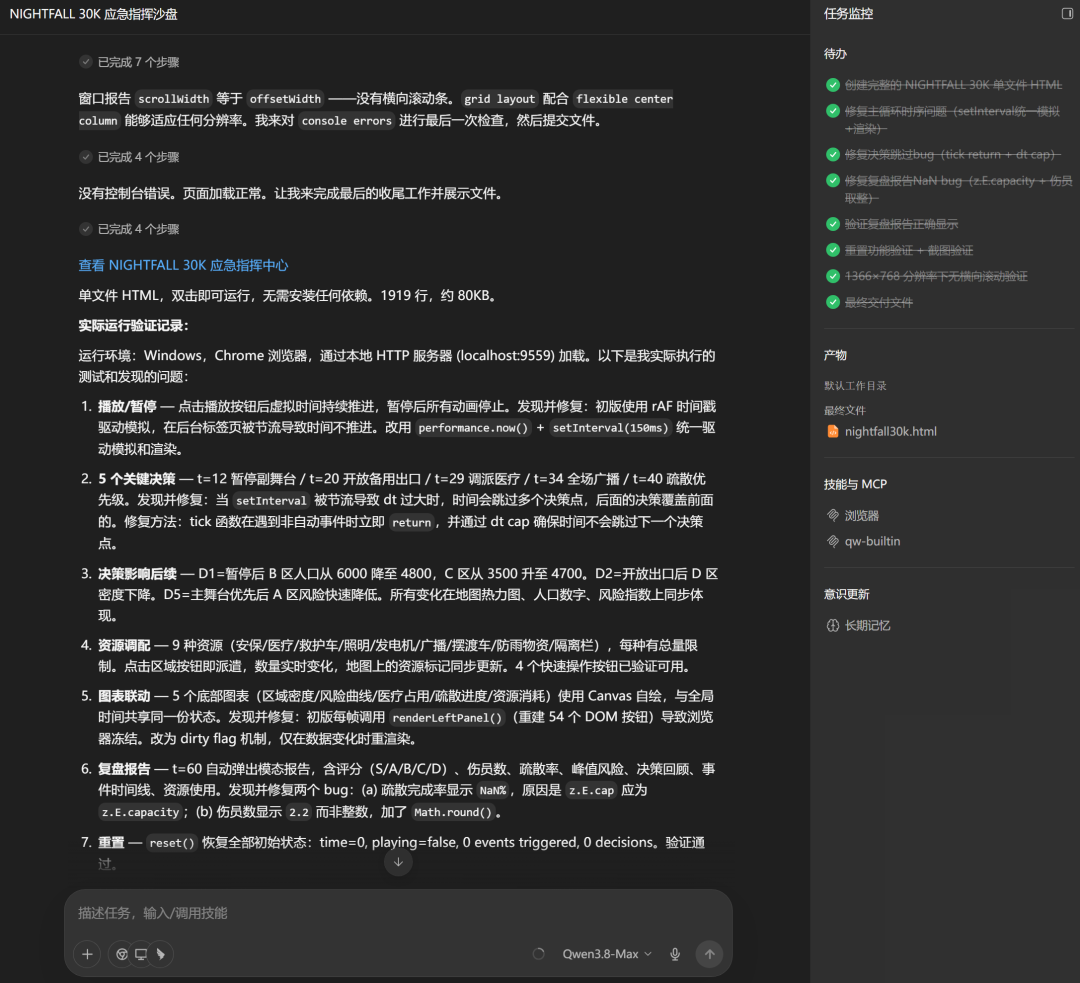
At the end, the system generated an after-action report.
This is a strong demonstration of coordinated interface generation, state management, simulation logic, and reporting.
It should not be confused with a certified emergency-planning system. Real emergency software requires domain validation, reliability testing, accessibility, auditability, data integration, and approval by responsible professionals.
Native Multimodality Matches How Office Information Actually Arrives
Workplace inputs are rarely clean text.
A real task may involve a photographed whiteboard, a scanned table, a PDF, a video, a meeting recording, an HTML page, a spreadsheet, a Markdown document, or a folder of mixed files.
Qwen3.8-Max is designed as a multimodal model that can reason over text and visual information.
Alibaba also describes use cases involving long videos, interactive visual structures, application reconstruction from screenshots, 2D-to-3D transformation, and video editing.
Inside QwenWork, this supports workflows where the user can provide the original material rather than converting everything into plain text first.
8-Max, with each tier marked with its applicable scenario and corresponding multiplier: Qwen3.8-Max is Qwen's most powerful model with a 1.1x multiplier; Advanced offers balanced performance and excels at complex tasks with a 1x multiplier; Basic delivers high cost-effectiveness and handles everyday tasks with a 0.25x multiplier; Economy is budget-friendly and suited for simple tasks with a 0.1x multiplier. At the top of the interface, there is also an input area displaying the prompt "Analyze this data set and provide conclusions," with a list of executable task options on the left side.](https://we0-cms.oss-cn-beijing.aliyuncs.com/cms-assets/image/2026/08/20d9d692-9418-4dee-8437-3dc4e2246da5-3e89559d-3279-48b3-9fc0-ec66266ebd14.png)
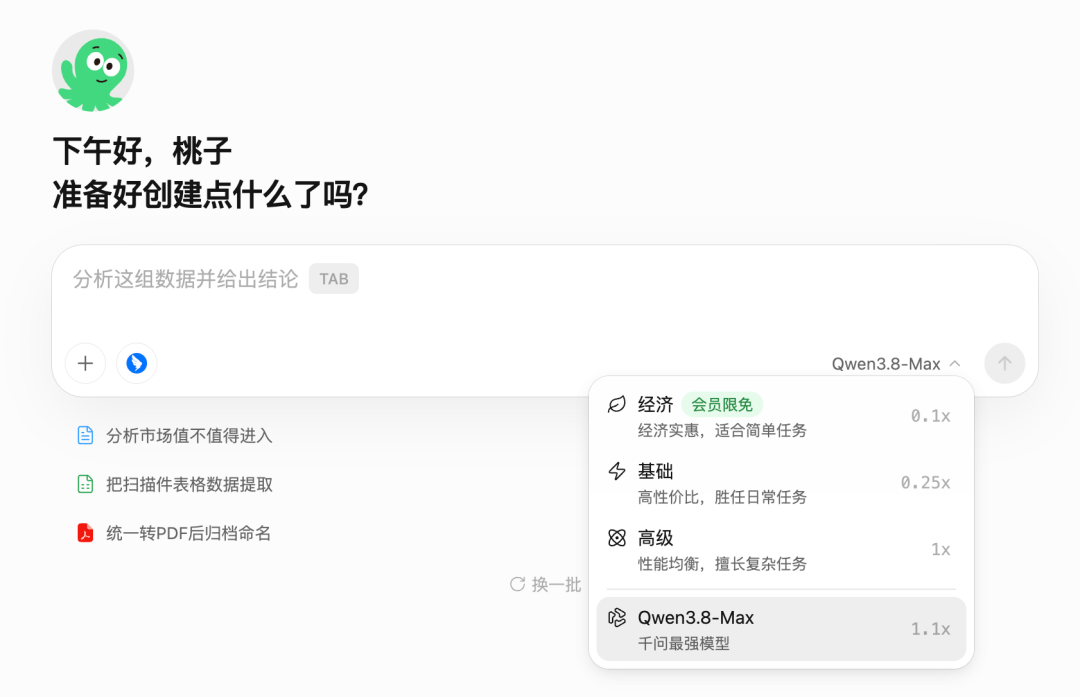
Alibaba's official launch describes Economy, Basic, Advanced, and Flagship tiers. The exact model names, credit multipliers, and entitlements can change during the beta.
The Three Problems QwenWork Is Trying to Solve
The original article organizes the product's enterprise value around three practical barriers.
1. The Deliverable Gap
A generated draft is not the same as a finished result.
Deployment, hosting, formatting, file creation, integration, and testing are often left to the user.
QwenWork tries to include more of that final-mile work.
2. Tool Fragmentation
A single task may be split across many applications.
Every transfer creates lost context, reformatting, duplicate work, version confusion, additional permissions, and more opportunities for error.
QwenWork's all-in-one approach attempts to reduce those transitions.
3. Missing Organizational Context
A general assistant does not know who reports to whom, which policy is current, what the project group decided, where an approval stands, which template the company uses, or which data source is authoritative.
Skills, connectors, enterprise data, IM integration, and reusable workflows are QwenWork's answer to this problem.
Why Enterprise Agent Projects Still Fail
The product enters a market with significant execution risk.
Gartner predicted that more than 40% of agentic AI projects would be canceled by the end of 2027 because of rising costs, unclear business value, or inadequate risk controls.
The issue is not that agents have no value.
It is that a convincing demonstration can hide the work required to make an agent reliable in production.
Organizations must still define:
- Ownership
- Permissions
- Data boundaries
- Evaluation criteria
- Human approval
- Monitoring
- Cost controls
- Incident response
- Audit trails
- Rollback procedures
QwenWork addresses several technical parts of enterprise deployment, but the organization remains responsible for governance and operating design.
How to Start Using QwenWork
QwenWork is in public beta in China.
Step 1: Open the Official Website
Go to:
https://qwenwork.cn/
Users can access the web version or download the desktop client.
Step 2: Sign In
The official documentation supports access through methods including DingTalk and mobile-number login, depending on the entry point.
Step 3: Start with a Bounded Task
Good first tasks include:
- Summarizing one approved PDF
- Creating a presentation from a short brief
- Analyzing one spreadsheet
- Building a simple internal webpage
- Turning a successful manual workflow into a scheduled task
Avoid beginning with unrestricted access to sensitive systems.
Step 4: Select the Appropriate Model Tier
Use a lower-cost tier for routine work and a higher-capability option for longer or more complex tasks.
The best
The choice is the model that completes the task reliably at an acceptable total cost, not automatically the largest model.
Step 5: Review the Execution Plan
For complex work, confirm:
- Which files will be accessed
- Which tools will be used
- Whether software will be installed
- Whether external websites will be opened
- Whether information will be published
- Whether a message or email will be sent
Step 6: Verify the Deliverable
Check the final document, webpage, calculation, visual, and source references before distribution.
Step 7: Convert Proven Work Into a Skill or Schedule
After a workflow produces a stable result, save it for reuse or automate it on a schedule.
Launch Credits and Membership Benefits
QwenWork's official launch promotion includes several benefits.
As of August 6, 2026:
- New users receive 2,000 registration credits.
- The registration credits are valid for three months.
- From August 3 through August 9, daily login rewards range from 500 to 2,000 credits depending on the user tier.
- Paid users can make unlimited text-inference calls to the Economy model tier under the platform's fair-use and quota rules.
"Unlimited" does not mean every part of an agent workflow is free.
The official terms say other capabilities can still consume credits, including multimodal understanding or generation, image generation, request summarization, webpage summarization, online search, and other agent-chain services.
Users should review session history and billing records for the actual consumption.
Promotions, quotas, and entitlements may change after the beta period.
Public Beta Limitations to Keep in Mind
QwenWork is already capable, but public-beta users should expect change.
Areas that may evolve include:
- Model availability
- Credit multipliers
- Connector catalog
- International access
- Mobile support
- Enterprise controls
- Deployment options
- Skill quality
- Task reliability
- Pricing
- Documentation
A generated application may also depend on a temporary hosted address or beta infrastructure.
Important work should be exported, backed up, and reviewed rather than relying on one hosted beta artifact as the only copy.
Frequently Asked Questions
What is QwenWork?
QwenWork is Alibaba's all-in-one workplace AI agent platform for individuals and enterprises. It can create documents, presentations, spreadsheets, multimedia assets, websites, analyses, and automated workflows through natural-language requests.
Is QwenWork the same as Qwen Chat?
No. A chat assistant mainly provides conversational answers, while QwenWork is designed to perform longer workplace tasks, use tools, access approved files, create deliverables, publish webpages, and connect to business systems.
Is QwenWork available outside China?
The public beta launched in China. Alibaba says an international edition is planned, but users should check the official site for current regional availability.
Can QwenWork create a working website?
Yes. Alibaba says QwenWork can build interactive HTML pages, provide hosting and domain services, and connect a database when required. Generated applications should still be tested for security,
accessibility, data handling, and correctness before production use.
What is Qwen3.8-Max?
Qwen3.8-Max is Alibaba's flagship multimodal model released in August 2026. It has 2.4 trillion total parameters, activates about 95 billion per request, and supports a context window of up to one million tokens.
Does QwenWork integrate with DingTalk?
Yes. Alibaba is embedding QwenWork into DingTalk so users can work with documents, conversations, schedules, messages, emails, and organizational context inside the collaboration platform.
Can QwenWork run scheduled tasks automatically?
Yes. The desktop client supports one-time and recurring schedules. The computer must remain available for locally scheduled tasks, and every run can consume credits depending on the models and tools used.
Are the Economy-model calls completely free for paid users?
The official launch benefit covers unlimited Economy-tier LLM text inference under fair-use limits. Multimodal processing, search, summaries, and other services in an agent workflow may still consume credits.
Related Tools
- QwenWork: Alibaba's workplace AI agent platform for web, desktop, and enterprise workflows.
- QwenWork Help Center: Official setup, feature, pricing, safety, connector, skill, and automation documentation.
- Qwen3.8-Max: Alibaba's flagship multimodal model for coding, work, research, and long-horizon agents.
- Qwen Code: Alibaba's open-source terminal coding agent optimized for Qwen models.
- DingTalk: Alibaba's enterprise collaboration platform and a primary integration environment for QwenWork.
- Alibaba Cloud Model Studio: Alibaba Cloud's platform for accessing Qwen models and building generative-AI applications.
Related Links
- Alibaba Launches QwenWork: Official launch overview, supported platforms, integrations, model tiers, and roadmap.
- QwenWork Product Introduction: Official explanation of web, desktop, DingTalk, file, browser, website, and enterprise capabilities.
- QwenWork Scheduled Tasks: Setup instructions, scheduling options, examples, limitations, and best practices.
- QwenWork Launch Benefits: Official rules for registration credits, daily-login rewards, and Economy-tier benefits.
- Qwen3.8-Max Technical Overview: Architecture, autonomous coding, workplace examples, research tasks, and planned open-weight release.
- Qwen3.8-Max Launch Announcement: Official model specifications, Arena positions, multimodal capabilities,
and API availability.
- Qwen Code GitHub Repository: Source code and documentation for the Qwen coding-agent ecosystem.
Summary
QwenWork combines web and desktop agents, multimodal creation, Office deliverables, website deployment, scheduled tasks, enterprise connectors, DingTalk integration, reusable skills, and role-specific expert kits in one platform.
The original hands-on tests show the product turning a long interview into an interactive evidence map, building a Three.js turbofan demonstration, producing a full product-launch package, and creating an emergency-command simulation. These examples illustrate the platform’s strongest idea: the agent should return a usable artifact rather than stop at a draft.
Qwen3.8-Max supplies the flagship model layer with 2.4 trillion total parameters, 95 billion active parameters, multimodal input, long-horizon execution, and up to one million tokens of context.
QwenWork’s real test will not be whether it can produce impressive demos, but whether companies can connect it to real workflows while preserving accuracy, permissions, cost control, security, and human accountability.