Seedream 5.0 Pro: ByteDance’s AI Image Model Moves from Generation to Design
Seedream 5.0 Pro is ByteDance’s latest step toward more controllable AI image creation. The model focuses on professional scenarios: dense infographics, local editing, realistic imagery, portrait detail, and multilingual visual generation. The key change is that image generation is becoming more like design work. Instead of regenerating the whole image every time, users can guide the model with spatial selections, region-level instructions, sketches, and localization needs. **In short: Seedream 5.0 Pro is not just about making images look better — it is about making AI-generated visuals easier to edit, localize, and use in real creative workflows.**
Seedream 5.0 Pro: ByteDance’s AI Image Model Moves from Generation to Design
Introduction
ByteDance has released Seedream 5.0 Pro, a multimodal image creation model that pushes AI image generation closer to real design work.
Instead of only focusing on making a good-looking picture from a prompt, Seedream 5.0 Pro is built around more practical creative needs: turning complex information into visual layouts, editing specific regions with better control, generating more realistic images, and handling multilingual visual content.
ByteDance Releases Seedream 5.0 Pro
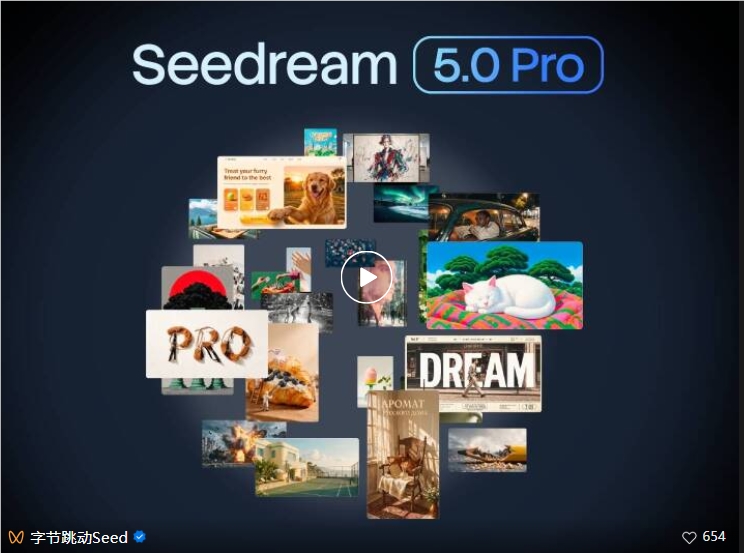
ByteDance has officially released Seedream 5.0 Pro, a multimodal image creation model from the Seed team. The release marks a shift in AI image creation: from simple image generation toward a more design-oriented workflow.
Compared with earlier versions, Seedream 5.0 Pro improves several core abilities, including image-text alignment, structural coherence, text rendering, and overall visual quality. More importantly, the model focuses on four practical capabilities that matter in real creative production.
Complex Information Visualization
The first major capability is complex information visualization.
Seedream 5.0 Pro can parse user intent and convert dense data, concepts, and text into structured visual content. This is useful for professional infographic design, educational posters, science communication, and content that needs both readability and visual hierarchy.
For example, the model can organize a panoramic data board around an Antarctic research station. It can combine a timeline, bar charts, pie charts, line charts, equipment panels, weather information, workflow steps, and realistic scene imagery into one coherent visual frame.
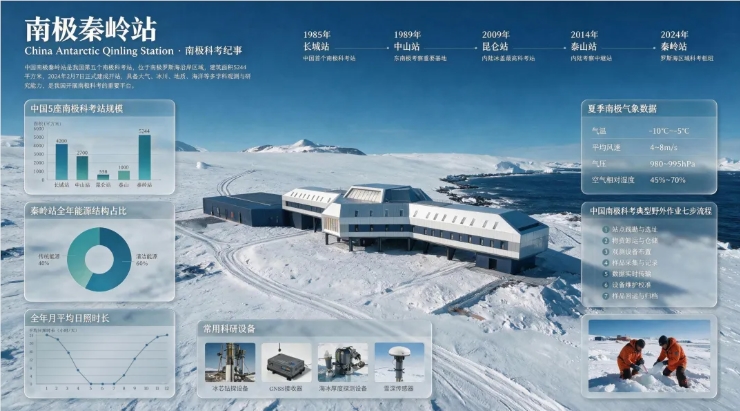
This matters because infographic generation is not only about drawing attractive graphics. A useful infographic must preserve information structure, place text clearly, and keep the visual layout easy to follow. Seedream 5.0 Pro is designed to handle that kind of dense visual planning more directly.
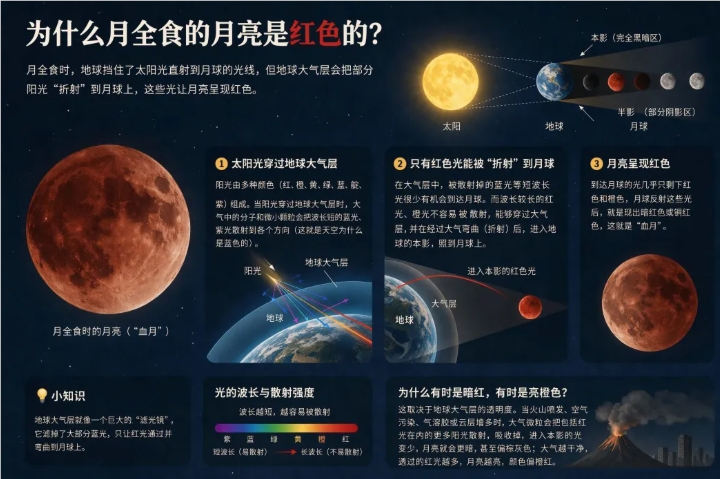
The same capability can also apply to astronomy, science explainers, beginner guides, and other knowledge-heavy visuals where layout and logic are just as important as style.
Interactive Precision Editing
The second key upgrade is interactive precision editing.
Traditional text prompts are good at describing what should be generated, but they are often weak at explaining exactly where something should be edited. Design work usually requires small, repeated adjustments: removing one object, changing a color, replacing a material, or adding something to a very specific location.
Seedream 5.0 Pro embeds control signals into the generation process. It uses spatial understanding, grounding, and regional semantic understanding to support more controlled local edits.
In practice, this means users can use actions such as:
- Point selection
- Lasso selection
- Object removal
- Fixed-position object insertion
- Color editing
- Material replacement
- Sketch rendering
- Layer separation
This makes the workflow closer to a design tool, not just a prompt-to-image generator. A user can identify a region, tell the model what to change, and keep the surrounding image more stable.
Better Realistic Images and Portrait Texture
Seedream 5.0 Pro also improves realistic image generation.
The model strengthens its simulation of lighting, materials, and skin texture. As a result, generated visuals can feel closer to photography while still keeping the expressive quality of CG-style image creation.
This is especially important in scenes that depend on subtle physical details. Architectural images need believable light and reflections. Product scenes need material consistency. Portraits need skin texture, natural facial lighting, and realistic expression without becoming overly smooth or artificial.
The original report highlights that Seedream 5.0 Pro can handle both complex lighting scenes and realistic portraits with stronger visual tension and more natural detail.
Native Multilingual Input and Generation
The fourth capability is native multilingual support.
Seedream 5.0 Pro supports commonly used languages including Chinese, English, French, German, Russian, Japanese, Korean, Spanish, Arabic, and more. The model can understand cross-language prompts and adapt visual output to different cultural and typographic contexts.
This is more than translation. For visual production, multilingual generation also needs to follow local layout rules, reading direction, typography habits, and cultural cues. Seedream 5.0 Pro aims to make localized image creation easier for global creative workflows.
Availability
According to the source article, Seedream 5.0 Pro has launched on the Volcengine Ark Experience Center and will gradually become available through Doubao and Jimeng AI.
For creators, designers, and teams working with visual content, the release points toward a more controllable AI image workflow: generate the first version, edit specific regions, refine the layout, localize the text, and move closer to a production-ready result.
FAQ
What is Seedream 5.0 Pro?
Seedream 5.0 Pro is a multimodal AI image creation model released by ByteDance’s Seed team. It focuses on professional image generation, interactive editing, dense infographic creation, realistic visual quality, and multilingual generation.
What makes Seedream 5.0 Pro different from a basic text-to-image model?
The main difference is control. Seedream 5.0 Pro is designed not only to generate images from prompts, but also to understand layout, regional editing instructions, spatial positions, and text-heavy visual structures.
Can Seedream 5.0 Pro create infographics?
Yes. The model is designed to transform dense information, data, and concepts into structured visual layouts. The source article highlights examples such as scientific research boards, astronomy explainers, and high-density educational visuals.
Does Seedream 5.0 Pro support local image editing?
Yes. It supports more precise editing through signals such as point selection, lasso selection, sketch guidance, color changes, material replacement, and layer separation. This makes it more suitable for iterative design workflows.
Which languages does Seedream 5.0 Pro support?
The source article says it supports over ten commonly used languages, including Chinese, English, French, German, Russian, Japanese, Korean, Spanish, and Arabic. The goal is to support both multilingual prompts and localized visual generation.
Where can users try Seedream 5.0 Pro?
According to the source article, Seedream 5.0 Pro is available through the Volcengine Ark Experience Center and will gradually be opened on Doubao and Jimeng AI. Availability may vary by region, account status, and platform rollout schedule.
Is Seedream 5.0 Pro suitable for production design work?
It is positioned for more professional creative production than basic AI image tools, especially for infographics, localized visual content, realistic imagery, and iterative editing. For production use, teams should still review text accuracy, brand consistency, copyright issues, and final image quality before publishing.
Related Tools
- Seedream 5.0 Pro: ByteDance Seed’s official page for the Seedream 5.0 Pro image model.
- ByteDance Seed: The official site for ByteDance’s Seed team and its model releases.
- Volcengine AI Experience Center: The official Volcengine experience center for trying Seedream and other AI models.
- Volcengine Ark: Official documentation for Volcengine’s large model service platform.
- Doubao AI Image Creation: Doubao’s AI creation page for image generation workflows.
- Jimeng AI: ByteDance’s AI creation platform for image and video workflows.
Related Links
- Introducing Seedream 5.0 Pro: ByteDance Seed’s official release blog for Seedream 5.0 Pro.
- Seedream 5.0 Pro Official Page: Official model page with feature examples and product positioning.
- Volcengine AI Experience Center: Official experience portal where Seedream 5.0 can be accessed.
- Volcengine Ark Quick Start: Official getting-started guide for using Volcengine Ark services.
- Volcengine Ark Model List: Official model list for checking available model services.
- Seedream 4.0 Technical Report: Research background on the earlier Seedream 4.0 multimodal image generation system.
Summary
Seedream 5.0 Pro is ByteDance’s latest step toward more controllable AI image creation. The model focuses on professional scenarios: dense infographics, local editing, realistic imagery, portrait detail, and multilingual visual generation.
The key change is that image generation is becoming more like design work. Instead of regenerating the whole image every time, users can guide the model with spatial selections, region-level instructions, sketches, and localization needs.
In short: Seedream 5.0 Pro is not just about making images look better — it is about making AI-generated visuals easier to edit, localize, and use in real creative workflows.