Seedance 2.5 Hands-On: 30-Second AI Video, Precise Editing, and Production-Ready References
ByteDance has released Seedance 2.5 , the latest generation of its joint audio-video model, with Jimeng AI serving as the primary experience entry in China and Dreamina providing a
Seedance 2.5 Hands-On: 30-Second AI Video, Precise Editing, and Production-Ready References
Introduction
ByteDance has released Seedance 2.5, the latest generation of its joint audio-video model, with Jimeng AI serving as the primary experience entry in China and Dreamina providing an international product workflow.
The headline upgrade is native generation of videos up to 30 seconds in a single run. That is accompanied by localized editing, richer reference control, green-screen and white-model workflows, and a beta long-video mode that can extend output to 180 seconds.
For creators, the practical change is not simply that clips can be longer.
Seedance 2.5 is designed to reduce the amount of reconstruction required after generation. Instead of repeatedly regenerating an entire scene because one object, one shot, or one moment is wrong, creators can refine specific regions and timeline segments while preserving more of the surrounding composition, motion, lighting, and audio.
ByteDance’s official model page describes Seedance 2.5 as a next-generation audio-video joint-generation model built for 30-second storytelling, precise reference control, and stronger editing. Dreamina’s official product pages add further product-level details, including support for up to 50 multimodal references, green-screen and white-model inputs, and a beta 180-second long-video workflow.
The source article tested these features across cinematic storytelling, advertising, product video, green-screen compositing, and game-previsualization scenarios.
The results are creator-reported rather than independently benchmarked, but they illustrate where Seedance 2.5 is trying to move AI video: from attractive short clips toward a more controllable production workflow.
30-Second Native Video Changes the Storytelling Window
Most widely used AI video systems have historically produced short clips, often in the range of roughly 5 to 15 seconds.
That duration is enough for:
- A single camera movement
- One product reveal
- A short character action
- A visual transition
- A social-media hook
It is much harder to fit a complete narrative beat into that window.
Longer projects usually require several independently generated shots, followed by manual selection, trimming, continuity repair, color matching, sound design, and editing.
Seedance 2.5 extends the single-generation window to 30 seconds.
ByteDance says the model is designed to maintain smoother motion, stronger consistency, and more realistic visual behavior across the longer sequence.
Dreamina’s product documentation also presents the 30-second mode as a way to preserve character identity, lighting, motion, and scene continuity for longer storytelling.
Why 30 Seconds Is More Than Twice a 15-Second Clip
A 30-second generation does not merely provide more footage.
It gives the model room to structure a scene.
A creator can define:
- An opening situation
- A visual or narrative escalation
- A key action
- A transition
- A closing image or reveal
That structure is especially useful for:
- Short advertisements
- Product films
- Story trailers
- Music-video segments
- Character scenes
- Cinematic concept tests
- Social-media narratives
The source article tested several styles, including a rain-soaked rescue sequence, a symmetrical European period-film look, an Eastern-fantasy story, and a space-survival sequence.
Across these examples, the reviewer emphasized three improvements:
- More complete story structure
- Better character consistency between shots
- More coherent transitions within one generated file
Those observations are subjective and depend on the prompt, reference material, and selected result. They should be treated as hands-on impressions rather than universal quality guarantees.
A Practical 30-Second Prompt Structure
A longer video benefits from a prompt that defines progression rather than only visual style.
A useful structure is:
0–5 seconds:
Establish the location, subject, lighting, and mood.

5–12 seconds:
Introduce the main action and camera movement.

12–20 seconds:
Escalate the action or reveal a problem.

20–27 seconds:
Resolve the central action with a clear visual payoff.

27–30 seconds:
End on a stable closing image, product shot, or narrative hook.
The exact syntax used by Jimeng or Dreamina may evolve, but time-based planning helps creators avoid spending the entire clip on an overlong establishing shot.
Longer Generation Does Not Remove the Need for Editing
Longer clips create more opportunities for useful storytelling.
They also create more places where something can go wrong.
A 30-second video may contain:
- An unwanted object
- A weak facial expression
- A product inconsistency
- An awkward transition
- A misplaced subtitle
- An unnecessary shot
- A background artifact
- A timing problem
- A broken hand or prop
- A moment that no longer fits the narrative
Earlier AI video workflows often forced creators to regenerate the whole clip.
That creates a familiar cycle:
- Generate a promising result.
- Notice one defect.
- Regenerate.
- Fix the defect but lose another good element.
- Repeat until the cost or patience runs out.
Seedance 2.5 adds more targeted editing.
ByteDance says editing now responds to a wider range of audio and visual requests. Dreamina describes localized editing that can replace objects, modify details, and improve specific regions while preserving more of the original video’s lighting, composition, motion, audio, and timeline continuity.
Localized Editing Makes Iteration More Practical
The source article tested the editing workflow on a generated space sequence.
Instead of rebuilding the entire video, the reviewer asked the model to remove selected shots, including an opening space view and moments involving dialogue.
The reported result followed the instruction without requiring a complete restart.
This is the more important production shift.
A model can generate an attractive first draft, but real creative work almost always includes revision.
Useful editing operations include:
- Removing an unwanted shot
- Replacing a background element
- Changing a prop
- Correcting a product
- Adding or deleting a visual element
- Adjusting a specific character
- Refining one timeline segment
- Changing an ending
- Inserting branding at a defined moment
Editing Should Be Described Precisely
A weak editing request might say:
Improve the last part.
A stronger instruction identifies:
- The time range
- The object or region
- What must change
- What must remain unchanged
- The intended visual result
For example:
From 00:24 to 00:28, replace only the damaged control panel with a clean,
active navigation display. Preserve the astronaut, camera movement, lighting,
soundtrack, and the rest of the scene.
For a product advertisement:
During the final second, add the LUNEVAR brand name behind the product.
Use restrained premium typography. Do not change the model, product shape,
camera path, lighting, or existing audio.
The source article reports that a final-second branding instruction was placed at the intended point with an error below one second.
ByteDance’s public model page confirms stronger editing and Dreamina documents camera and timeline control, but the specific sub-one-second accuracy should be treated as a result from the source test rather than a published universal accuracy specification.
The Beta Long-Video Mode Extends Output to 180 Seconds
In addition to 30-second native generation, Dreamina documents a beta long-video mode that can reach 180 seconds, or three minutes.
ByteDance’s model page describes a 30-second generation that can be extended twice for richer storytelling. Dreamina’s product page describes the beta mode as supporting output up to 180 seconds.
The distinction matters:
- 30-second mode is the core native storytelling unit.
- 180-second mode is an extended beta workflow and may have different availability, cost, reliability, or account requirements.
Longer output is useful for:
- Narrative shorts
- Extended advertisements
- Music videos
- Product explainers
- Game cinematics
- Mood films
- Internal concept presentations
It does not mean that every three-minute output will have flawless continuity.
Long sequences place greater pressure on:
- Character identity
- Object permanence
- Lighting continuity
- Narrative pacing
- Audio consistency
- Camera logic
- Scene geography
Creators should still review the output shot by shot and expect to use editing or external post-production for important commercial work.
Up to 50 References Create a Larger Creative Context
The second major theme in Seedance 2.5 is reference capacity.
Dreamina’s official Seedance 2.5 page says the model can combine up to 50 multimodal inputs in one workflow.
References can include materials such as:
- Images
- Videos
- Audio
- Scripts
- Storyboards
- Style guides
- Character sheets
- Product photos
- Camera references
- Environment references
This gives the model a richer specification than a text prompt alone.
A prompt can describe a luxury product, but a reference image shows its exact shape.
A prompt can request handheld action, but a reference video demonstrates the intended motion rhythm.
A prompt can request a brand style, but a set of campaign images communicates the color, composition, wardrobe, product framing, and overall visual language more precisely.
Why Reference Volume Matters
A commercial video rarely depends on one reference.
An advertising project may need:
- Multiple angles of the product
- Model and wardrobe references
- Brand colors
- Existing campaign imagery
- A location reference
- Lighting references
- Music or sound references
- Example camera movements
- Logo and packaging details
- A storyboard
A game cinematic may need:
- Character sheets
- White-model footage
- Environment blockouts
- Camera paths
- Weapon or prop references
- UI references
- Lighting targets
- Example animations
A larger reference pool allows these elements to enter the same creative context.
It does not guarantee perfect reproduction. The model is still generating and interpreting rather than mechanically compositing every asset.
The value is that it has fewer important details left to guess.
Green-Screen References Can Become Finished Advertising Scenes
One of the source article’s strongest demonstrations used green-screen footage.
The input contained a model wearing sunglasses against a plain green background.
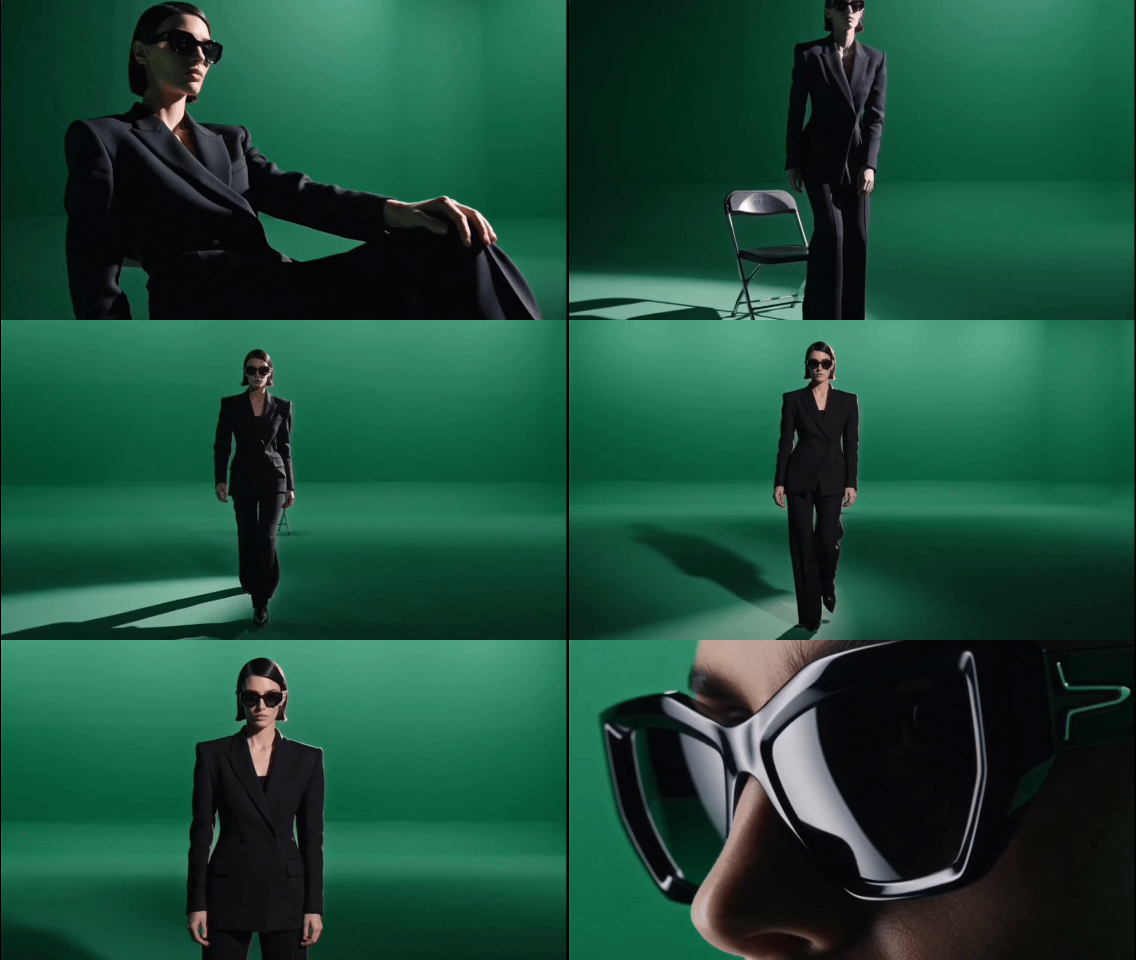
The model was then asked to preserve the person and product while generating a complete environment and advertising atmosphere.
According to the reviewer, Seedance 2.5:
- Removed the green background cleanly
- Integrated the subject into a new scene
- Preserved the product and model details
- Matched the generated environment with the subject
- Added synchronized sound details
Dreamina’s official green-screen workflow pages confirm that Seedance 2.5 supports turning actor, presenter, dancer, athlete, and product footage into new scenes while using localized editing and timeline control.
Why Green-Screen Input Is Valuable
A green-screen workflow provides information that a still image cannot.
It preserves:
- Real performance
- Body movement
- Product handling
- Gesture timing
- Clothing motion
- Subject-camera relationship
- Existing shot duration
The model can focus on generating the environment, lighting treatment, scene atmosphere, and final look around a performance that already exists.
That can be more controllable than asking the model to invent both the actor’s movement and the environment from scratch.
A Green-Screen Workflow
A practical workflow is:
- Record a clean subject against an evenly lit green background.
- Keep motion blur and compression under control.
- Upload the green-screen footage as a reference.
- Add product and brand references where needed.
- Describe the target environment, camera treatment, and lighting.
- Specify what must remain unchanged.
- Generate the first draft.
- Use localized editing for weak areas.
- Review product accuracy, hands, logos, and timing.
- Finish color, audio, legal text, and final export in a conventional editor.
The AI model can shorten the compositing and concept-development process, but it does not eliminate the need for quality control.
Timeline Control Is Especially Useful for Advertising
Advertising depends on precise timing.
A brand may require:
- A logo in the final second
- A product close-up at a specific moment
- A transition aligned with a music beat
- A spoken line before the final shot
- A legal disclaimer for a defined duration
- A call to action after the product reveal
The source article tested a request to add branding during the last second of the generated sunglasses advertisement.
The reviewer reported that Seedance 2.5 placed the requested brand text at the intended point.
The broader capability is more important than one successful test: creators can describe what should happen at a particular point on the timeline rather than relying only on general prompts.
For production use, branding and legal text should still be checked manually.
AI video models can produce misspelled, distorted, or inconsistent typography. Important text is often safer to add in a conventional editing or motion-graphics tool after the generated scene is approved.
White-Model References Connect AI Video to Game and 3D Workflows
Seedance 2.5 also supports white-model or blockout references.
A white model is a simplified 3D scene with basic geometry and little or no final material, texture, or lighting work.
It is commonly used for:
- Scene layout
- Camera planning
- Level blocking
- Character position
- Spatial relationships
- Animation timing
- Previsualization
The source article used a futuristic ruined-city blockout as the input.
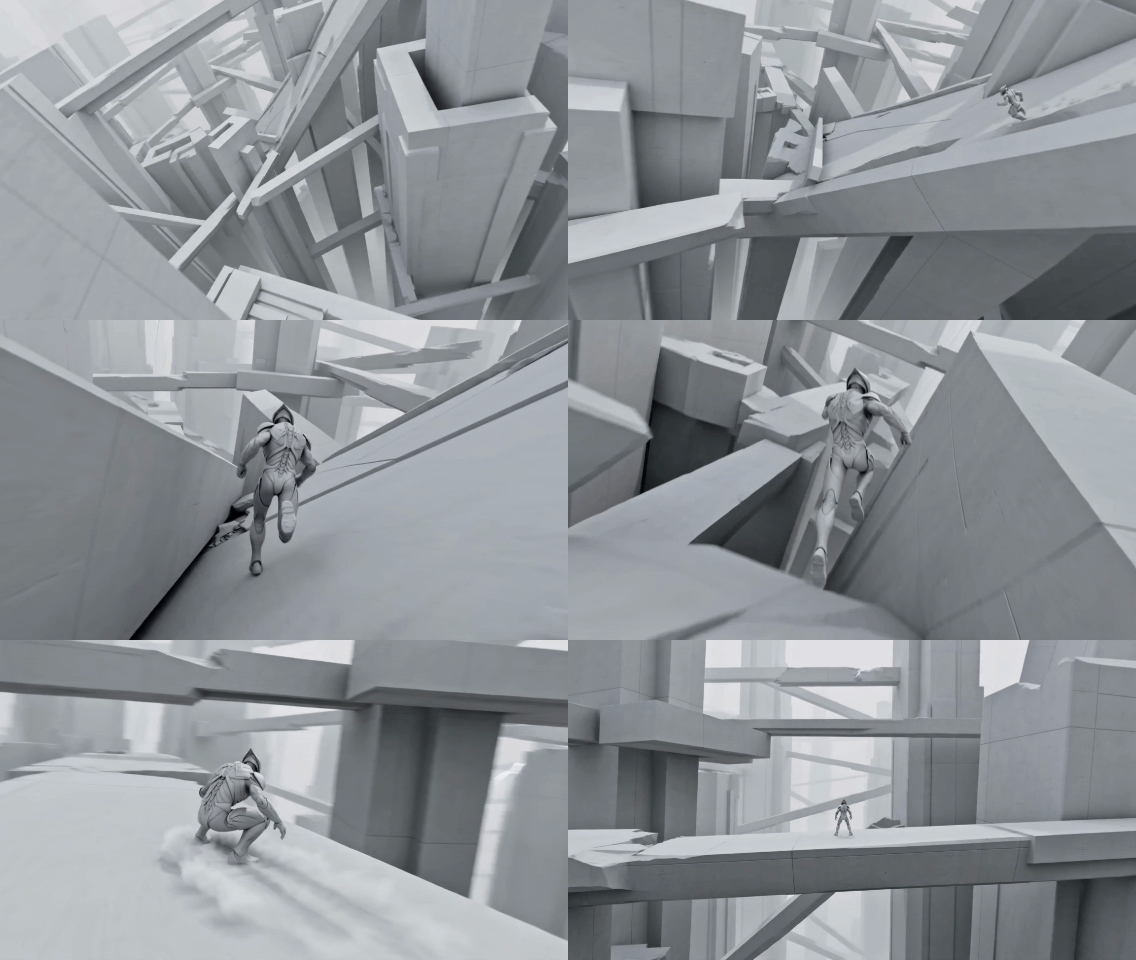
The reported output preserved the main camera path, spatial layout, and shot relationships while turning the blockout into a more cinematic environment.
Dreamina’s official Blender workflow pages describe similar uses:
- Converting a grey sci-fi alley into a cinematic scene
- Turning a white-clay camera path into a finished shot
- Animating 3D character references
- Converting environment blockouts into atmospheric footage
- Turning product renders into commercial video
What White-Model Guidance Can Save
In a conventional 3D pipeline, a blockout may still need:
- Detailed modeling
- UV work
- Texturing
- Materials
- Lighting
- Simulation
- Rendering
- Compositing
- Color grading
Seedance 2.5 can potentially create a fast visual target before those stages are completed.
That is valuable for:
- Pitching a scene
- Testing camera direction
- Comparing art directions
- Reviewing level layouts
- Previsualizing a cinematic
- Exploring lighting and weather
- Deciding whether a shot deserves full production investment
It should not automatically replace the final 3D pipeline.
Game and film production often require exact geometry, repeatable simulation, physical consistency, editable assets, and frame-level control that a generative video output may not provide.
The generated video is best treated as:
- A concept
- A previs layer
- A mood target
- A client-review draft
- A visual-development aid
Maya and Blender Integration
The source article states that Jimeng provides Maya and Blender plugins that can launch the generation workflow directly.
Jimeng’s official product surfaces display Maya and Blender white-model plugin entries, while Dreamina publishes official Blender and Maya workflow pages.
However, exact plugin installation steps, supported software versions, regional availability, and account requirements were not fully documented on the public ByteDance model page reviewed for this article.
Studios should therefore confirm the current in-product documentation before planning a production dependency around the plugin.
Seedance 2.5 Moves From “Looks Good” Toward “Can Be Used”
Seedance 2.0 was already notable for multimodal audio-video generation, reference support, and strong visual quality.
Its published technical report describes:
- Text, image, audio, and video inputs
- Native joint audio-video generation
- Multi-shot storytelling
- Reference-based generation and editing
- Output between 4 and 15 seconds on the documented platform
- Up to 3 video, 9 image, and 3 audio references in the documented open-platform configuration
Seedance 2.5 expands the production surface in several visible ways:
| Capability | Seedance 2.0 Published Configuration | Seedance 2.5 Product Direction |
|---|---|---|
| Native duration | 4–15 seconds | Up to 30 seconds |
| Extended duration | Not the main published workflow | Beta mode up to 180 seconds |
| Reference capacity | 3 videos, 9 images, 3 audio files in published configuration | Up to 50 multimodal inputs |
| Editing | Multimodal editing capabilities | More reliable localized audio and visual editing |
| Production references | Images, video, audio | Green screen, white models, scripts, storyboards, product assets, and other references |
| 3D workflow | External preparation required | Product workflows for Blender and Maya references |
The comparison is based on public documentation and product pages rather than a controlled benchmark.
The real shift is not that every result is automatically production-ready.
It is that the model now exposes more of the controls that professional production requires:
- Longer narrative space
- More references
- Targeted revision
- Timeline direction
- Green-screen input
- White-model input
- 3D workflow support
A Practical Seedance 2.5 Production Workflow
The source article focuses on creative testing, but the features can be organized into a repeatable workflow.
Step 1: Define the Delivery Format
Decide:
- 16:9, 9:16, 1:1, or another ratio
- 30-second clip or extended mode
- Advertising, narrative, product, game, or concept use
- Final distribution platform
- Required audio and text
Step 2: Build the Reference Set
Gather only references that serve a clear role.
Possible categories:
- Subject identity
- Product details
- Wardrobe
- Environment
- Lighting
- Camera style
- Motion
- Music
- Voice
- Storyboard
- Brand style
More references do not automatically produce a better result. Conflicting references can make the instruction less clear.
Step 3: Write the Timeline
Break the story into time ranges.
For example:
00:00–00:04 — Establish the empty rain-soaked city.
00:04–00:10 — The protagonist runs toward the damaged vehicle.
00:10–00:18 — A mechanical pursuer enters frame; handheld tracking shot.
00:18–00:26 — The protagonist reaches the vehicle and activates it.
00:26–00:30 — Wide shot as the vehicle escapes into the storm.
Step 4: Define What Must Stay Stable
State the non-negotiable elements:
- Character face
- Product proportions
- Logo
- Clothing
- Camera direction
- Color palette
- Spatial layout
- Audio track
Step 5: Generate the First Draft
Treat the first output as a working version.
Check:
- Story clarity
- Continuity
- Motion
- Identity
- Product accuracy
- Audio
- Camera behavior
- Unwanted text
- Visual artifacts
Step 6: Edit Specific Problems
Use localized edits rather than regenerating the whole video when possible.
Name the exact region, object, or time span.
Step 7: Extend Only After the Core Clip Works
A weak 30-second clip usually becomes a weak 180-second video.
Approve the short storytelling unit before entering the long-video workflow.
Step 8: Finish Outside the Generator
For commercial publication, complete:
- Typography
- Legal text
- Final logo treatment
- Color consistency
- Audio mixing
- Subtitles
- Export settings
- Rights review
AI generation should be one part of the production chain, not the only review stage.
Where Seedance 2.5 Is Most Useful
The new capabilities are particularly relevant to several creator groups.
Film and Short-Form Narrative
Useful for:
- Previsualization
- Mood films
- Short narrative scenes
- Pitch trailers
- Visual development
- Camera tests
Advertising and E-Commerce
Useful for:
- Product scenes
- Green-screen transformation
- Brand-world exploration
- Campaign variations
- Social ads
- Concept testing
Games
Useful for:
- White-model visualization
- Cinematic previs
- Level mood tests
- Character shots
- Camera-path review
- Environment concepts
3D and Design Teams
Useful for:
- Turning rough renders into moving concept footage
- Comparing lighting directions
- Presenting blockouts to clients
- Product visualization
- Architecture walkthrough concepts
Important Limitations
Seedance 2.5 reduces several practical barriers, but it does not remove them.
References Do Not Guarantee Exact Reproduction
The model can still alter:
- Faces
- Packaging
- Logos
- Product dimensions
- Text
- Fine geometry
- Clothing details
Review every important frame.
Long Video Is Harder Than Short Video
A three-minute mode creates more room for continuity drift and pacing problems.
Use clear scene structure and intermediate review.
Local Edits Can Affect Nearby Content
A targeted change may still alter lighting, movement, or adjacent objects.
Preserve the original and compare versions.
Availability Can Vary
Jimeng, Dreamina, plugins, beta features, credit consumption, output resolution, and account access may differ by region and plan.
Check the current product interface before committing a deadline.
Generated Video Still Needs Rights Review
Do not use unlicensed characters, trademarks, music, footage, or identifiable people without the necessary rights.
Commercial output should be reviewed for:
- Copyright
- Trademark
- Personality rights
- Model releases
- Music licensing
- Platform disclosure rules
常见问题
What is Seedance 2.5?
Seedance 2.5 is ByteDance’s next-generation joint audio-video model for longer storytelling, reference-based generation, and video editing. It is available through Jimeng AI in China, with Dreamina providing an official international workflow.
How long can Seedance 2.5 videos be?
The core model supports native generation up to 30 seconds. Dreamina also documents a beta long-video mode that can extend output to 180 seconds.
How many references can Seedance 2.5 use?
Dreamina’s official Seedance 2.5 page says the workflow supports up to 50 multimodal inputs. These can include prompts, images, videos, audio, scripts, storyboards, style guides, and other creative references.
Can Seedance 2.5 edit an existing video?
Yes. ByteDance and Dreamina describe localized editing for replacing objects, modifying details, adjusting characters, and refining specific video regions while preserving more of the surrounding scene.
Can Seedance 2.5 use green-screen footage?
Yes. Official Dreamina workflow pages describe using green-screen clips to preserve a real subject or performance while generating a new background, lighting treatment, and cinematic environment.
Can Seedance 2.5 use Blender or Maya assets?
Seedance 2.5 supports white-model, blockout, and 3D-reference workflows. Dreamina publishes Blender and Maya workflow guidance, while Jimeng’s product surface references Maya and Blender plugins; exact plugin access and compatibility may vary.
Does Seedance 2.5 guarantee accurate logos and product details?
No. Reference control improves consistency, but generated text, logos, geometry, faces, and fine product details still require manual inspection. Critical brand text is often safer to finalize in conventional editing software.
Is the three-minute mode the same as one native generation?
Not exactly. ByteDance emphasizes native 30-second generation, while Dreamina describes 180 seconds as a beta long-video mode. The extended workflow may use continuation behavior and can have different quality or availability constraints.
相关工具
- Jimeng AI: ByteDance’s AI creation platform and the main Seedance 2.5 experience entry in China.
- Dreamina: CapCut’s official international AI creation platform with Seedance video workflows.
- ByteDance Seedance 2.5: The official ByteDance Seed model page for Seedance 2.5.
- Blender: An open-source 3D suite used for white-model, blockout, camera, and render-reference workflows.
- Autodesk Maya: A professional 3D animation and visual-effects application used in film, advertising, and game production.
- CapCut: A video editor suitable for finishing generated clips with typography, subtitles, audio, and final exports.
Related Links
- ByteDance Seedance 2.5 Official Page: Official description of 30-second storytelling, reference control, editing, green-screen, and white-model capabilities.
- Official Dreamina Seedance 2.5 Generator: Product-level details on 30-second generation, 180-second beta mode, 50 references, local editing, and commercial workflows.
- Seedance 2.5 Green-Screen Workflow: Official workflow guidance for turning green-screen performances into generated scenes.
- Seedance 2.5 Blender Workflow: Official examples for converting Blender renders, blockouts, white models, and camera references into video.
- How to Use Seedance 2.5 With Maya: Dreamina’s workflow guidance for Maya-based production references.
- Jimeng AI Video Generator: The official China-region generation interface.
- Seedance 2.0 Technical Report: The previous generation’s technical report, useful for understanding the model family’s multimodal audio-video foundation.
Summary
Seedance 2.5 expands AI video generation from short visual experiments toward a more structured production workflow. Native 30-second output creates more room for storytelling, while localized editing reduces the need to regenerate an entire clip because one region or moment is wrong.
The model’s larger reference system is equally important. Up to 50 multimodal inputs, together with green-screen and white-model workflows, allow creators to carry real performances, products, visual identity, camera paths, spatial layouts, and brand direction into the generation process.
The beta 180-second mode and Maya/Blender-oriented workflows make the system more relevant to advertising, film previsualization, game cinematics, product visualization, and other professional creative work. These features still require careful review, rights management, and conventional post-production.
Seedance 2.5’s real upgrade is not simply longer video—it is the combination of longer storytelling, reference control, and targeted revision in one creative pipeline.