别再一把梭复制代码了,用 Repomix 打包仓库 / Stop Copy-Pasting Code Into AI: Use Repomix to Package Your Repository
别再一把梭复制代码了,用 Repomix 打包仓库 / Stop Copy-Pasting Code Into AI: Use Repomix to Package Your Repository
中文发布信息
标题:别再一把梭复制代码了,用 Repomix 打包仓库
标签:Repomix, AI 编程, 开源项目, 代码仓库打包, Claude, ChatGPT, Cursor, Codex, MCP, 开发者工具, 代码审查, SEO 增长工具
SEO标题:Repomix 教程:把代码仓库打包给 AI 阅读
SEO摘要:介绍 Repomix 如何把本地或远程 GitHub 仓库打包给 AI 阅读,减少复制粘贴、控制 token,并提前检查敏感信息。
SEO关键词:Repomix, Repomix 教程, Repomix 怎么用, AI 编程上下文, 代码仓库打包工具, 仓库打包给 AI, Claude 读取代码仓库, ChatGPT 读取项目代码, Cursor 上下文管理, Codex 项目上下文, AI 代码审查工具, coding agent 工作流, repomix-output.xml, npx repomix, repomix remote, repomix include ignore, repomix compress, Tree-sitter 压缩代码, Secretlint 敏感信息检查, GitHub 仓库分析, MCP Server, GitHub Action 代码上下文, 开源开发者工具, AI 写代码效率, We0.ai 展示网站增长平台, 展示型官网开发流程, SEO 内容工作流
SEO封面说明:封面建议使用 16:9 横图,主视觉为代码仓库文件树流向 AI 对话窗口,中间突出“Repomix”与“Repository Context for AI”,风格干净偏开发者工具,避免过重装饰,图片需压缩并补充 alt 文案。
SEO文章 Slug:repomix-ai-codebase-context-guide
SEO技术交接备注:Title 约 24 个汉字,Description 约 50-70 个汉字,长度适合中文搜索展示;建议结构化数据使用 BlogPosting;中英文双语页建议配置 hreflang:zh-CN 与 en;社媒主页链接为待补项,不要编造;图片需补 alt、压缩并优先使用 WebP;建议内链锚文本:AI 编程工作流、展示型官网开发流程、We0.ai SEO/GEO 内容增长。
中文正文
别再一把梭复制代码了,用 Repomix 打包仓库
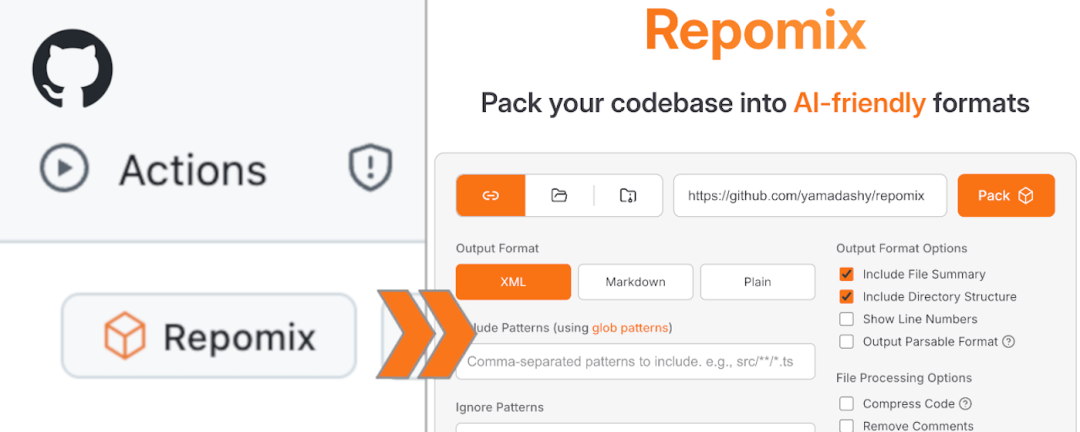
很多人用 AI 写代码时,最先崩的往往不是模型,而是上下文。
你贴了一个 Button.tsx,它问路由在哪;你又贴了路由,它开始猜状态管理;你继续贴十个文件,它终于能回答了,但开头还是那句“根据你提供的信息……”。这时候真正的问题,通常不是提示词不够玄学,而是你一直在手工把一个大项目切成碎片再喂给 AI。
Repomix 解决的就是这个很笨、但很常见的问题:把一个代码仓库打包成 AI 更容易阅读的文件。
开源项目简介
Repomix 是一个开源代码库打包工具,可以把本地项目或远程 GitHub 仓库整理成 XML、Markdown、JSON 或纯文本格式,方便 Claude、ChatGPT、Gemini、Codex、Cursor 这类工具阅读。
它不是新的 coding agent,也不会替你直接改代码。它更像一个“上下文打包员”:先把目录结构、文件内容、可选说明、安全检查和 token 信息收拾好,再交给模型。
用它做代码审查、重构规划、陌生项目理解、文档生成,或者让 AI 先读完整个库再动手,都很合适。对需要长期维护官网、展示站、业务系统或增长工具的团队来说,这种稳定的上下文输入也能减少很多重复解释成本。
几个核心亮点
1. 少复制粘贴
你可以在项目目录里跑一条命令,让 Repomix 生成 repomix-output.xml;也可以直接对远程仓库使用 --remote,不用先把别人的项目克隆下来,再手动挑文件。
这件事看起来简单,但在真实开发里很有用。因为 AI 编程最浪费时间的地方,经常不是提问,而是反复补上下文。
2. 不是粗暴全塞
Repomix 默认尊重 .gitignore、.ignore 和 .repomixignore,支持 --include / --ignore 过滤,也能从 stdin 接收文件列表。
也就是说,“给 AI 看什么、不看什么”可以变成一个稳定流程,而不是每次临时靠感觉。你可以只给它看 src、文档、配置文件,也可以把测试、构建产物或无关目录排除掉。
3. 理解上下文窗口不是无限的
官方提供 token counting、split output、代码压缩等能力;其中 --compress 会用 Tree-sitter 提取关键结构,减少 token 占用,同时尽量保留代码形状。
对稍微大一点的仓库来说,这比“全量扔进去,然后祈祷模型别漏看”靠谱得多。尤其是在做 review、迁移、重构或文档整理时,清楚知道上下文大概占多少 token,会更容易控制成本和效果。
4. 把安全问题往前拦一步
Repomix 内置 Secretlint 检查,会在打包时提示可能包含敏感信息的文件。
它不能代替安全审计,但至少能提醒你:不要把 .env、密钥、测试 token 或内部配置一起复制给外部模型。对私有项目来说,这一步很重要。
怎么用
最快的方式是在项目目录里直接跑:
暂时无法在飞书文档外展示此内容
它会生成默认的 repomix-output.xml。接下来,把这个文件交给 AI 助手,再补一句明确任务:
暂时无法在飞书文档外展示此内容
如果只想打包一部分文件,可以这样写:
暂时无法在飞书文档外展示此内容
如果要快速研究一个开源项目,可以直接用远程仓库:
暂时无法在飞书文档外展示此内容
更长期的用法,是在项目里放一个 repomix.config.json,把输出格式、忽略规则、行号、压缩、安全检查等配置固定下来。这样团队里每个人、每个 agent、每次 PR 审查都用同一套上下文规则,结果会稳定很多。
除了 CLI,Repomix 还有网页、浏览器扩展、GitHub Action、Node.js library 和 MCP Server。日常开发用 CLI 已经够了;如果你在搭 agent 工作流,MCP 和 GitHub Action 会更有用,比如让 CI 生成最新仓库上下文,或者让支持 MCP 的助手按需打包项目。
简短判断
Repomix 的价值不在“让 AI 更聪明”,而在让 AI 少猜。
它适合已经认真使用 coding agent 的人:项目文件多、上下文散、每次都要解释一遍架构、经常让模型先 review 再动手。它不适合无脑全仓库倾倒,尤其是私有项目和敏感代码;过滤规则、安全检查和输出范围还是要自己把关。
但这类工具值得放进工作流。很多 AI 编程问题,看起来是模型能力问题,本质上是输入材料太乱。先把代码库打包清楚,再让 AI 干活,通常比多写十句提示词更有效。
如果你正在用 We0.ai 搭展示型官网、沉淀产品案例或维护增长内容,Repomix 也适合放进团队的 AI 开发流程里:先让模型读懂代码和文档,再去写页面、改组件、补 SEO 内容,整体会更稳。
项目 / Source Link
GitHub:https://github.com/yamadashy/repomix
官网:https://repomix.com/
English Publishing Info
Title: Stop Copy-Pasting Code Into AI: Use Repomix to Package Your Repository
Tags: Repomix, AI coding, open source tools, repository packaging, Claude, ChatGPT, Cursor, Codex, MCP, developer tools, code review, SEO workflow
SEO Title: Repomix Tutorial: Package Code Repos for AI
SEO Description: Learn how Repomix packages local and remote repositories for AI tools, reducing copy-paste work, token waste, and secret leaks.
SEO Keywords: Repomix, Repomix tutorial, how to use Repomix, AI coding context, repository packaging for AI, package codebase for Claude, package GitHub repository for ChatGPT, Cursor context management, Codex project context, AI code review workflow, coding agent workflow, repomix-output.xml, npx repomix, repomix remote, repomix include ignore, repomix compress, Tree-sitter code compression, Secretlint secret scanning, GitHub repository analysis, MCP Server, GitHub Action repository context, developer productivity tools, AI coding tools, We0.ai showcase website growth platform, SEO content workflow
SEO Cover Brief: Use a 16:9 developer-tool style cover showing a repository file tree flowing into an AI chat window. Highlight “Repomix” and “Repository Context for AI”. Keep it clean, lightweight, and optimized for web performance.
SEO Slug: repomix-ai-codebase-context-guide
SEO Technical Handoff: SEO Title is within the 50-60 character target; Description is around 120 characters; use BlogPosting structured data; add hreflang for zh-CN and en versions; social profile links are TODO and should not be invented; compress images and add descriptive alt text; suggested internal anchors: AI coding workflow, showcase website development, We0.ai SEO/GEO growth workflow.
English Content
Stop Copy-Pasting Code Into AI: Use Repomix to Package Your Repository
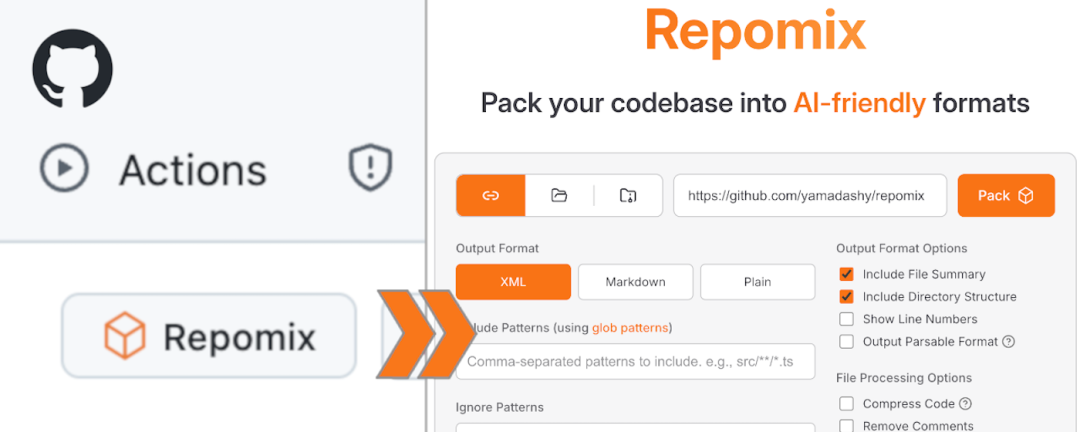
When people use AI for coding, the first thing that usually breaks is not the model. It is the context.
You paste a Button.tsx file, and the assistant asks where the routes are. You paste the routing file, and it starts guessing the state management setup. You paste ten more files, and it finally answers, but still begins with “Based on the information you provided...”. At that point, the real problem is probably not your prompt. The problem is that you are manually slicing a large project into fragments for the AI.
Repomix solves this simple but painful problem: it packages a code repository into a file that AI tools can read more easily.
Open Source Project Overview
Repomix is an open source repository packaging tool. It can turn a local project or a remote GitHub repository into XML, Markdown, JSON, or plain text for tools like Claude, ChatGPT, Gemini, Codex, and Cursor.
It is not another coding agent, and it will not edit code for you. It is more like a “context packer”: it organizes the directory structure, file content, optional instructions, security checks, and token information before you hand everything to the model.
That makes it useful for code review, refactoring plans, understanding unfamiliar projects, generating documentation, or asking AI to read the full repository before taking action. For teams maintaining showcase websites, business systems, growth tools, or documentation-heavy products, a stable context input can also reduce repeated explanations.
Key Highlights
1. Less copy and paste
You can run one command inside a project and let Repomix generate repomix-output.xml. You can also use --remote for a GitHub repository, without cloning someone else’s project and manually selecting files first.
This sounds small, but it matters in real development. With AI coding, a lot of time is lost not in asking the question, but in constantly adding missing context.
2. It does not blindly include everything
Repomix respects .gitignore, .ignore, and .repomixignore by default. It supports --include and --ignore filters, and it can also receive file lists from stdin.
In other words, deciding what AI should and should not see can become a repeatable workflow instead of a last-minute guess. You can include only src, docs, or configuration files, and exclude tests, build outputs, or unrelated folders.
3. It understands that context windows are limited
Repomix provides token counting, split output, and code compression. The --compress option uses Tree-sitter to extract key structures, reduce token usage, and still preserve the shape of the code as much as possible.
For larger repositories, this is much better than throwing everything into the model and hoping nothing important is missed. When doing reviews, migrations, refactors, or documentation work, knowing the approximate token size also helps control cost and output quality.
4. It catches security issues earlier
Repomix includes Secretlint checks and can warn you when packaged files may contain sensitive information.
It is not a replacement for a real security review, but it does remind you not to send .env files, secrets, test tokens, or internal configuration to an external model. For private projects, that guardrail matters.
How to Use It
The fastest way is to run this command inside your project:
暂时无法在飞书文档外展示此内容
It generates a default repomix-output.xml. Then you can give that file to an AI assistant and add a clear task:
暂时无法在飞书文档外展示此内容
If you only want to package part of the project, use filters:
暂时无法在飞书文档外展示此内容
If you want to quickly inspect an open source project, use a remote repository:
暂时无法在飞书文档外展示此内容
For longer-term use, add a repomix.config.json file to your project. You can fix the output format, ignore rules, line numbers, compression, and security checks. Then every teammate, every agent, and every PR review can use the same context rules, which makes the results more consistent.
Besides the CLI, Repomix also provides a web app, browser extension, GitHub Action, Node.js library, and MCP Server. For daily development, the CLI is usually enough. If you are building an agent workflow, MCP and GitHub Action become more useful: for example, CI can generate the latest repository context, or an MCP-enabled assistant can package the project on demand.
Quick Take
The value of Repomix is not that it makes AI smarter. It helps AI guess less.
It is a good fit for people who already use coding agents seriously: projects with many files, scattered context, repeated architecture explanations, and frequent “review first, then edit” workflows. It is not a tool for dumping an entire private repository into a model without thinking. You still need to control filters, security checks, and output scope yourself.
Still, this kind of tool deserves a place in the workflow. Many AI coding problems look like model capability problems, but the real issue is messy input material. Package the codebase clearly first, then ask AI to work. That is often more effective than writing ten extra lines of prompt.
If you are using We0.ai to build a showcase website, publish product cases, or maintain growth content, Repomix can also fit into your AI development workflow: let the model understand the code and docs first, then write pages, update components, or improve SEO content with less guessing.
Project / Source Link
GitHub: https://github.com/yamadashy/repomix
Website: https://repomix.com/