OpenAI Launches ChatGPT Desktop App for Linux in Preview With Work and Codex
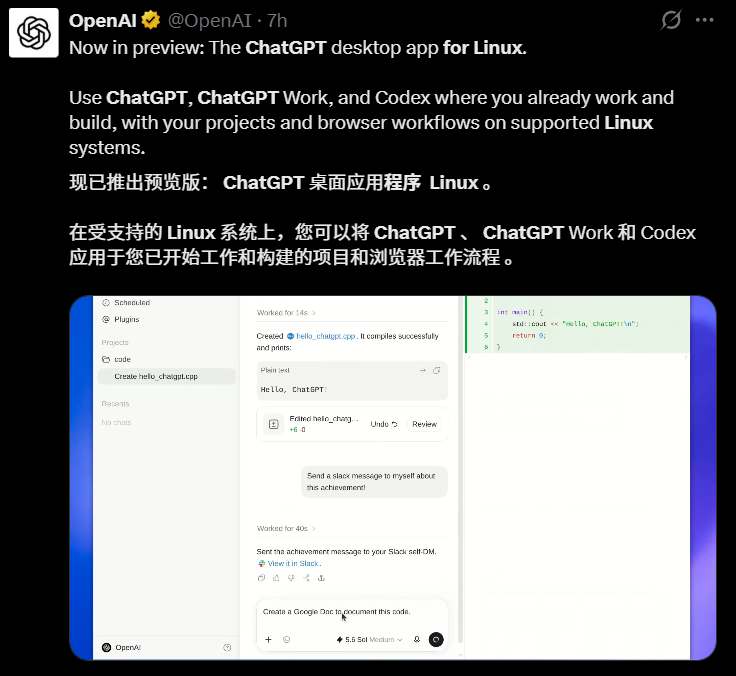
OpenAI has officially brought its new ChatGPT desktop experience to Linux. The company announced on August 11, 2026 that the ChatGPT desktop app for Linux is now available in preview, extending the unified desktop client beyond macOS and Windows. The Linux preview brings three major work surfaces into the same application: - ChatGPT for everyday conversations and research - ChatGPT Work for longer professional tasks and finished deliverables - Codex for software development with local projects,

OpenAI Launches ChatGPT Desktop App for Linux in Preview With Work and Codex
Introduction
OpenAI has officially brought its new ChatGPT desktop experience to Linux.
The company announced on August 11, 2026 that the ChatGPT desktop app for Linux is now available in preview, extending the unified desktop client beyond macOS and Windows.
The Linux preview brings three major work surfaces into the same application:
- ChatGPT for everyday conversations and research
- ChatGPT Work for longer professional tasks and finished deliverables
- Codex for software development with local projects, files, repositories, terminals, and developer tools
The original AIBase report was published the following morning and describes the release as an important expansion of OpenAI's desktop ecosystem, particularly for developers and technical users who work primarily on Linux.
This is a preview release, not a claim that every Linux distribution or every desktop feature is already supported. OpenAI's initial compatibility list is intentionally focused on several mainstream stable distributions and two major CPU architectures.
ChatGPT Desktop Is Now Available on Linux in Preview
OpenAI's Linux announcement confirms that the desktop application is designed as a native workspace where users can work with projects and files, use browser-based workflows, and run Codex alongside ChatGPT.
For Linux users, the most important change is that the desktop experience is no longer limited to a browser, the Codex CLI, or editor integrations.
The preview creates a single desktop entry point for workflows that can include:
- Asking questions in ChatGPT
- Researching and analyzing information
- Working with local project files
- Using ChatGPT Work for documents and other professional outputs
- Opening coding projects in Codex
- Running software-development tasks against repositories and terminals
- Using browser workflows from the desktop environment
OpenAI's official announcement describes this as one native desktop experience rather than separate ChatGPT and Codex applications.
Chat, Work, and Codex Have Different Roles
The current desktop architecture separates the application into distinct work surfaces.
| Surface | Primary Use |
|---|---|
| Chat | Questions, search, research, and general conversation |
| Work | Longer professional tasks that can produce documents, spreadsheets, presentations, reports, and other finished outputs |
| Codex | Software development using local files, repositories, terminals, and developer tools |
This is the same broader product direction OpenAI introduced on macOS and Windows in July, when Codex became part of the new ChatGPT desktop app.
The Linux release extends that unified model to supported Linux systems.
Supported Linux Distributions and Architectures
OpenAI's initial Linux preview supports a defined set of distributions rather than Linux in general.
Supported Distributions
The official announcement lists:
- Ubuntu 24.04 LTS
- Ubuntu 26.04 LTS
- Debian 13
- Fedora 43
- Fedora 44
These choices cover both Debian-based and RPM-based Linux environments and focus on current stable or long-term-support releases.
Supported CPU Architectures
OpenAI also provides builds for:
- x64
- ARM64
That matters for developers using traditional Intel/AMD workstations as well as newer ARM-based Linux hardware and development environments.
Available Package Formats
The Linux preview is distributed in two standard package formats:
.deb.rpm
In practical terms, .deb packages are the natural fit for supported Ubuntu and Debian systems, while .rpm packages cover the supported Fedora releases.
| Linux Family | Supported Systems | Package Format |
|---|---|---|
| Debian-based | Ubuntu 24.04 LTS, Ubuntu 26.04 LTS, Debian 13 | .deb |
| RPM-based | Fedora 43, Fedora 44 | .rpm |
| Architectures | x64, ARM64 | Architecture-specific package |
Users should download the package that matches both their Linux distribution and processor architecture from OpenAI's official download flow.
The Preview Is More Than a Linux Chat Window
The significance of the release is not simply that ChatGPT now has a Linux window.
OpenAI is bringing the same broader desktop-workspace concept to Linux: the app is meant to sit close to the user's projects, files, browser workflows, and development tools.
That is particularly relevant to Linux because the platform is widely used in software engineering, infrastructure, machine learning, data science, and server-oriented development workflows.
ChatGPT for General Work
The Chat surface is the familiar conversational layer.
Users can use it for tasks such as:
- Research
- Search
- Explaining technical material
- Reviewing files
- Drafting and editing
- Problem solving
- Planning work
The desktop app keeps this general-purpose experience beside the more task-oriented Work and Codex surfaces.
ChatGPT Work for Longer Deliverables
OpenAI describes Work as a workspace for taking a goal and turning it into a finished output.
Depending on account and workspace availability, Work can be used for tasks involving:
- Research
- Analysis
- Documents
- Spreadsheets
- Presentations
- Reports
- Other multi-step professional work
The important distinction is that Work is designed around completing an outcome, not simply answering one prompt.
The Linux preview places that workflow inside the same desktop application.
Codex for Local Software Projects
Codex is the developer-facing part of the app.
OpenAI describes the desktop Codex experience as a command center for agentic coding, including work with:
- Local files
- Repositories
- Terminals
- Project folders
- Developer tools
- Parallel coding work
For Linux developers who were already using the Codex CLI or IDE extension, the desktop preview adds a graphical workspace rather than replacing those existing tools.
Why Linux Support Matters for Developers
Linux users had been requesting an official ChatGPT desktop client for a long time.
OpenAI's developer forum contains years of requests from developers who wanted an official client instead of relying on the browser or unofficial wrappers.
The demand became even more visible after Codex desktop workflows expanded on macOS and Windows.
For developers, Linux is often the environment where the actual code, containers, package managers, local databases, build tools, and infrastructure tooling already live.
A native desktop app can therefore reduce context switching between:
Browser ChatGPT
      ↓
Terminal
      ↓
IDE
      ↓
Repository
      ↓
Browser again
and move toward a more integrated workflow:
ChatGPT desktop app
      ├── Chat
      ├── Work
      └── Codex
           ├── Project files
           ├── Repository
           └── Terminal tools
The practical value will depend on how much of OpenAI's full desktop feature set is enabled during the Linux preview and how quickly the preview expands beyond the initial distributions.
The July Desktop Consolidation Set Up the Linux Release
The Linux preview is the next step in a desktop consolidation OpenAI began in July 2026.
On July 13, OpenAI announced that Codex had joined the ChatGPT desktop app on macOS and Windows.
Previously, Codex had its own desktop application.
After the update, the new ChatGPT desktop client brought together:
- Chat
- Work
- Codex
inside one application.
Existing Codex Projects Were Designed to Carry Over
OpenAI's migration documentation says existing Codex users could update the Codex app as usual and move into the new ChatGPT desktop experience.
Their existing Codex chats and projects were intended to remain available after the update.
For users who preferred the developer-first experience, OpenAI also allowed Codex to remain the default view when the desktop app opens.
On supported platforms, users could also keep the Codex-style app icon in settings.
The Linux release therefore did not appear as an isolated new client. It arrived after OpenAI had already standardized its desktop product around one application containing multiple work modes.
ChatGPT Classic and the New Desktop App Are Not the Same Product
OpenAI's current desktop documentation also distinguishes the new ChatGPT app from the older desktop client.
On macOS and Windows, some users may still see:
- ChatGPT — the new application with Chat, Work, and Codex
- ChatGPT Classic — the previous ChatGPT desktop application
The Linux preview belongs to the new unified desktop-app direction.
This matters when reading older tutorials or screenshots because the navigation and available agent features can differ between the old and new clients.
What Linux Users Should Expect During the Preview
Because OpenAI explicitly calls the Linux release a preview, users should expect the product to evolve.
Preview software can change in areas such as:
- Supported distributions
- Installation packaging
- Desktop integration
- Feature availability
- Performance
- GPU and rendering behavior
- Notifications
- Local permissions
- Enterprise deployment controls
- Update mechanisms
- Browser and computer-use workflows
The official Linux announcement confirms the core distribution list and the presence of ChatGPT, Work, and Codex, but it does not promise complete one-to-one feature parity with every macOS or Windows capability on day one.
That distinction is particularly important for features tied closely to operating-system APIs.
The Main Desktop Documentation Is Still Catching Up
At the time this article was prepared, OpenAI's freshest Linux-specific information was the August 11 official developer-community announcement.
Some of OpenAI's broader desktop documentation still referred specifically to macOS and Windows in sections that were written before the Linux preview arrived.
For example, the general desktop-app documentation and migration guide had not yet been fully rewritten around the new Linux compatibility list when checked on August 12.
That does not negate the Linux release.
It simply means the announcement is newer than some of the surrounding documentation.
For Linux-specific compatibility, the August 11 announcement should therefore be treated as the most current source until the main documentation is updated.
How to Get the Linux Preview
OpenAI links the Linux preview from its official Codex/ChatGPT desktop download flow.
A safe installation workflow is:
- Open OpenAI's official Codex or ChatGPT desktop download page.
- Choose the Linux build.
- Select the package for your distribution family.
- Make sure the package architecture matches your machine: x64 or ARM64.
- Install the package using your distribution's standard package-management workflow.
- Launch ChatGPT and sign in with your ChatGPT account.
Because the app is in preview, users should prefer official OpenAI download links rather than unofficial Linux wrappers or repackaged desktop clients.
Check Your Architecture Before Downloading
Linux users can check the machine architecture with:
uname -m
Typical outputs include:
x86_64
for x64 systems, or:
aarch64
for ARM64 systems.
The downloaded package should match the architecture of the installed operating system.
What the Linux Release Does Not Mean
A few interpretations go beyond what OpenAI has actually announced.
It Does Not Mean Every Linux Distribution Is Supported
The preview currently names only Ubuntu 24.04/26.04 LTS, Debian 13, and Fedora 43/44.
Users of Arch Linux, openSUSE, Linux Mint, Pop!_OS, older Ubuntu releases, or other distributions should not assume official support unless OpenAI expands the list.
It Does Not Mean Every Feature Has Guaranteed Cross-Platform Parity
OpenAI confirms that ChatGPT, Work, and Codex are present in the Linux desktop experience.
That is different from promising that every operating-system-specific feature behaves identically across macOS, Windows, and Linux during preview.
It Does Not Replace Codex CLI
Codex CLI remains a separate developer surface.
Linux developers who prefer terminal-native workflows can continue using it.
The desktop app adds another interface for managing projects and coding work.
It Does Not Make the Browser Version Obsolete
ChatGPT remains available on the web.
The desktop app is most useful when users want tighter integration with local projects, files, development tools, and longer-running desktop workflows.
A Short Timeline
| Date | Event |
|---|---|
| Before July 2026 | ChatGPT desktop and Codex desktop were separate products on supported systems |
| July 13, 2026 | OpenAI announces that Codex is joining the new ChatGPT desktop app on macOS and Windows |
| July 2026 | Existing Codex users can migrate while retaining chats/projects and optionally keep Codex as the default desktop view |
| August 11, 2026 | OpenAI announces the ChatGPT desktop app for Linux in preview |
| August 12, 2026 | AIBase reports the Linux release and its supported distributions and package formats |
FAQ
Is there now an official ChatGPT desktop app for Linux?
Yes. OpenAI announced an official Linux preview of the ChatGPT desktop app on August 11, 2026. It brings ChatGPT, Work, and Codex into the same native desktop experience on supported Linux systems.
Which Linux distributions does the ChatGPT desktop app support?
The initial preview supports Ubuntu 24.04 LTS, Ubuntu 26.04 LTS, Debian 13, Fedora 43, and Fedora 44. OpenAI has not said that every other Linux distribution is officially supported.
Does the Linux ChatGPT app support ARM64?
Yes. OpenAI's release announcement lists both x64 and ARM64 architectures. Users should download the package matching their system architecture.
Is the Linux app available as a .deb or .rpm package?
Yes. OpenAI provides .deb and .rpm package formats for the Linux preview. This covers the officially supported Debian/Ubuntu and Fedora distribution families.
Does ChatGPT for Linux include Codex?
Yes. OpenAI says the Linux desktop preview brings ChatGPT, Work, and Codex together in one native desktop application. Codex is intended for software-development workflows involving local projects, files, repositories, terminals, and developer tools.
Does the Linux app include ChatGPT Work?
Yes, the official Linux announcement explicitly includes Work as one of the three main surfaces in the preview. Actual feature availability can still depend on account, workspace, rollout, and the maturity of the preview.
Is the Linux desktop app a stable release?
No. OpenAI labels it as a preview. Users should expect supported distributions, feature behavior, and desktop integration to evolve as the preview matures.
Can I still use Codex CLI on Linux?
Yes. The Linux desktop application does not replace Codex CLI or the IDE extension. Developers can choose the interface that best fits their workflow.
相关工具
- ChatGPT Desktop App: OpenAI's official documentation for the unified desktop workspace containing Chat, Work, and Codex.
- Codex: OpenAI's agentic coding product for working across ChatGPT, editors, and the terminal.
- ChatGPT Work: OpenAI's professional workspace for turning goals into researched, analyzed, and finished work products.
- Codex CLI: OpenAI's terminal-based coding agent, useful for Linux developers who prefer command-line workflows.
- Codex IDE Extension: OpenAI's editor integration for reviewing and applying coding-agent work alongside source files.
Related Links
- Official Linux Preview Announcement: OpenAI's August 11 announcement listing Ubuntu, Debian, Fedora, x64, ARM64,
.deb, and.rpmsupport. - OpenAI Codex: The official product page and download entry for Codex in the ChatGPT app.
- ChatGPT Desktop App Documentation: OpenAI's documentation for projects, files, browser workflows, ChatGPT, and Codex on desktop.
- Moving to the New ChatGPT Desktop App: OpenAI's migration guide explaining how Chat, Work, and Codex were consolidated in the new desktop client.
- ChatGPT & Codex Changelog: Official release history, including the July 2026 desktop consolidation and current Codex updates.
- Codex Authentication: Official guidance for signing into the desktop app, Codex CLI, and IDE extension with ChatGPT or an API key where supported.
Summary
OpenAI has officially released a preview of the ChatGPT desktop app for Linux, closing a major platform gap for developers who work primarily on Linux. The first supported systems are Ubuntu 24.04/26.04 LTS, Debian 13, and Fedora 43/44, with x64 and ARM64 builds delivered as .deb and .rpm packages.
The more important product change is that Linux receives OpenAI's newer unified desktop model: ChatGPT, Work, and Codex live inside the same application rather than being treated as separate desktop products.
Because the release is still a preview, users should rely on OpenAI's current compatibility list and avoid assuming support for every Linux distribution or complete feature parity with macOS and Windows.
For Linux users, the release is the first official path to OpenAI's full new desktop workspace rather than another browser-only or unofficial-wrapper solution.