MiniMax H3 on MetaSo: 768p AI Video at ¥0.09 per Second Without Local Deployment
MiniMax H3 had only just arrived when the conversation around it shifted from model quality to something much more practical: how cheaply and easily can ordinary creators actually
MiniMax H3 on MetaSo: 768p AI Video at ¥0.09 per Second Without Local Deployment
Introduction
MiniMax H3 had only just arrived when the conversation around it shifted from model quality to something much more practical: how cheaply and easily can ordinary creators actually use it?
The model has attracted attention for unified text, image, video, and audio conditioning, native stereo sound, video editing, reference-based generation, and output up to 2K. It is also open-weight, giving developers the option to deploy it themselves.
That openness, however, does not make local deployment effortless.
Running a large multimodal video model still means dealing with model files, inference frameworks, GPU memory, dependencies, environment configuration, and generation latency. MiniMax’s own open-source documentation recommends frameworks including SGLang, vLLM, Diffusers, and ComfyUI, and its example SGLang deployment uses four GPUs.
For creators who simply want to turn an idea into a clip, that can be a very different job from making video.
The source article highlights a third-party route: MetaSo (秘塔AI) has added MiniMax H3 to its browser-based video-generation product. In the interface shown by the source, users can access H3 directly without setting up a local environment.
The most striking part is the platform-specific pricing shown at the time of testing:
- 768p: ¥0.09 per generated second
- 2K: ¥0.15 per generated second
Those are MetaSo’s displayed prices in the source article, not MiniMax’s universal official API prices. Third-party pricing can be promotional, subsidized, or revised later, so it should always be checked again before production use.

From Complex Deployment to Direct Generation
MiniMax H3 is an unusually capable open-weight video model, but “open” and “easy to run” are not the same thing.
MiniMax’s official repository describes H3 as a general-purpose omni-modal generative system that understands context made from:
- Text
- Images
- Video
- Audio
It can generate synchronized video and native stereo sound for clips between 4 and 15 seconds.
The current open release provides two main base-model variants:
| Model Variant | Main Use | Input |
|---|---|---|
| H3-Base-FL2VA | Text-to-video and first/last-frame generation | Text plus zero, one, or two images |
| H3-Base-Ref2VA | Multi-reference audio-video generation | Text plus reference images, videos, and/or audio |
The reference model supports up to:
- 9 images
- 3 video clips
- 3 audio clips
- 12 files in total
MiniMax also documents a full 2K workflow that combines H3-Base with H3-Context-IR and H3-Regenerate-2K.
H3 Was Strong Enough to Top a Live Video-Editing Leaderboard
The source article refers to MiniMax H3 reaching the top of Artificial Analysis’s video-editing leaderboard shortly after launch.
That statement is verifiable for the current snapshot reviewed on August 7, 2026.
Artificial Analysis lists MiniMax H3 at number one in its current Video Editing Leaderboard with Audio, ahead of Gemini Omni Flash in that view. Because these are live preference-based rankings, the exact order can change as more samples arrive.
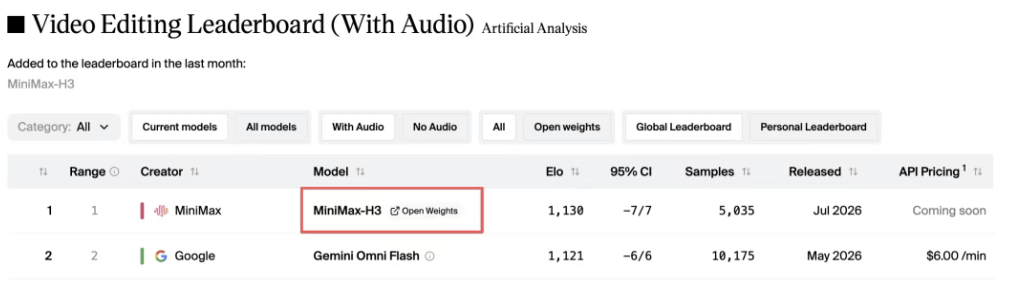
This is useful evidence that H3 is competitive in editing quality, but it should not be stretched into a broader claim that H3 is permanently number one across every video-generation category.
Text-to-video, image-to-video, reference generation, and video editing are separate tasks, and rankings depend on the selected filters, date, audio settings, and user votes.
The Deployment Barrier Is Still Real
The source article makes a point that is easy to overlook in open-model discussions: many creators do not want to become inference engineers just to test a creative idea.
A self-hosted H3 workflow can involve:
- Finding the official repository.
- Downloading the appropriate checkpoint.
- Installing a supported inference framework.
- Preparing GPU resources.
- Configuring dependencies.
- Starting the model service.
- Connecting a client or workflow UI.
- Debugging memory and compatibility problems.
MiniMax’s official repository provides a SGLang example like this:
sglang serve \
  --model-path MiniMaxAI/MiniMax-H3 \
  --num-gpus 4 \
  --ulysses-degree 4 \
  --performance-mode speed \
  --host 0.0.0.0 \
  --port 30010 \
  --model-variant fl2va
The reference-generation variant uses the same four-GPU example with a different model variant and port.
That does not mean every possible H3 deployment always requires exactly four GPUs. Hardware needs depend on framework, precision, parallelism, resolution, video duration, and optimization method.
It does show that the official reference deployment is not aimed at a typical consumer laptop.
Open Weights Do Not Eliminate Compute Cost
The model weights are available, but inference still requires substantial compute.
A creator using local hardware has to consider:
- GPU purchase or rental
- VRAM
- System memory
- Storage
- Model download size
- Inference time
- Power usage
- Driver compatibility
- Framework updates
- Failed generations
The source includes a community post from a user who hit an out-of-memory error after downloading H3 locally.
That anecdote should not be treated as a universal hardware benchmark, but the larger point is valid: being able to download a model is not the same as being able to run it comfortably.
Local Generation Can Also Be Slow
The source reports that local generation of a roughly 10-second clip can take 20–40 minutes on some setups.
That is not an official MiniMax latency specification and will vary dramatically by hardware and software configuration.
Still, latency matters for creative work.
Video generation is iterative. A user may need several attempts to fix:
- Camera movement
- Character motion
- Product consistency
- Text rendering
- Shot selection
- Timing
- Style
When each attempt takes a long time, experimentation becomes harder even if the model itself is free to download.
MetaSo Turns H3 Into a Browser Tool
The workflow highlighted in the source removes most of the local-deployment steps.
MetaSo’s homepage now exposes a Video Generation entry alongside its existing search and productivity products.
According to the source test, the basic flow is:
- Open MetaSo.
- Enter the Video Generation area.
- Select MiniMax H3.
- Choose the generation mode.
- Enter a prompt and references if needed.
- Generate the clip in the browser.
There is no need to download the H3 repository or configure CUDA before making the first video.
Supported Creation Modes
The interface shown in the article includes the main workflows creators expect from H3:
- Text-to-video
- Image-to-video
- Multi-reference generation
The screenshot also shows an H3 Context IR option, which aligns with MiniMax’s official architecture.
H3-Context-IR is MiniMax’s hosted preprocessing and orchestration system for interpreting free-form multimodal instructions. It analyzes relationships among text, images, audio, and reference video, then turns that context into a representation that H3-Base can use more effectively.
MiniMax does not include the full H3-Context-IR hosted system in the open-source weights. It provides an API for reproducing the official workflow.
That distinction helps explain why a hosted service can be easier than a purely local open-weight installation.
A 15-Second Western-Style Test Finished in About Three Minutes
The source author tested H3 through MetaSo with a short Western-style treasure-hunt concept.
The generated clip included:
- Desert establishing shots
- Cowboy close-ups
- Horse-riding action
- Multiple shot changes
- A consistent Western atmosphere
The author reports that the entire process, from opening the generation page to receiving the finished 15-second result, took around three minutes.
That is an individual test result, not a guaranteed service-level latency.
Actual generation time can vary with:
- Queue load
- Resolution
- Duration
- Generation mode
- Reference count
- Platform capacity
The practical difference is that users do not have to manage the inference infrastructure themselves.
For many creators, that is more important than whether the model is technically open-weight.
MetaSo Also Supports a ComfyUI-Oriented Workflow
The source says advanced users can connect the service to ComfyUI workflows.
That is a useful middle ground between a one-box web generator and a fully self-hosted model.
ComfyUI is an open-source, node-based generative-AI workflow system. MiniMax’s own H3 repository officially lists ComfyUI as one of the recommended H3 inference/workflow options and links to H3 templates.
A node workflow gives users more control over:
- Input preparation
- Prompt stages
- References
- Branching
- Post-processing
- Reusable generation pipelines
The practical split becomes:
| User Type | Suitable Workflow |
|---|---|
| Creator testing an idea | Browser prompt interface |
| Creator using references | Browser multi-reference workflow |
| Power user | ComfyUI or API workflow |
| Infrastructure team | Local or cloud deployment of open weights |
This is one reason hosted access and open weights are complementary rather than mutually exclusive.
¥0.09 per Second Changes the Cost of Iteration
The second half of the source article focuses on price.
At the time of the author’s test, MetaSo displayed:
| Resolution | MetaSo Price Shown in Source |
|---|---|
| 768p | ¥0.09 / second |
| 2K | ¥0.15 / second |

These rates produce very small per-clip numbers.
768p Examples
| Duration | Cost at ¥0.09/s |
|---|---|
| 5 seconds | ¥0.45 |
| 10 seconds | ¥0.90 |
| 15 seconds | ¥1.35 |
2K Examples
| Duration | Cost at ¥0.15/s |
|---|---|
| 5 seconds | ¥0.75 |
| 10 seconds | ¥1.50 |
| 15 seconds | ¥2.25 |
This is why the source describes AI video as moving into a “few cents” era in RMB terms.
More precisely, it is a third-party hosted price at one point in time, and it should not be generalized to the entire H3 ecosystem.
MiniMax’s own API and other providers may use different prices, currencies, resolutions, billing logic, and promotional discounts.
Artificial Analysis currently lists H3’s creator-API price at about $7.80 per minute of 1080p video at default settings for its leaderboard comparison. That is a different pricing basis from MetaSo’s source screenshot and shows why provider-specific rates must be labeled clearly.
Why Cheap Generation Matters More Than It First Appears
AI video usually does not produce a final result in one attempt.
A creator may generate a clip, notice a problem, change the prompt, and try again.
That means the real cost is not:
price of one video
It is closer to:
cost per attempt × number of attempts needed for an acceptable result
Suppose a creator needs eight 10-second 768p attempts before selecting one usable version.
At the MetaSo price shown in the source:
10 seconds × ¥0.09 × 8 attempts = ¥7.20
The same basic creative process becomes much harder when each attempt costs tens of yuan.
Lower prices can change user behavior.
Creators can afford to test:
- More camera directions
- More character actions
- More prompt variations
- Different aspect ratios
- Several versions of one advertisement
- Alternative story beats
The value is not only saving money on the final output.
It is reducing the psychological cost of experimentation.
Cheap Iteration Is Especially Important for Video
Text generation is inexpensive enough that users rarely hesitate before asking for another draft.
Video is different.
Each generation consumes much more compute, and the result contains many dimensions that can fail simultaneously:
- Visual quality
- Temporal consistency
- Motion
- Camera behavior
- Audio
- Dialogue
- Identity
- Text
- Product details
- Editing rhythm
This makes repeated sampling normal.
A useful production metric is therefore:
Total spend
──────────────
Usable outputs
A model with a low per-second rate is valuable if it also produces enough usable generations to keep the cost per accepted clip low.
Creators should evaluate both price and hit rate.
H3’s Capabilities Make Low-Cost Iteration More Interesting
The price matters because H3 is not a minimal text-to-video model.
MiniMax’s official repository confirms that H3 supports:
- Native stereo audio
- 4–15 second outputs
- 24 FPS
- Multiple aspect ratios
- First-frame generation
- Last-frame generation
- First-and-last-frame generation
- Reference images
- Reference video
- Reference audio
- Multi-reference workflows
- 2K regeneration
The architecture also jointly predicts video and audio latents through the H3-Omni-Transformer.
That means one generation can potentially include both visual and audio structure rather than requiring a separate dubbing stage.
2K Is a Separate Regeneration Stage in the Open Workflow
The official H3 repository describes the complete system as:
- H3-Context-IR
- H3-Base
- H3-Regenerate-2K
H3-Base produces 768p output.
H3-Regenerate-2K then takes the base result together with the original context and regenerates the clip at higher resolution.
That is different from a simple pixel upscaler.
The hosted API can abstract those stages away from the user.
API Access Extends H3 Beyond the Web Interface
The source article also shows an H3 API panel inside MetaSo.
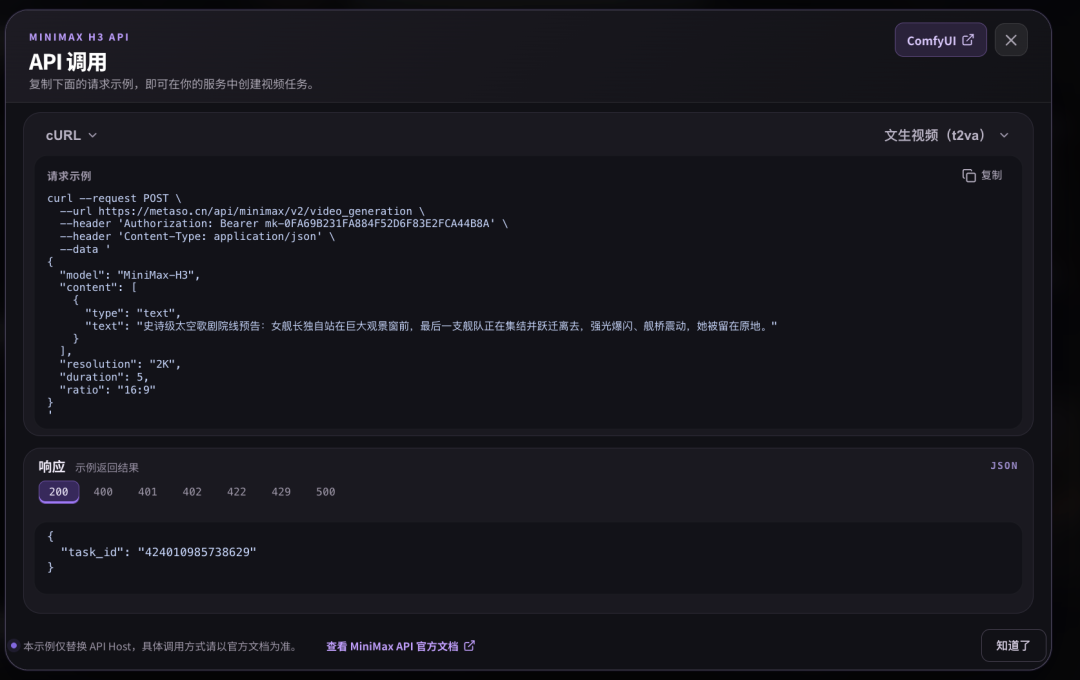
The screenshot provides a request example using MetaSo’s own API host and the MiniMax-H3 model name.
A simplified version of the structure shown is:
curl --request POST \
  --url https://metaso.cn/api/minimax/v2/video_generation \
  --header 'Authorization: Bearer <YOUR_API_KEY>' \
  --header 'Content-Type: application/json' \
  --data '{
    "model": "MiniMax-H3",
    "content": [
      {
        "type": "text",
        "text": "Describe the video you want to generate."
      }
    ],
    "resolution": "2K",
    "duration": 5,
    "ratio": "16:9"
  }'
This code reflects the request shape visible in the source screenshot. Developers should use MetaSo’s current documentation or in-product API panel before deploying it in production because endpoints, fields, authentication formats, and limits may change.
The API Is Useful for Repeated Workflows
Programmatic access is more useful than a browser when a team needs to:
- Generate many variants
- Connect a content pipeline
- Automate product videos
- Build an internal creative tool
- Send jobs from ComfyUI
- Store outputs automatically
- Add review and approval steps
Hosted inference lets the application call H3 without managing the actual model-serving stack.
Hosted API and Local Open Weights Serve Different Users
The H3 ecosystem now gives developers several ways to work.
Option 1: Use a Hosted Creative Interface
Best for:
- Individual creators
- Marketing teams
- Rapid experiments
- People without GPUs
Advantages:
- No deployment
- Low setup time
- Simple UI
- Provider manages compute
Trade-offs:
- Provider-specific pricing
- Queueing
- Usage limits
- Platform dependency
Option 2: Use a Hosted API
Best for:
- Developers
- SaaS products
- Internal automation
- ComfyUI users who do not want to self-host inference
Advantages:
- Programmatic control
- No GPU operations
- Easier scaling
Trade-offs:
- Usage charges
- API dependency
- Provider limits
Option 3: Self-Host the Open Weights
Best for:
- Research teams
- Infrastructure teams
- Organizations with their own GPU capacity
- Custom inference work
Advantages:
- Greater infrastructure control
- Open model access
- Custom pipelines
- Potential offline/private operation for supported components
Trade-offs:
- Hardware cost
- Deployment complexity
- Operational maintenance
- Longer setup time
The right choice depends more on workflow economics than ideology.
An open model can still be most convenient through a hosted service.
A Practical Workflow for Creators
For users who want to test H3 without local deployment, a sensible process is:
Step 1: Start at 768p
Use the lower-cost mode while exploring the prompt and scene.
Do not spend on high resolution before the concept works.
Step 2: Generate Several Variations
Change one variable at a time:
- Camera angle
- Subject action
- Lighting
- Shot rhythm
- Reference strength
This makes it easier to understand what improved the result.
Step 3: Keep the Best Prompt and References
Save the successful combination.
A reusable prompt can become more valuable than one lucky output.
Step 4: Move the Final Candidate to 2K
Once the composition and motion are acceptable, generate or regenerate at the higher-resolution tier.
Step 5: Use ComfyUI or API for Repetition
If the same workflow is repeated frequently, move it into a node graph or application pipeline.
Step 6: Finish in a Conventional Editor
For commercial use, check:
- Logos
- Text
- Product details
- Audio levels
- Subtitles
- Rights
- Final color
- Export settings
AI generation should be treated as part of the production chain, not the only review stage.
A Practical Workflow for Developers
Developers should separate model access from business logic.
A simple architecture can look like this:
Application
    ↓
Generation Service
    ↓
Provider Adapter
    ↓
MetaSo H3 API / MiniMax API / Self-Hosted H3
    ↓
Job Status + Output URL
    ↓
Storage / Review / Publishing
The provider adapter makes it easier to change inference backends later.
Store fields such as:
- Prompt
- References
- Resolution
- Duration
- Aspect ratio
- Provider
- Model version
- Cost
- Job ID
- Generation time
- Output URL
- Review status
That creates a useful dataset for comparing real cost per usable clip.
What the ¥0.09 Price Does Not Mean
The headline number is attractive, but several boundaries matter.
It Is Not MiniMax’s Universal Official Price
The ¥0.09/s and ¥0.15/s figures are the MetaSo prices displayed in the source article.
They should not be quoted as MiniMax’s global API list price.
It May Change
Third-party providers can adjust pricing because of:
- Promotions
- Compute supply
- Volume agreements
- Queue policies
- Model updates
- Commercial strategy
Always check the live interface.
Low Price Does Not Guarantee Low Cost per Final Video
A workflow with many failed generations can still become expensive.
Measure acceptance rate.
Hosted Access Is Not the Same as Open Deployment
MetaSo handles the infrastructure for the user.
Self-hosting gives more control but also moves the compute and operations burden back to the user.
The Bigger Shift: Open Models Are Becoming Easier to Consume
The most interesting part of the source is not only that one provider has a low price.
It is the convergence of two trends.
First, high-quality video models are becoming more open.
MiniMax released H3 weights and supports several inference frameworks, including ComfyUI.
Second, hosted platforms are turning those open models into one-click services.
That creates a wider range of users:
- Researchers can inspect and deploy the model.
- Developers can use an API.
- Power users can build ComfyUI graphs.
- Creators can open a webpage and generate.
The model does not become simpler internally.
The infrastructure becomes invisible to the person using it.
常见问题
What is MiniMax H3?
MiniMax H3 is an open-weight omni-modal video-generation system from MiniMax. It can use text, images, video, and audio as context and generate synchronized video with native stereo audio for clips up to 15 seconds.
How much does MiniMax H3 cost on MetaSo?
The source article shows MetaSo charging ¥0.09 per generated second for 768p and ¥0.15 per second for 2K at the time of testing. These are MetaSo platform prices, not MiniMax’s universal official API rates, and they may change.
Can I use MiniMax H3 without a GPU?
Yes, if you use a hosted service such as MiniMax’s own API/app or a third-party platform such as MetaSo. The provider runs the model on its infrastructure, so your local device only needs to access the service.
Is MiniMax H3 open source?
MiniMax has released H3 model weights and code under its community license. The complete hosted H3-Context-IR orchestration system is not included in the open release, although MiniMax provides APIs and prompting guidance for that stage.
Can MiniMax H3 run in ComfyUI?
Yes. MiniMax’s official H3 repository lists ComfyUI among the recommended workflows and links to H3 templates. MetaSo also says its hosted H3 access can be used with ComfyUI-oriented workflows.
What hardware is needed to self-host H3?
Requirements depend on inference framework, precision, duration, and performance target. MiniMax’s official SGLang reference command uses four GPUs, so users should not assume that a normal consumer laptop can run the full model comfortably.
Is H3 currently number one on Artificial Analysis?
As of the August 7, 2026 snapshot reviewed for this article, H3 ranks first on Artificial Analysis’s Video Editing Leaderboard with Audio. Rankings are dynamic and do not mean H3 is number one across every video-generation category.
Should I generate directly in 2K?
For experimentation, starting at the cheaper resolution can make more sense because most concepts require several iterations. Once motion, framing, and references are stable, move the preferred result into a higher-resolution workflow.
相关工具
- MiniMax H3: The official open repository containing H3 model architecture, checkpoints, prompting guidance, deployment examples, and workflow links.
- MiniMax API Platform: MiniMax’s official hosted developer platform for H3 and other MiniMax models.
- MetaSo: The AI product highlighted in the source article, with a browser video-generation entry that includes MiniMax H3.
- ComfyUI: An open-source node-based generative-AI workflow system officially supported in MiniMax’s H3 repository.
- SGLang: One of the inference frameworks recommended by MiniMax for serving H3 locally.
- Hugging Face: MiniMax’s official H3 model page for public model files and community use.
Related Links
- MiniMax H3 Official GitHub Repository: Official architecture, model variants, input limits, local deployment, ComfyUI links, and 2K workflow documentation.
- MiniMax H3 Online API: MiniMax’s official global API platform for hosted H3 access.
- MiniMax Official Website: Official MiniMax product and company information.
- MetaSo Official Website: The platform used for the low-cost H3 workflow described in the source.
- Artificial Analysis Video Editing Leaderboard: The live preference-based leaderboard on which H3 ranked first in the with-audio snapshot reviewed on August 7.
- ComfyUI GitHub Repository: Official source for the node-based workflow environment supported by H3.
- SGLang GitHub Repository: Open-source model-serving framework used in MiniMax’s reference H3 deployment instructions.
Summary
MiniMax H3 is open-weight, but local deployment still involves meaningful hardware and engineering overhead. MiniMax’s own reference serving example uses a multi-GPU SGLang configuration, which helps explain why many video creators prefer a hosted route.
The source article shows MetaSo turning H3 into a browser-based service with text-to-video, image-to-video, multi-reference generation, API access, and ComfyUI-oriented workflows. At the time of the test, MetaSo displayed pricing of ¥0.09 per second for 768p and ¥0.15 per second for 2K.
Those low third-party rates matter because AI video is inherently iterative. Cheaper attempts let creators test more camera directions, prompts, scenes, and edits before committing to a final high-resolution result.
The real shift is not only that H3 is open—it is that open-weight video models are increasingly becoming as easy to consume as ordinary web services.