Meta Muse Image and Muse Video: Agentic Media Generation Explained
Meta’s Muse Image release is notable because it reframes image generation as an agentic workflow. The model can use tools, refine its own outputs, work with multiple references, and connect with Meta’s broader social ecosystem. Muse Video is still in preview, but it signals that Meta is moving from static image generation toward a broader multimodal media stack. The combination of Muse Spark, Muse Image, and Muse Video points to a future where AI-generated content is planned, checked, edited, and distributed across product surfaces. For creators, marketers, and AI builders, the key lesson is clear: better media generation is becoming less about a single prompt and more about the system around the model. **Muse Image is not just another AI image generator; it is Meta’s attempt to make visual creation behave like an agent-driven workflow.**
Meta Muse Image and Muse Video: Agentic Media Generation Explained
Meta MSL Releases Muse Image and Previews Muse Video
After Muse Spark, Meta Superintelligence Labs has introduced a new pair of media generation models: Muse Image, which is now being rolled out, and Muse Video, which is currently being previewed.
Muse Image is Meta’s image generation model built for text-to-image creation, image editing, multi-reference composition, and social-context generation inside Meta products. Muse Video is trained on the same broad media-generation direction and is designed for high-fidelity video output, prompt adherence, temporal consistency, and native audio support.
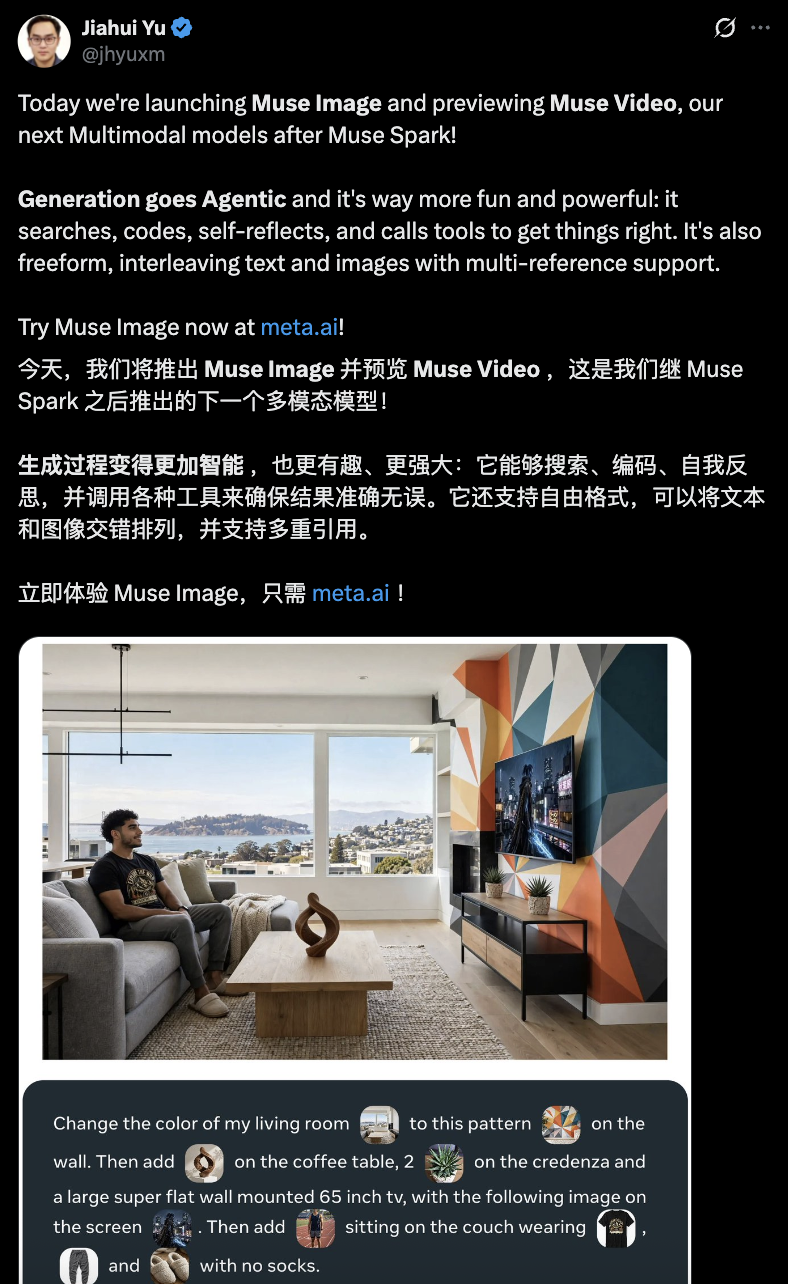
According to Meta’s own announcement, Muse Image is available through the Meta AI app and web experience, with rollout paths across Instagram Stories, WhatsApp, and Facebook surfaces. Meta says Muse Video is coming later for creators and Meta AI users.
The release also arrived with benchmark-style comparisons from Arena leaderboards. In the source article, Muse Image is shown near the top of the text-to-image, single-image editing, and multi-image editing rankings. Muse Video is also shown entering the text-to-video ranking near the leading group.
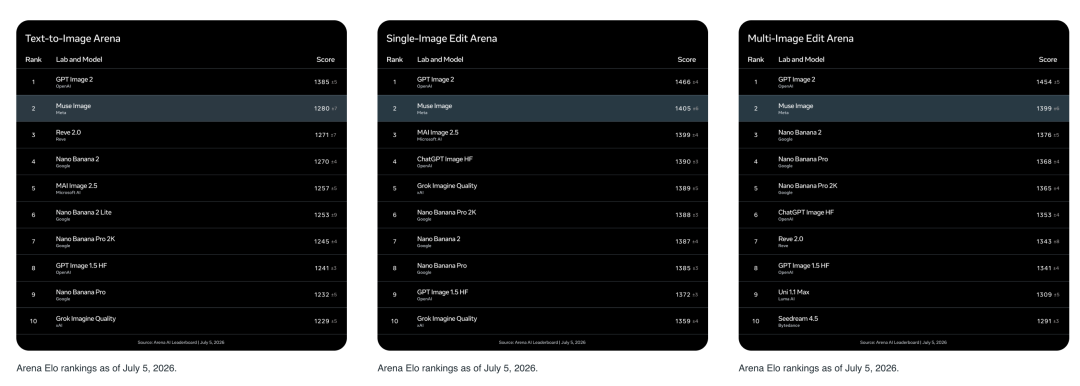
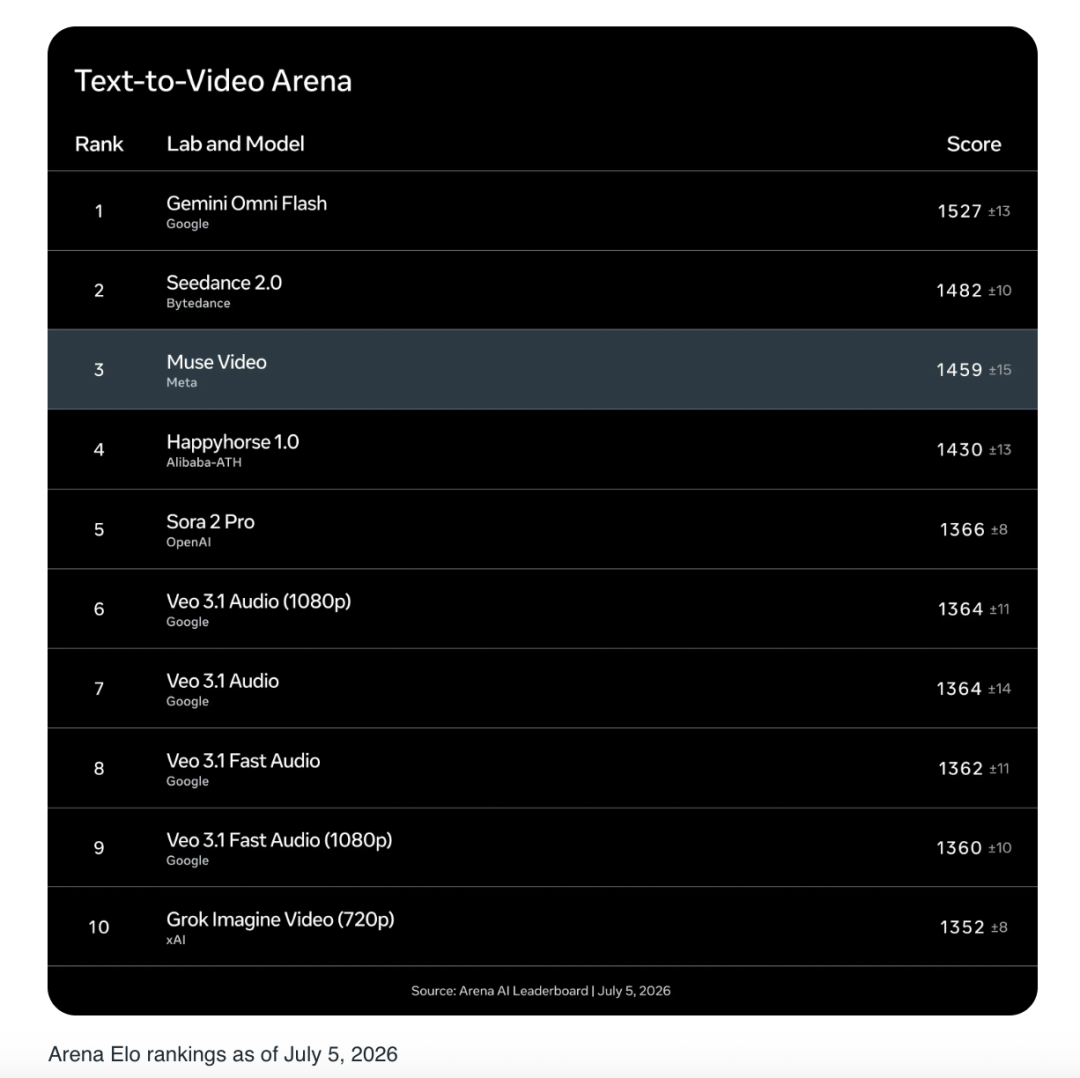
The important point is not only the ranking. The more interesting part is the model design: Meta is trying to make image generation behave more like a multi-step creative workflow instead of a one-shot prompt-to-picture tool.
Drawing Like an Agent
Muse Image Does Not Just Generate Immediately
A typical image model often takes a prompt, compresses the intent, and directly generates a result. Muse Image follows a different pattern. Meta describes it as an agentic system that can reason through the request, decide whether extra information is needed, use tools, and improve the result before delivery.
For example, when a prompt requires current real-world context, Muse Image can use search. When the scene requires accurate plots, formulas, layouts, or QR codes, it can use coding tools to create more reliable intermediate assets.
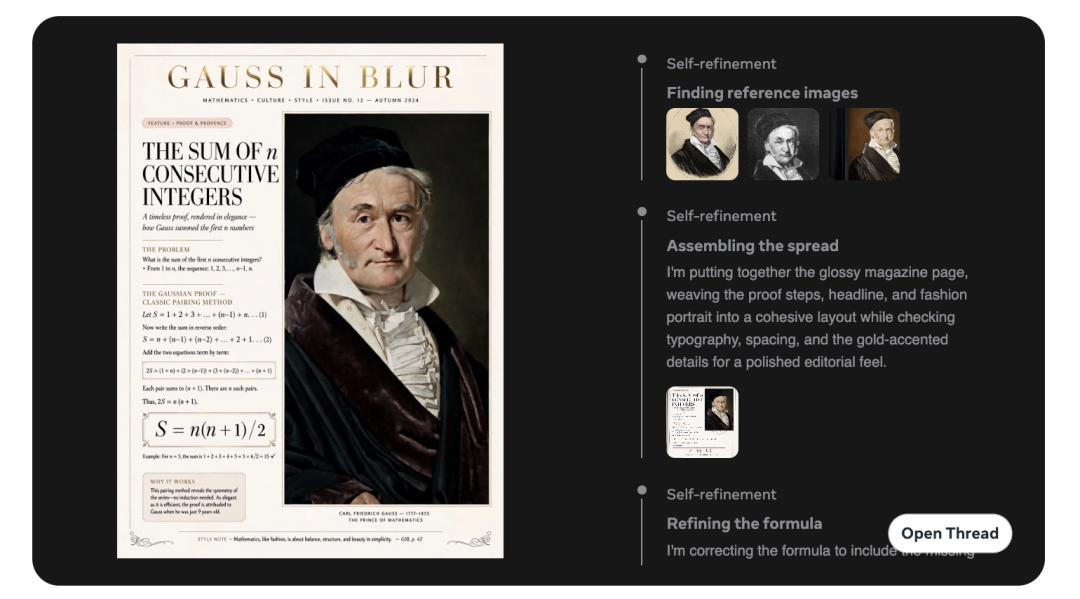
This matters because many image generation failures are not purely about beauty. They often come from weak grounding: wrong facts, broken text, inconsistent object placement, unreadable charts, or details that look good at first glance but fail when inspected.
Tool Use: Search and Code
Meta says Muse Image can use tools such as search and code execution during the generation process. Search helps with prompts that involve current events, landmarks, brands, identities, or factual context. Coding helps when the final image needs mathematically or structurally accurate content.
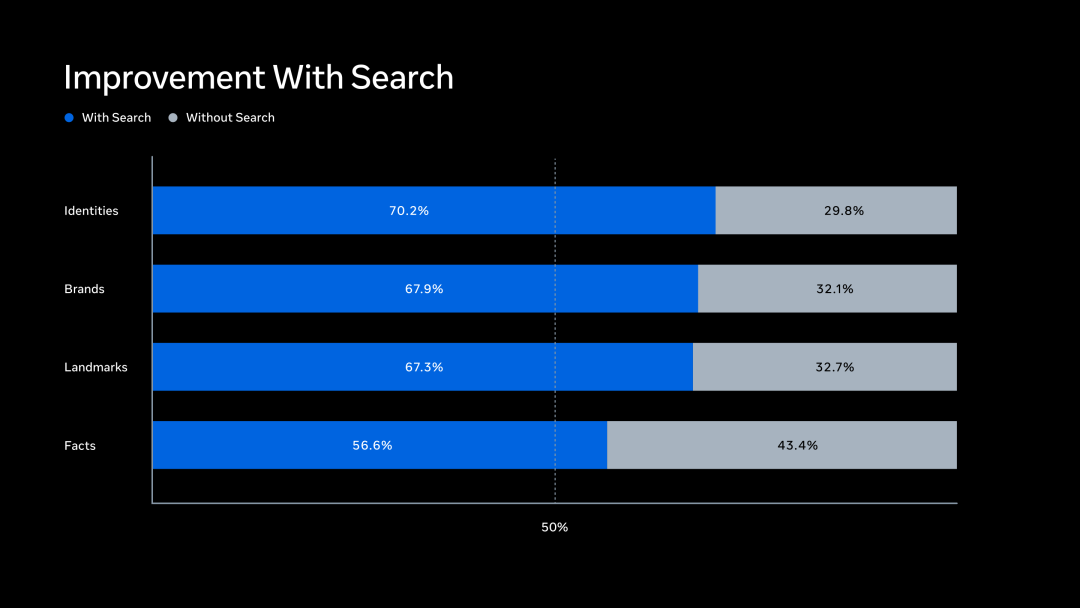
The source article gives a simple way to understand this: if you ask the model to draw something that depends on today’s real world, it should not rely only on a frozen internal memory. It can look up references first. If you ask it to create a chart, a formula page, or a scannable QR code, it can use code as part of the process.
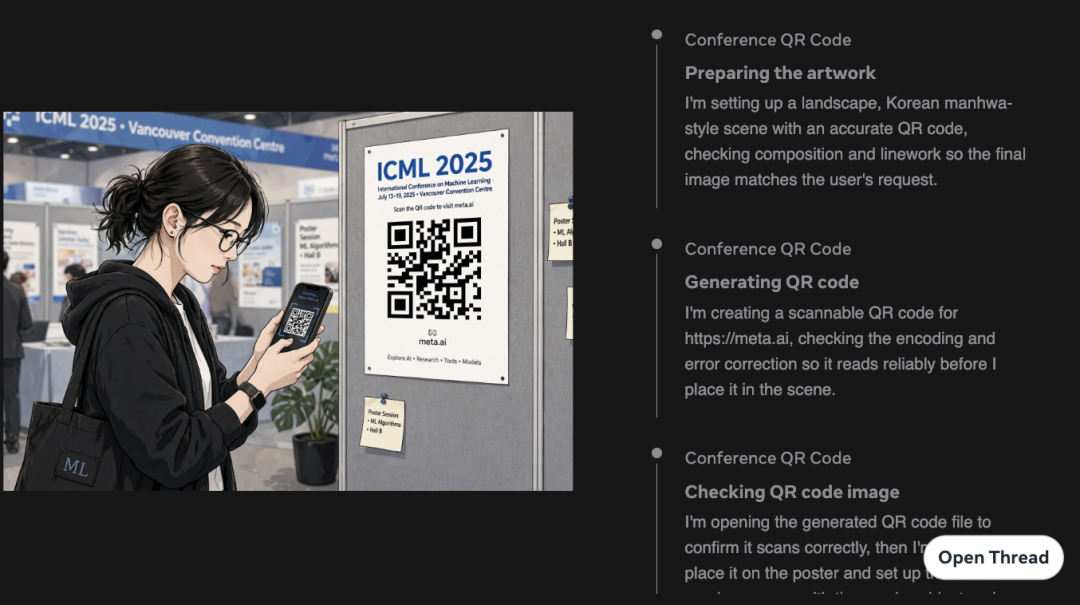
That does not mean every output will be perfect. But it changes the expected workflow. The model is no longer just “imagining” the result; it can assemble evidence, calculate parts of the scene, and verify details before the image is finalized.
Self-Refinement
Another key idea is self-refinement. Muse Image can inspect its own output, notice problems, and decide whether to revise a small area, regenerate a larger section, or use tools again for a more accurate result.
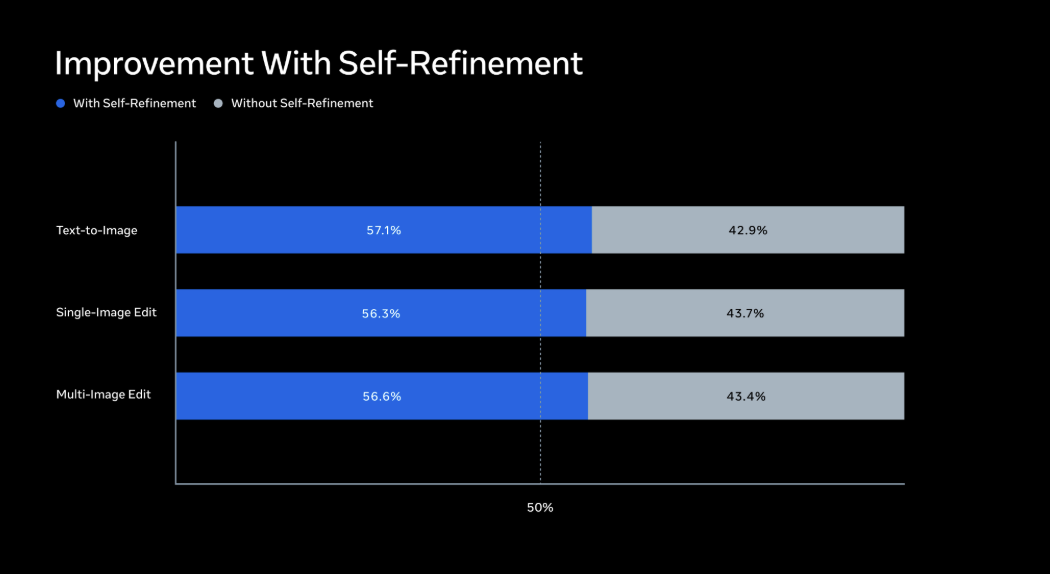
In normal image generation, users often need to manually prompt the model again and again: fix the hand, remove the wrong logo, make the text readable, keep the character consistent. Muse Image is designed to move part of that correction loop into the model process itself.
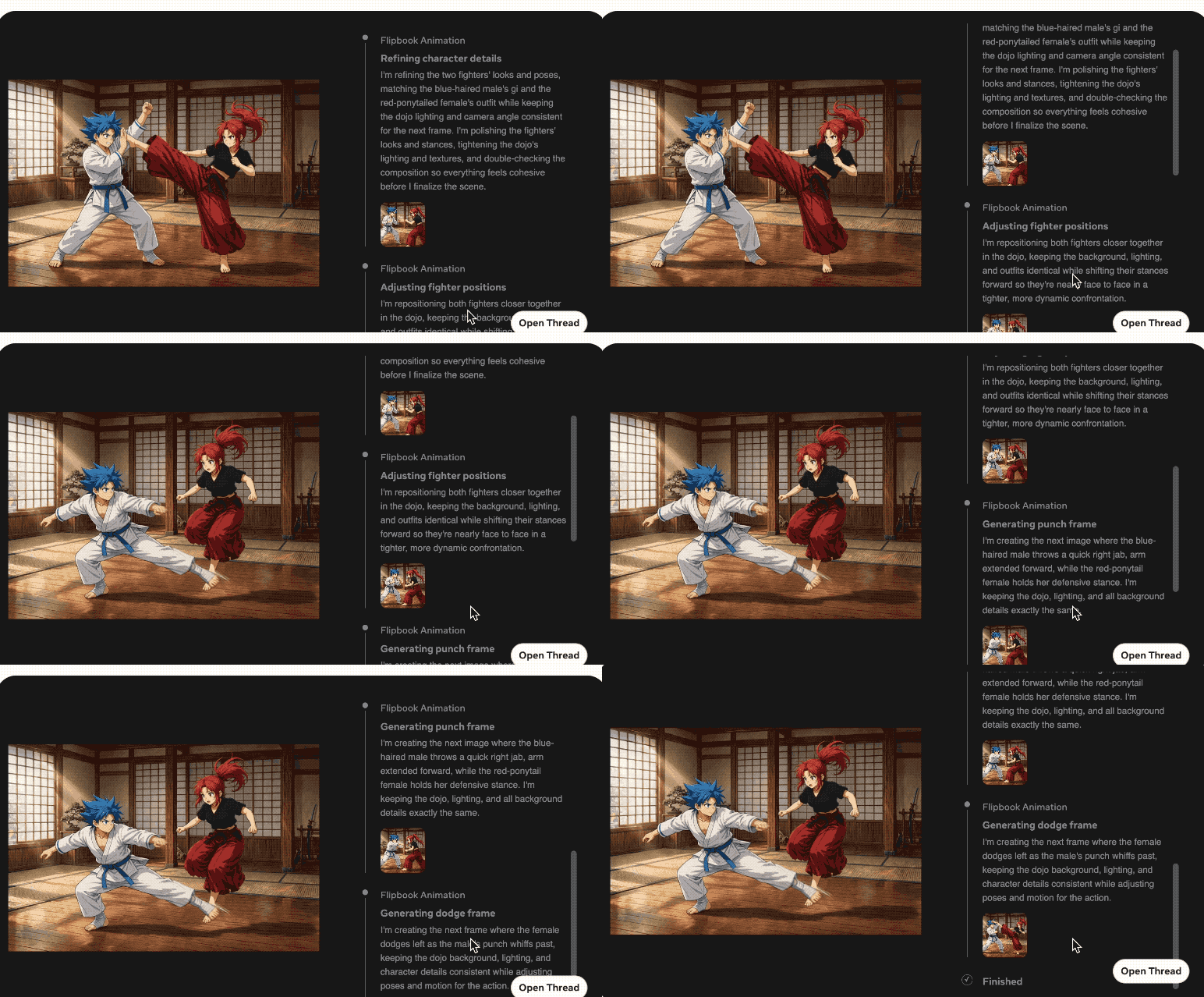
For creators and marketers, this is the practical difference. A model that can revise its own draft is more useful for production workflows, because the first acceptable result may arrive faster and require fewer manual edits.
Test-Time Compute and Better Results
Meta also reports that stronger reasoning at generation time can improve the quality of the output. In simple terms, giving the system more time and compute to think, plan, search, refine, or select among candidates may produce a better image.
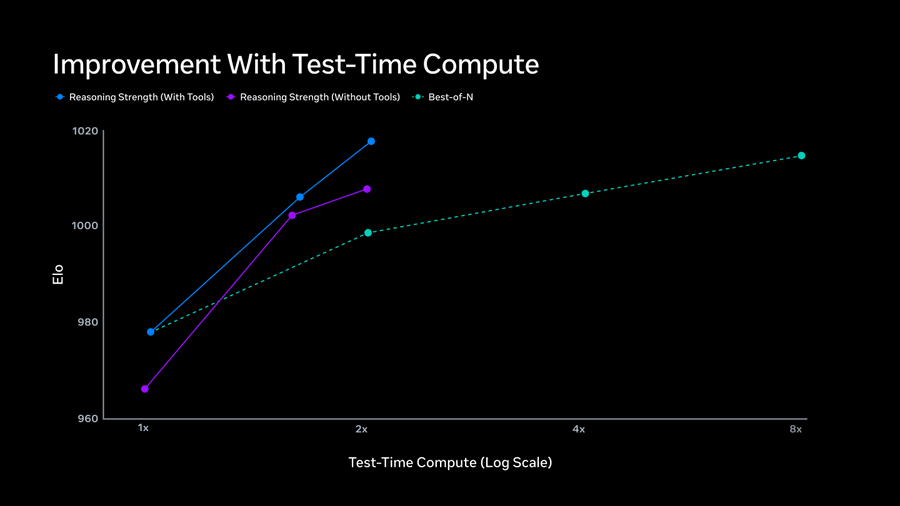
This is similar to what many people have already seen in language models: the model’s answer can improve when it is allowed to reason more carefully. Muse Image applies a similar idea to visual creation.
Muse Spark and Muse Image Can Work Together
Muse Image is also designed to connect with Muse Spark, Meta’s language model in the Muse family. Meta says the two models can share tools and jointly plan media generation.
That connection opens the door to more complex outputs than a single static image. For example, a workflow might combine website code, embedded images, animated GIFs, and interactive visual elements. In that case, the language model handles planning and structured generation, while the image model handles the visual assets.
This is where the “agentic” framing becomes more meaningful. The model is not just a painter. It becomes part of a creative system that can plan, create, check, and revise across multiple media formats.
Multi-Reference Image Creation and Editing
Muse Image supports multiple visual references. A user can provide a person, an outfit, a background, a style image, or another visual cue, then ask the model to combine them into a new scene.
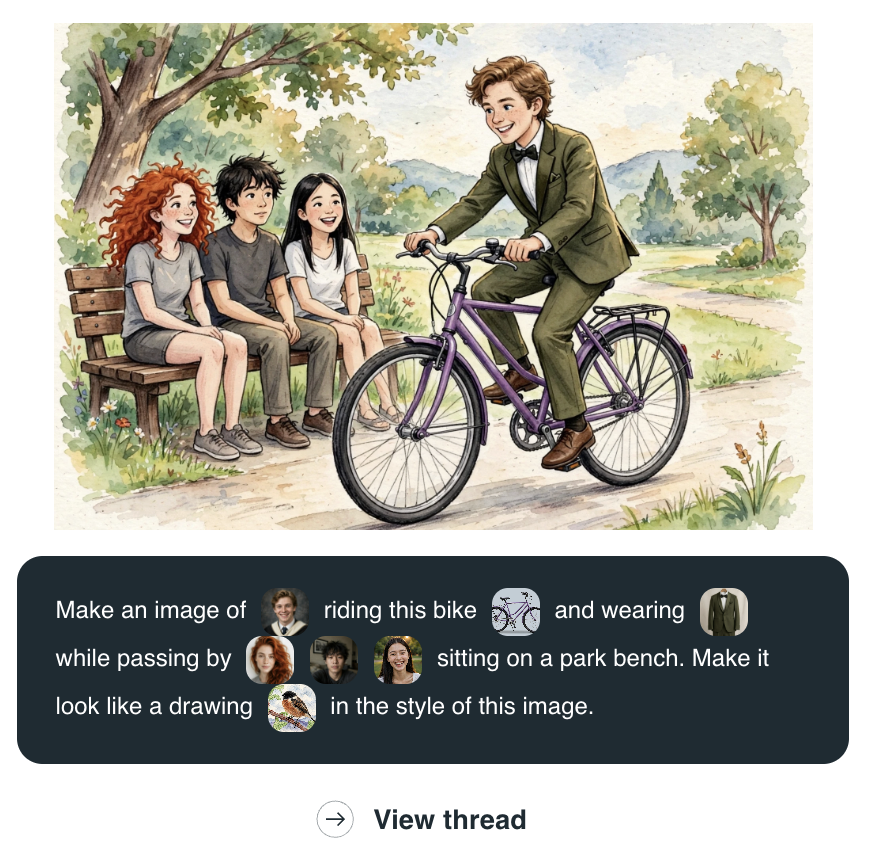
A natural prompt might look like this:
Create a picture of this person in this outfit, sitting in this location, and keep the style close to this reference image.
This kind of mixed image-and-text prompting is important because real creative work rarely starts from text alone. Designers, founders, creators, and brand teams often think with references. They bring mood boards, screenshots, product photos, campaign examples, and style samples into the process.
Muse Image also supports direct image editing. Instead of restarting from scratch, a user can mark a part of the image, describe the change, and continue refining the same visual direction.
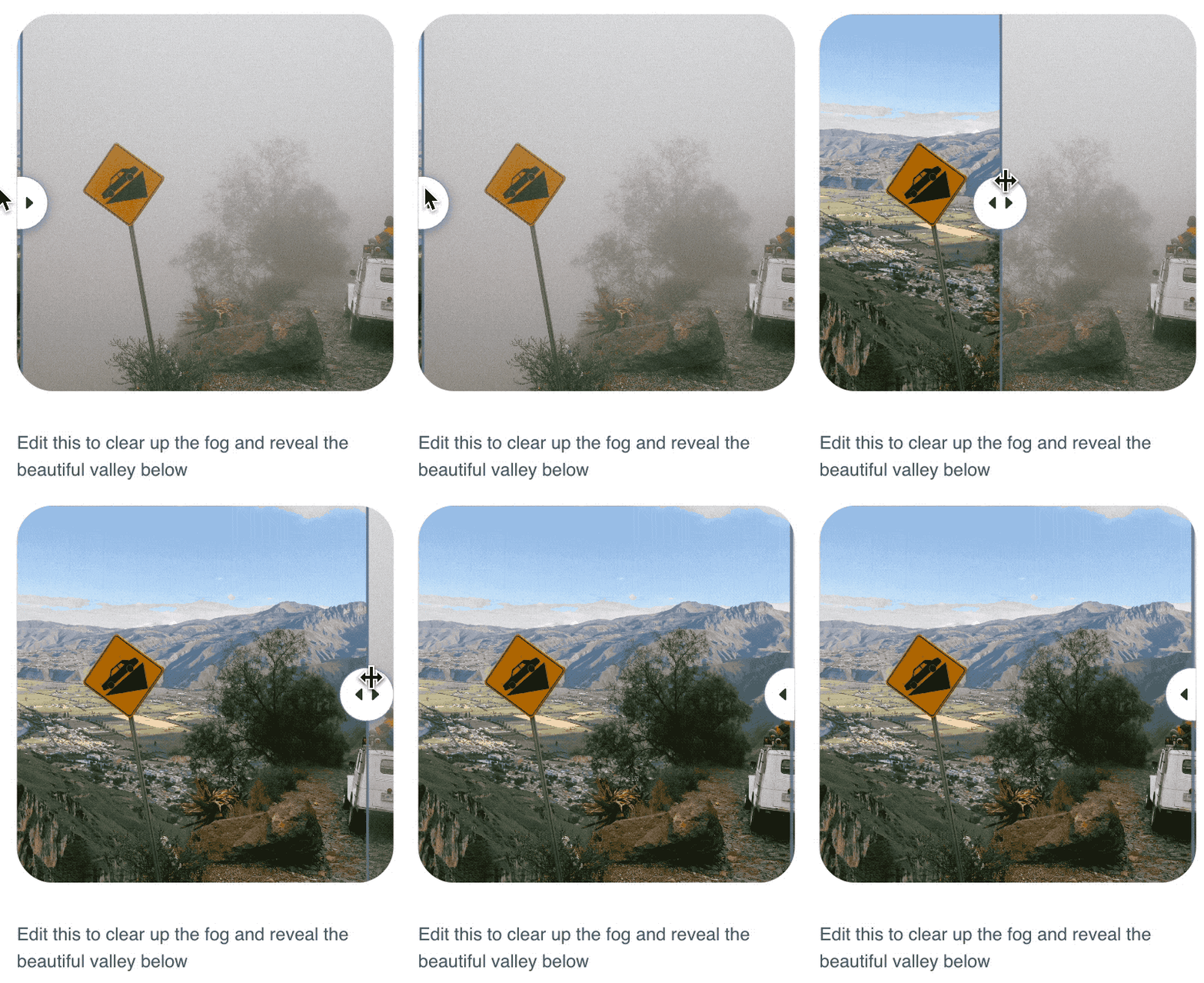
For social content, ecommerce images, visual ads, and lightweight brand assets, this editing loop may be more useful than pure text-to-image generation. The output needs to match a purpose, not just look impressive.
Native Social Context and Instagram Integration
One of the most discussed Muse Image features is its connection to Meta’s social graph. Meta calls this direction Native Social Context.
In practice, Muse Image can use public Instagram context when users mention accounts inside prompts. That means a user may be able to generate images that reference public posts or profile content, depending on platform settings and availability.
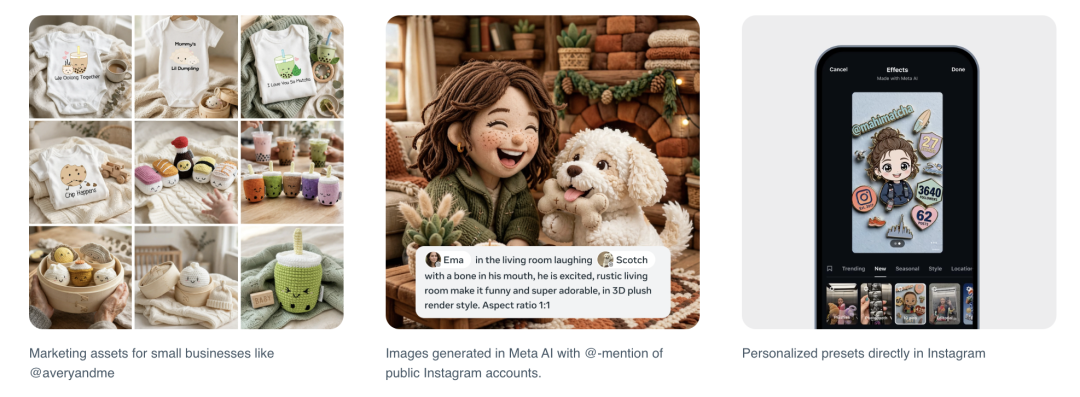
This is powerful, but it also raises privacy questions. Meta says users have controls that allow them to manage whether their Instagram content can be reused for AI creation. For public accounts, this is an important setting to review, especially for creators, influencers, founders, and anyone whose public photos are part of their personal brand.
Meta also says Muse Image outputs include Content Seal, an invisible watermarking system intended to help identify AI-generated images. According to Meta, the signal is designed to survive common transformations such as cropping, compression, resizing, and screenshots. Meta is also previewing a detection tool for checking whether an image carries that watermark.
Muse Video Preview
Muse Video is not fully released yet, so the available information is more limited. Meta describes it as a video generation model built on the same pretraining base as Muse Image, with strengths in visual fidelity, prompt following, temporal consistency, and native audio support.
The source article also notes that Meta is still working on difficult areas such as audio-video synchronization and physically accurate fast motion. That is a realistic limitation. Video generation is harder than image generation because the model must keep objects, identity, lighting, movement, sound, and timing coherent across frames.
Still, Muse Video entering the leading group of text-to-video rankings suggests Meta wants to compete directly with other top video models, not just add basic short-video effects to its apps.
Team Behind the Release
The source article highlights that Meta’s MSL visual model team includes several high-profile researchers with backgrounds across OpenAI, Google, Stanford, UIUC, and other major AI research environments.
Shengjia Zhao is publicly reported as Chief Scientist of Meta Superintelligence Labs. Reuters and TechCrunch reported in 2025 that Zhao, a former OpenAI researcher, joined Meta to help lead scientific direction for the new AI unit.

The source article also names Jiahui Yu as a key multimodal leader associated with Muse Image and Muse Video. Yu has a long research record in computer vision, image generation, image editing, and multimodal systems.
The broader takeaway is simple: Meta is not only adding a product feature. It is building a media generation stack around a newly concentrated AI research and product team.
What This Means for Creators, Brands, and AI Product Teams
Muse Image shows where consumer AI media tools are heading. The next generation of image tools will not only generate pretty pictures from short prompts. They will behave more like creative assistants that can:
- Understand mixed text and image inputs.
- Search for fresh visual context.
- Use code for precise visual elements.
- Revise their own drafts.
- Preserve context across editing turns.
- Connect with platform-native social data.
- Add provenance signals to generated outputs.
For creators, this means faster asset production. For small businesses, it may reduce the effort needed to create social visuals, product mockups, event invitations, and marketing images. For AI product teams, the most important lesson is that generation quality increasingly depends on the full workflow around the model, not only the model checkpoint itself.
FAQ
What is Meta Muse Image?
Muse Image is Meta’s image generation model from Meta Superintelligence Labs. It is designed for text-to-image generation, image editing, multi-reference composition, and social-context creation inside Meta AI and related Meta products.
What makes Muse Image “agentic”?
Meta describes Muse Image as agentic because it can plan before generating, use tools such as search and code, and refine its own outputs. This makes it closer to a creative workflow assistant than a simple one-shot image generator.
What is Muse Video?
Muse Video is Meta’s previewed video generation model. Meta says it is built on the same broad media-generation direction as Muse Image and focuses on prompt adherence, visual fidelity, temporal consistency, and native audio support.
Can Muse Image use Instagram photos?
Meta says Muse Image can use Instagram social context when users mention public accounts, depending on platform availability and settings. Public account holders should review Instagram controls for AI reuse if they do not want their public content to be used in this way.
What is Content Seal?
Content Seal is Meta’s invisible watermarking system for AI-generated images. Meta says images created by Muse Image in Meta AI and on meta.ai carry a hidden provenance signal that can remain after common edits such as cropping or compression.
Is Muse Image available to everyone?
Meta says Muse Image is available through the Meta AI app and meta.ai, with additional availability across Instagram Stories in the U.S., WhatsApp in limited countries, and future Facebook surfaces. Rollout may vary by region and product surface.
Why does Muse Image use search and code?
Search helps ground image generation in current or factual context, such as landmarks, brands, or real-world references. Code helps create accurate charts, formulas, QR codes, and other structured visual elements that normal image models often struggle to render reliably.
Related Tools
- Meta AI: Meta’s AI assistant where Muse Image is being rolled out for image creation and editing.
- Muse Image and Muse Video: Meta’s official technical announcement for the Muse media generation models.
- Instagram: The Meta platform where Muse Image social-context features and AI effects are being integrated.
- WhatsApp: A Meta messaging product where Muse Image-powered image generation is being introduced in limited countries.
- Content Seal Detection: Meta’s previewed tool for checking whether an image contains a Content Seal watermark.
Related Links
- Meta AI Official Blog: Introducing Muse Image and Muse Video: The main official announcement for Muse Image and Muse Video.
- Meta Newsroom: Introducing Muse Image: Product-level explanation of how Muse Image works inside Meta AI and Meta apps.
- Meta AI: The official web entry point for trying Meta AI features where available.
- Instagram Help: AI Reuse Controls: Meta’s help page for managing how Instagram content may be reused for AI creation.
- Instagram AI Effects Announcement: Official Instagram update about AI-powered effects in Stories.
- Reuters: Meta Expands Generative AI Tools: News coverage of Meta’s Muse Image rollout.
- The Verge: Muse Image and Instagram Mentions: Coverage of Muse Image’s Instagram account mention feature and social context.
Summary
Meta’s Muse Image release is notable because it reframes image generation as an agentic workflow. The model can use tools, refine its own outputs, work with multiple references, and connect with Meta’s broader social ecosystem.
Muse Video is still in preview, but it signals that Meta is moving from static image generation toward a broader multimodal media stack. The combination of Muse Spark, Muse Image, and Muse Video points to a future where AI-generated content is planned, checked, edited, and distributed across product surfaces.
For creators, marketers, and AI builders, the key lesson is clear: better media generation is becoming less about a single prompt and more about the system around the model.
Muse Image is not just another AI image generator; it is Meta’s attempt to make visual creation behave like an agent-driven workflow.