Manus Returns to Independent Operations After Meta Deal Unwinds: Who Must Back Up Data Before August 23
General-purpose AI agent platform Manus is returning to independent operation after its acquisition by Meta was ordered unwound. On August 11, Manus published “A Note to Our Users,” saying it would once again operate as an independent company and continue serving millions of users around the world. For most users, the transition requires no action. For a subset of affected accounts, however, the separation has an important data consequence: certain data created on or after Meta acquired Manus on
Manus Returns to Independent Operations After Meta Deal Unwinds: Who Must Back Up Data Before August 23
Introduction
General-purpose AI agent platform Manus is returning to independent operation after its acquisition by Meta was ordered unwound.
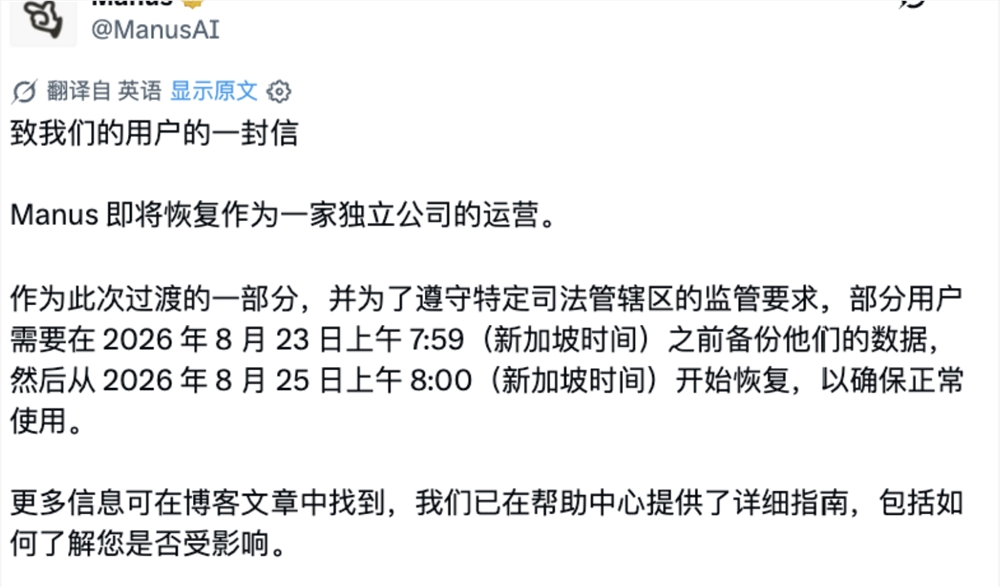
On August 11, Manus published “A Note to Our Users,” saying it would once again operate as an independent company and continue serving millions of users around the world.
For most users, the transition requires no action.
For a subset of affected accounts, however, the separation has an important data consequence: certain data created on or after Meta acquired Manus on December 29, 2025 must be deleted as part of the transition and to comply with regulatory requirements in specific jurisdictions.
Affected users have until:
August 23, 2026
7:59 a.m. Singapore Time (SGT)
to create a backup.
The deletion period begins one minute later and runs through August 24. The restoration portal opens at:
August 25, 2026
8:00 a.m. Singapore Time (SGT)
Manus emphasizes that this is not a data breach or security incident. It is a service-transition measure related to the separation from Meta.
The practical advice is simple:
If Manus tells you that your account is affected, create the required backup before the deadline and verify that the files were actually saved.
Manus Is Returning to Independent Operation
The August 11 notice marks the end of an unusually short chapter in Manus’s corporate history.
Manus announced on December 29, 2025 that it was joining Meta.
At the time, Manus CEO Xiao Hong said the deal would give the company a stronger and more sustainable foundation while allowing Manus to continue iterating on its general-purpose AI agent and serving existing users.
Meta did not publicly disclose the transaction price in the acquisition announcement.
Reuters and other outlets reported that the deal valued Manus at more than $2 billion, with Reuters initially citing a range of roughly $2 billion to $3 billion.
That distinction matters for accuracy:
Meta officially announced the acquisition
+
media reported a $2B+ valuation
rather than:
Meta officially announced a precise $2B purchase price
Manus remained based in Singapore, while Meta planned to use the company’s agent technology across its AI products.
That arrangement did not last.
China Ordered the Acquisition to Be Unwound
On April 27, 2026, China’s Foreign Investment Security Review Working Mechanism Office, operating through the National Development and Reform Commission, issued a formal decision on the foreign acquisition of Manus.
The official notice was short and direct.
The regulator said it had made a prohibition decision under applicable laws and regulations and required the parties to withdraw the acquisition transaction.
Contemporary Reuters reporting described the Meta transaction as worth more than $2 billion and said Beijing had ordered the completed acquisition to be unwound.
Over the following months, Meta and Manus began separating:
- Corporate operations.
- Data.
- Business systems.
- Ownership and financial arrangements.
By August, Manus was ready to tell users that it would resume operating independently.
The Separation Is Now Reaching User Accounts
Corporate restructuring is usually invisible to ordinary software users.
This one is not.
Manus says that to complete the separation and comply with regulatory requirements in certain jurisdictions, some data associated with affected users must be permanently deleted.
The key date is the date of Meta’s acquisition:
December 29, 2025
Manus’s detailed Help Center clarifies that this date means:
December 29, 2025 at 12:00 a.m. Pacific Time
Other transition times are stated in Singapore Time unless otherwise noted.
Key Timeline
| Date and Time | What Happens |
|---|---|
| December 29, 2025 | Meta acquisition date |
| August 11, 2026 | Manus publishes the transition notice |
| August 11–August 23, 7:59 a.m. SGT | Backup period for affected users |
| August 23, 8:00 a.m. SGT | Deletion period begins |
| August 23–24 | Affected users may temporarily lose access |
| August 25, 8:00 a.m. SGT | Restoration portal opens |
For users in other regions, Manus also provides the backup deadline as:
August 22, 7:59 p.m. EDT
August 23, 1:59 a.m. CEST
August 23, 7:59 a.m. SGT
Users should follow the official in-app notice for their own account.
Not Every Manus User Is Affected
This is one of the most important points in the announcement.
Manus is not deleting data for every user.
The company says affected users will receive:
- An in-app notification.
- An email, where Manus has an email address for the account.
Users who signed up only through Apple ID or Facebook should pay particular attention to in-app notifications because Manus may not have their email address.
If an account is unaffected, Manus says:
- The account remains available.
- Subscription status is unaffected.
- Task data remains available.
- Connectors remain available.
- No backup or restoration action is required.
Unaffected users will receive an in-app notice confirming that they do not need to do anything.
Three Account Categories Explain the Impact
Manus’s Help Center uses Type A, Type B, and Type C to explain how different affected personal accounts are handled.
These labels are transition categories, not normal Manus subscription tiers.
Type A and Type B
These accounts were created before the acquisition date, and the account email and user information were not changed on or after that date.
The difference between A and B mainly concerns subscription timing.
For these accounts, the account itself can be retained, but affected task data created or updated after the acquisition date and enabled connector data may be deleted during the transition.
These users generally need to back up their Task Data.
Type C
A Type C account was created on or after the acquisition date, or had identifying account information such as its email changed on or after that date.
For affected Type C accounts, Manus says the transition can require deletion of:
- Account data.
- Task data.
- Subscription information.
- Associated data.
Type C users therefore need two backups:
- Account Data Backup
- Task Data Backup
The Account Data Backup must be preserved because it is needed to restore the deleted account before task data can be restored.
What Data May Be Deleted?
Depending on the account category and the notice received, affected data can include:
- Account information.
- Subscription records.
- Task history.
- Manus-generated files and artifacts.
- Generated websites.
- Generated slide presentations.
- Third-party connector authorizations.
- Team-account data in affected cases.
The exact scope varies by account type.
Do not assume that another user’s notice describes your own account.
Manus recommends using the in-app status and Help Center classification to determine the actual impact.
This Is Not a Security Breach
The timing of a large user-data deletion can understandably sound like an emergency security response.
Manus explicitly says it is not.
The company’s official FAQ states that the deletion is caused by:
the transition back to independent operations
+
regulatory requirements in specific parts of the world
It is not the result of:
- A hack.
- A data leak.
- A security incident.
That distinction is important both for affected users and for anyone reporting on the change.
The risk for users is not that an attacker has stolen their Manus history.
The risk is that data covered by the transition will be intentionally deleted if the user does not preserve the required backup.
What Affected Users Should Do Before August 23
Manus has created a dedicated Data Backup Tool.
The official Help Center recommends using the web or desktop version of Manus for the backup process.
Step 1: Check Whether Your Account Is Affected
Open Manus and review the in-app notification.
Also check the email address associated with the account.
If you have:
- Multiple Manus accounts.
- A personal account and a team account.
- Several team workspaces.
check each one separately.
The status of one account does not automatically determine the status of another.
Step 2: Fix Facebook-Only Login Before Backing Up
Manus says users who currently log in only with Facebook need to add another login method or email address in Account Settings before creating the backup.
Facebook login will not be available after the service change for these affected accounts.
Do this before the backup deadline.
Step 3: Open the Official Data Backup Tool
Log in to Manus and open the Data Backup Tool from the Manus website or Help Center.
Do not rely on third-party export tools for restoration.
The official encrypted backup format is what Manus uses to reconstruct task and account data after the transition.
Step 4: Type C Users Must Back Up Account Data First
If Manus identifies your account as Type C, generate the:
Account Data Backup
before the task-data archive.
Manus says this file is small—no more than about 10 MB—and can be delivered as an email attachment.
It is required to restore a deleted Type C account.
Without the Account Data Backup, a Type C user cannot restore the account and therefore cannot restore its task data.
Type A and B users do not normally need this account-information archive because the underlying account remains intact.
Step 5: Create the Task Data Backup
All affected users should preserve the required task data.
The Task Data Backup can include:
- Tasks.
- Generated files.
- Websites.
- Slides.
- Configuration data.
- Other Manus-generated artifacts.
The file can be much larger than the Account Data Backup.
Manus says Task Data backups may range from tens of megabytes to tens of gigabytes depending on usage.
A single backup package is capped at:
4 GB
Larger exports are split into multiple packages.
Step 6: Prefer Google Drive or OneDrive for Large Backups
Manus recommends exporting large Task Data Backups directly to:
- Google Drive.
- Microsoft OneDrive.
The connection uses OAuth authorization.
Local download remains possible, but cloud storage can make large transfers more stable.
Whichever option you choose, verify that the archive actually exists after the export finishes.
A successful-looking export screen is not enough.
Step 7: Do Not Rename or Modify the Backup Files
Manus warns users not to:
- Rename the encrypted archives.
- Modify them.
- Move them unnecessarily in ways that may corrupt or confuse the restore process.
Keep the original files intact.
If a backup is lost or damaged during the backup window, create another one before the deadline.
Once the backup period ends, Manus says a new backup can no longer be generated for the deleted data.
Step 8: Back Up Again If You Keep Using Manus
The backup is a snapshot.
It does not automatically synchronize tasks created afterward.
If you create or update important tasks after the first backup, run the backup process again before:
August 23, 2026
7:59 a.m. SGT
Manus supports multiple backups.
For active users, making a final backup close to the deadline can help preserve recent work.
Team Accounts Need Extra Attention
Team data follows stricter ownership rules.
Only the team owner can create a restorable team backup.
Ordinary team members cannot independently restore the team workspace.
If you are an affected team member:
- Contact the team owner.
- Confirm that the team owner checked the team’s status.
- Confirm that the required team backup was completed.
- Separately check your own personal Manus account.
A readable plaintext export by a team member is not equivalent to a Manus restoration backup.
If a team owner also has a personal account, Manus says the personal account and the team account may require separate backup procedures.
What Happens During the Deletion Window?
At:
August 23, 2026
8:00 a.m. SGT
Manus will begin deleting the specified data for affected accounts.
The deletion period continues until just before the restoration window opens on August 25.
Affected regions and users may be unable to access Manus during this period.
Unaffected users can continue using Manus normally.
Depending on the account classification, the deleted information may include task data only or the entire account and its associated data.
Subscriptions, Credits, and Refunds
The transition also affects billing for some users.
Manus says affected users will not be charged during the backup period.
The detailed Help Center describes several possible outcomes depending on account type, including:
- Cancellation of subscriptions started after the acquisition date.
- Pro-rata refunds.
- Temporary free membership through the deletion period.
- Add-on credits.
- Refunds of remaining balances and assets.
- Welcome-back rewards after restoration.
Manus says refunds that apply under the transition are processed automatically.
Users should follow the account-specific email and in-app message because compensation differs by account category and team status.
How to Restore Manus Data on August 25
Restoration begins at:
August 25, 2026
8:00 a.m. SGT
The restoration portal will be available from the Manus website.
Type A and B Restoration
For Type A and B accounts:
- Log in to the existing Manus account.
- Open the Task Data Restoration Tool.
- Import the most recent Task Data Backup.
- Confirm that the backup belongs to the logged-in account.
- Complete the restoration.
Manus checks whether the account information in the backup matches the active account.
If the identities do not match, restoration stops.
Type C Restoration
Type C users must restore in a specific order:
- Open the account-restoration website.
- Upload the Account Data Backup.
- Restore the Manus account.
- Log in to the restored account.
- Open the Task Data Restoration Tool.
- Upload the most recent Task Data Backup.
- Complete task restoration.
The account step comes first.
Skipping it prevents the task archive from being restored.
Restoration Can Only Be Completed Once
This is an important limitation.
Manus says data restoration can be completed only once.
Multiple backup packages can be uploaded during that restoration. Manus will deduplicate and consolidate them.
Before confirming restoration:
- Check that you selected the correct archives.
- Include the latest packages.
- Make sure all split backup files are available.
- Confirm that the files belong to the correct account.
There is no need to rush the restoration immediately at 8:00 a.m. if your backups are safely stored.
Manus says there is no fixed deadline for restoration once the portal opens.
The backup deadline is the urgent part.
What Happens to Deployed Manus Websites?
Manus-generated websites tied to affected data may become unavailable during the deletion period.
The official restoration guide says affected deployed websites can remain offline until the user actively restores the relevant Task Data Backup.
After restoration, the deployed sites should return automatically.
This matters for users who rely on Manus not only for private task history but for public-facing generated artifacts.
Third-Party Connectors Must Be Re-Enabled
Restoration can restore connector information, but Manus says users may need to manually switch connectors back on afterward.
That is a reasonable safety measure.
A restored authorization should not necessarily become active without the user confirming the connection again.
After restoration, review every important integration before assuming scheduled or agentic workflows are back to normal.
Where Will Manus Store User Data After Independence?
Manus’s official FAQ says that once the company returns to independent operation:
user data is stored in the United States and Singapore
The company directs users to its Trust Center for more information about data handling.
The AIBase article describes Singapore as the company’s headquarters, consistent with Manus being a Singapore-based company throughout the Meta transaction period.
For users handling sensitive business data, the separation is a good moment to review:
- Manus’s Trust Center.
- Privacy Policy.
- Connector permissions.
- Team access.
- Data-retention settings.
- Internal compliance requirements.
What Unaffected Users Need to Do
Nothing.
That is Manus’s official answer.
If the account is unaffected:
- Do not create a transition backup just because another user received a warning.
- Do not delete data manually.
- Do not recreate the account.
- Do not disconnect integrations unless you have another reason to do so.
An unaffected user should be able to keep using Manus throughout the August 23–24 transition window.
Manus Says New Agent Features Are Already in Development
The AIBase article ends by noting that Manus is not framing the separation as a retreat.
Its August 11 letter says the company is already preparing a series of new features intended to push the boundaries of general AI agents again.
The official announcement does not yet name those features.
That means claims about the next product release, new models, or specific post-Meta capabilities would be speculative.
What is confirmed is that Manus plans to continue:
- Operating independently.
- Serving its global user base.
- Iterating on the product.
- Developing new general-agent capabilities.
The next chapter begins with a fairly unglamorous but important task: safely separating user data and infrastructure from the Meta period.
Transition Checklist for Affected Manus Users
Open Manus and confirm whether the account is affected.
Check both email and in-app notifications.
Check every personal and team account separately.
If Facebook is your only login method, add another login method or email.
Type C users: create and preserve the Account Data Backup first.
Create the Task Data Backup for required tasks and artifacts.
Prefer Google Drive or OneDrive for very large exports.
Verify every backup file exists after export.
Do not rename or modify the encrypted backup archives.
If you create new tasks later, run another backup before the deadline.
Team members: confirm the team owner backed up the workspace.
Finish all backups before 7:59 a.m. SGT on August 23.
Starting August 25 at 8:00 a.m. SGT, restore using the official portal.
Type C users: restore the account before restoring task data.
Review connectors and re-enable them after restoration where required.
FAQ
Why is Manus becoming independent again?
China’s foreign-investment security review authority issued a prohibition decision on April 27, 2026 and required the parties to withdraw the foreign acquisition of Manus. Manus now says it is separating from Meta and returning to independent operation.
Did Meta buy Manus for exactly $2 billion?
Meta and Manus did not disclose a precise purchase price in their official December 2025 announcements. Reuters and other media reported the deal at more than $2 billion, with early reporting estimating a valuation of roughly $2 billion to $3 billion.
Does every Manus user need to back up data before August 23?
No. Manus says only affected accounts need to take action. Check the official in-app notification and email for each account; unaffected users can continue using Manus normally.
What is the exact Manus backup deadline?
Affected users must complete backups before 7:59 a.m. Singapore Time on August 23, 2026. Manus also lists the equivalent deadline as 7:59 p.m. EDT on August 22 and 1:59 a.m. CEST on August 23.
What happens if an affected user does not back up?
Deleted task data and Manus-generated artifacts cannot be recovered unless the user has the required backup files. Type C users also need the Account Data Backup to restore a deleted account.
Is the Manus data deletion caused by a hack?
No. Manus explicitly says the transition is not the result of a data breach or security incident. The deletion is part of its separation from Meta and compliance with regulatory requirements in specific jurisdictions.
When can affected users restore their data?
The restoration portal opens at 8:00 a.m. Singapore Time on August 25, 2026. Manus says there is no fixed restoration deadline after the portal opens, but users must preserve the original backup files.
Where will Manus store data after it becomes independent?
Manus says its data is stored in the United States and Singapore. Users who need more detail about data handling should review the company’s Trust Center and privacy documentation.
相关工具
- Manus: The official general-purpose AI agent platform and entry point for affected account notices.
- Manus Data Backup & Restoration: The official transition portal for backup and restoration workflows.
- Manus Help Center: Official account-specific guidance for the Meta separation and data transition.
- Manus Trust Center: Security, privacy, compliance, and data-handling information for Manus users.
- Google Drive: One of the cloud-storage destinations Manus recommends for large Task Data Backups.
- Microsoft OneDrive: Another official backup destination recommended by Manus for large archives.
Related Links
- Manus: A Note to Our Users: Manus’s official August 11 announcement of its return to independent operation and the data transition.
- Service Change Overview: Official timeline, account classifications, deletion scope, refunds, and team-account rules.
- How to Back Up Your Manus Data: Official step-by-step backup guide for Account Data and Task Data.
- How to Restore Your Manus Data: Official restoration instructions beginning August 25.
- Manus Joins Meta: Manus’s December 29, 2025 acquisition announcement.
- NDRC Foreign Investment Security Review Decision: China’s April 27, 2026 decision prohibiting the foreign acquisition and requiring the transaction to be withdrawn.
- Reuters: Manus Returns to Independent Operations: Independent reporting on the separation and user-data transition.
Summary
Manus is returning to independent operation after the Meta acquisition announced in December 2025 was ordered unwound by China’s foreign-investment security review authority.
The immediate issue for users is data continuity. Affected accounts must create the required backups before 7:59 a.m. SGT on August 23, 2026. The specified data will then be deleted during August 23–24, and the restoration portal opens at 8:00 a.m. SGT on August 25.
Not every user is affected. Manus will identify affected accounts by email and in-app notification, while unaffected users can continue using the service without taking action. The transition is also not a security breach: Manus says it is required by the separation from Meta and regulatory obligations in specific jurisdictions.
If Manus marks your account as affected, the critical action is to create and verify the correct backup before August 23; restoration can wait, but a missed backup cannot be recreated after the deletion window begins.