How to Cut Claude Code Token Costs: Anthropic’s Practical Guide to Efficient Sessions
Anthropic has published a practical guide for developers who want to get more value from every Claude Code session. The central message is simple: the same coding task can cost ver

How to Cut Claude Code Token Costs: Anthropic's Practical Guide to Efficient Sessions
Introduction
Anthropic has published a practical guide for developers who want to get more value from every Claude Code session.
The central message is simple: the same coding task can cost very different amounts depending on how you manage the session.
Claude Code is not like a traditional editor with a flat cost per task. Every model request has an inference cost, and long conversations repeatedly carry forward files, tool results, command output, system instructions, and earlier messages. If that context is poorly managed, a simple bug fix can end up consuming far more tokens than necessary.

The source article distilled the advice into six practical habits:
- Run
/clearwhen one task is finished and you are moving to another. - Choose the model and reasoning effort at the beginning of the session instead of switching repeatedly in the middle.
- Use
@to reference files directly rather than making Claude search for them. - Add quiet flags to commands that otherwise produce large amounts of output.
- Run
/compactbefore a long break while the existing prompt cache is still warm. - Send large, noisy investigative work to a subagent so its intermediate context does not accumulate in the main conversation.
Anthropic's own TL;DR also recommends running /context in a fresh session to see what is already loaded, including CLAUDE.md and MCP tool definitions.
These suggestions make more sense once you understand what happens to a token inside a Claude Code session.
The Life Cycle of a Token
Claude Code can be used through paid Claude plans or through metered API usage. For individual users, Claude Pro is currently $20 per month when billed monthly, while Claude Max starts at $100 per month and also offers a higher-usage tier. API usage is billed separately according to the model and token volume.
Anthropic's Claude Code cost documentation says that across enterprise deployments, average usage is around $13 per developer per active day** and roughly **$150–250 per developer per month, although actual costs vary substantially with the model, codebase, workflow, and level of automation.
The same task can cost several times more if Claude has to search through unnecessary files, run verbose commands, or repeatedly carry irrelevant context forward.
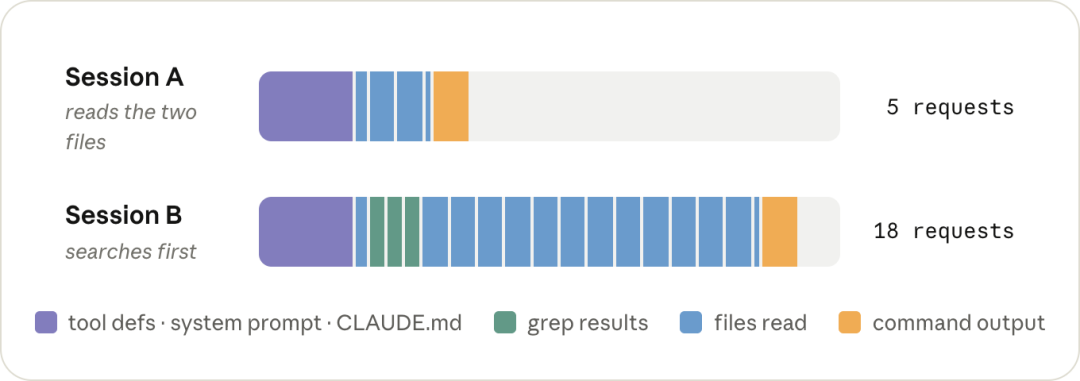
To understand why, it helps to separate
each request into two phases.
Prefill: Reading the Input
During prefill, the model reads the request and its context in one pass.
That input can include:
- Tool definitions
- The system prompt
CLAUDE.md- Your current message
- Earlier conversation history
- Files Claude has read
- Command and tool output already added to the session
All of these count as input tokens.
Decode: Producing the Output
During decode, the model generates its response token by token.
That includes reasoning tokens, tool calls, and the text you eventually see. Unlike prefill, decoding is sequential: a 200-token response requires the model to generate 200 tokens one after another.
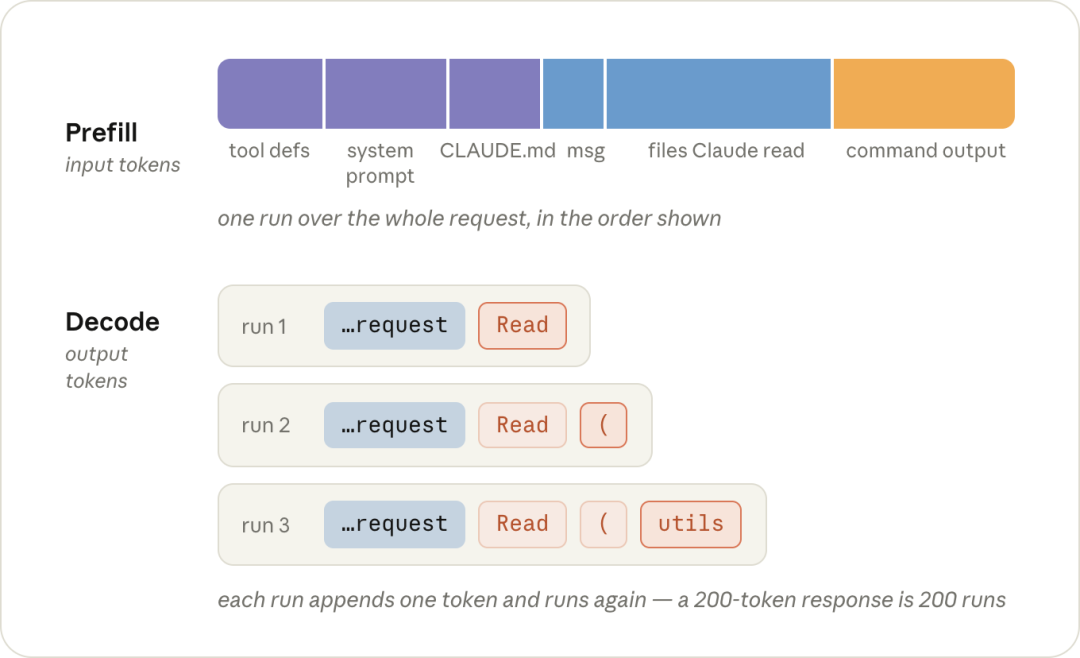
This is why output tokens are typically much more expensive than input tokens. For the current Claude models discussed here, output pricing is five times the base input price.
The current standard API prices are:
| Model | Input | Output |
|---|---|---|
| Claude Opus 5 | $5 / MTok | $25 / MTok |
| Claude Sonnet 5 | $2 / MTok | $10 / MTok |
| Claude Haiku 4.5 | $1 / MTok | $5 / MTok |
MTok means one million tokens.
The other major variable is effort level. Much of the output generated in an agentic coding session can be reasoning. Higher effort allows the model to spend more tokens thinking through a difficult problem, while lower effort can be more appropriate for routine work.
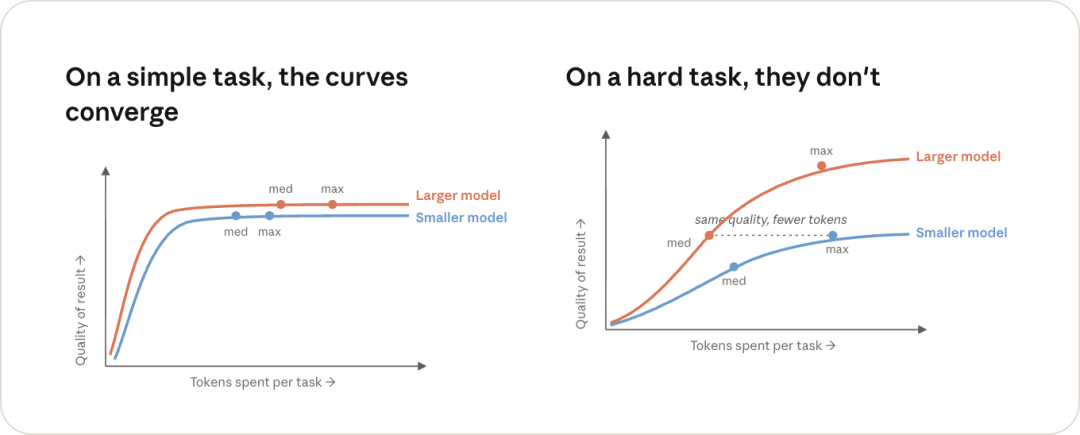
The practical rule is straightforward: use a stronger model and higher effort when the problem is genuinely difficult or ambiguous, not automatically for every small task.
Prompt Caching Is the Biggest Cost Lever
Prompt caching is one of the most important parts of Claude Code's cost model.
Every Claude Code request begins with a large amount of repeated material: tool definitions, the system prompt, CLAUDE.md, and the conversation history accumulated so far.
If the beginning of a new request matches a recent request exactly, the server can reuse the previously computed state instead of processing the entire shared prefix again.
A cache read costs only 0.1× the normal input-token price.
Cache writes are more expensive than normal input because the server has to store the computed state. A standard five-minute cache write costs 1.25× base input price, while a one-hour cache write costs 2×. The important point is that the write happens once, while subsequent cache hits can repeatedly reuse the prefix at one-tenth of the normal input cost.
Imagine that a conversation already contains 50,000 tokens of history. Without a cache hit, the model would have to prefill that entire history at the normal input rate on the next request. With a valid cache, the shared prefix is read at 0.1× the base rate and only the newly
Appended material has to be processed at full input price.
Across a long agent loop, that difference can become substantial.
What Breaks the Cache?
The cache has to match continuously from the start of the request. If something changes near the front of that prefix—or changes part of the cache key—the remaining history can no longer be reused in the same way.
The source article highlights six common cases.
- Changing the model with
/model - Each model has a separate cache. Switching from one model to another means the next turn has to prefill the existing conversation again for the new model.
- Changing reasoning effort with
/effort - Effort level is part of the cache key. Changing it in the middle of a session can force the conversation to be processed again.
- Turning Fast mode on
- Fast mode also changes the cache key. Anthropic recommends enabling it at the beginning if you plan to use it. Turning Fast mode off again does not incur the same cache penalty.
- Running
/compact - Compaction rewrites the conversation into a shorter summary. The old conversation no longer matches, so the previous conversation cache cannot simply continue.
- Letting the cache expire
- In Claude Code subscriptions, Anthropic says the prompt cache expires after one hour of inactivity. With an API key, the default TTL is five minutes unless the one-hour cache is explicitly enabled.
- Resuming an old session
- An old session will usually no longer have a live cache, and the system prompt is rebuilt when Claude Code launches. The next request therefore often requires a fresh prefill.
This does not mean you should never change models, effort, or compact a conversation. It means there are cheaper times to do it: at the beginning of a session or just after /clear, rather than halfway through a long, expensive context.
There is also a less obvious case in opusplan mode. Anthropic notes that entering or leaving plan mode can switch models, so each transition can invalidate the relevant model cache.
Why /compact Is Cheaper Before a Break
/compact summarizes the current conversation into a much shorter version.
Because producing that summary requires reading the existing context, it is cheaper to compact while the conversation is still available through the prompt cache. If you wait until after a long break and the cache has expired, Claude may need to read the full conversation at normal input cost before it can summarize it.
That is why Anthropic recommends compacting before you step away from the keyboard for an extended period.
Your Session Is Quietly Getting Bigger
Prompt caching makes repeated context cheaper, but it does not stop the context itself from growing.
Every time Claude reads a file, the file content is added to the conversation. Every time it runs a command, the output can be added as well. From that point onward, later turns continue carrying that material.
Turn 40 is not just the latest request. It is also carrying much of what happened in turns 1 through 39.
That is why long sessions can accumulate costs much faster than developers expect. Even when old history is
Cached, repeatedly carrying irrelevant context is not free, and it also consumes space in the context window.
Claude Code does have a guardrail for extremely large Bash output. Anthropic’s current documentation says that when command output exceeds 30,000 characters, Claude Code writes the output to a file and keeps only a short preview and path in the conversation.
The awkward case is output that is noisy but still below that threshold.
A test suite that prints hundreds of successful test lines may remain under 30,000 characters. If so, those lines can stay in the conversation and continue to be sent on later turns.
Anthropic therefore recommends actively keeping the working context lean.
1. Reference Files With @
If you know which file Claude needs, reference it directly.
Instead of asking Claude to locate a file by name, use an @ mention so the file is attached to the message from the beginning.

Compare these prompts conceptually:
The tests are failing.
Claude may have to search the repository, inspect multiple files, and collect several tool results before it reaches the actual problem.
A more specific request removes some of that exploration:
Fix the failing test in utils.test.ts.
And an @ reference can avoid the separate Read call:
Fix the failing test in @utils.test.ts.
The file still occupies context either way. The saving comes from avoiding unnecessary search and Read turns.
Also avoid attaching the same file repeatedly in one conversation. Once a file has entered the context, mentioning it again can add another copy.
2. Add Quiet Flags to Noisy Commands
Repeated command output can quietly dominate a session.
For commands you run constantly, put a concise version in CLAUDE.md so Claude knows the lower-noise invocation from the start.
For example:
run a single test file with npx vitest run <file> --reporter=dot
A dot reporter may return only a compact result instead of hundreds of lines of detailed output.
This is a small configuration change, but over many turns it can save a large amount of repeated context.
3. Isolate High-Output Work in a Subagent
A subagent gets its own context window.
It has its own system prompt, tools, and CLAUDE.md, but it does not inherit the full main conversation. It can inspect logs, run commands, search history, or read a large file and then return only the answer to the parent session.
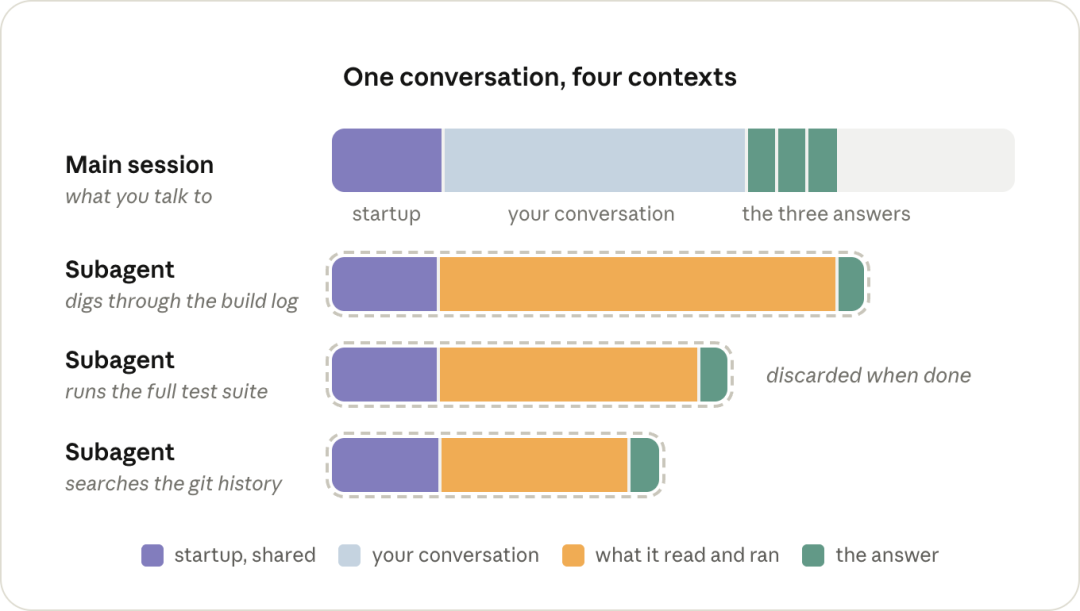
This is useful for tasks such as:
"Go through this build log and tell me what is wrong."
"Search this large file and report the relevant section."
“Run the full test suite and return the important failures.”
“Inspect the Git history and summarize the change that introduced this behavior.”
The intermediate file reads and command output disappear when the subagent finishes. Only its returned answer enters the main session.
There is a tradeoff: because the subagent does not inherit the parent conversation, it may need to reread material that the main session already knows. For small jobs, that overhead can make a subagent less efficient. It pays off when the isolated task is noisy enough that you do not want its process to remain in the main context.
4. Use /clear When the Task Changes
This is one of the simplest and most valuable habits.
Once you finish a bug fix and begin a different task, run:
/clear
The previous task’s file reads, command output, failed approaches, and temporary context no longer need to follow every subsequent turn.
Anthropic’s own comparison shows that keeping three separate tasks in one continuous session can send substantially more tokens than clearing between tasks.
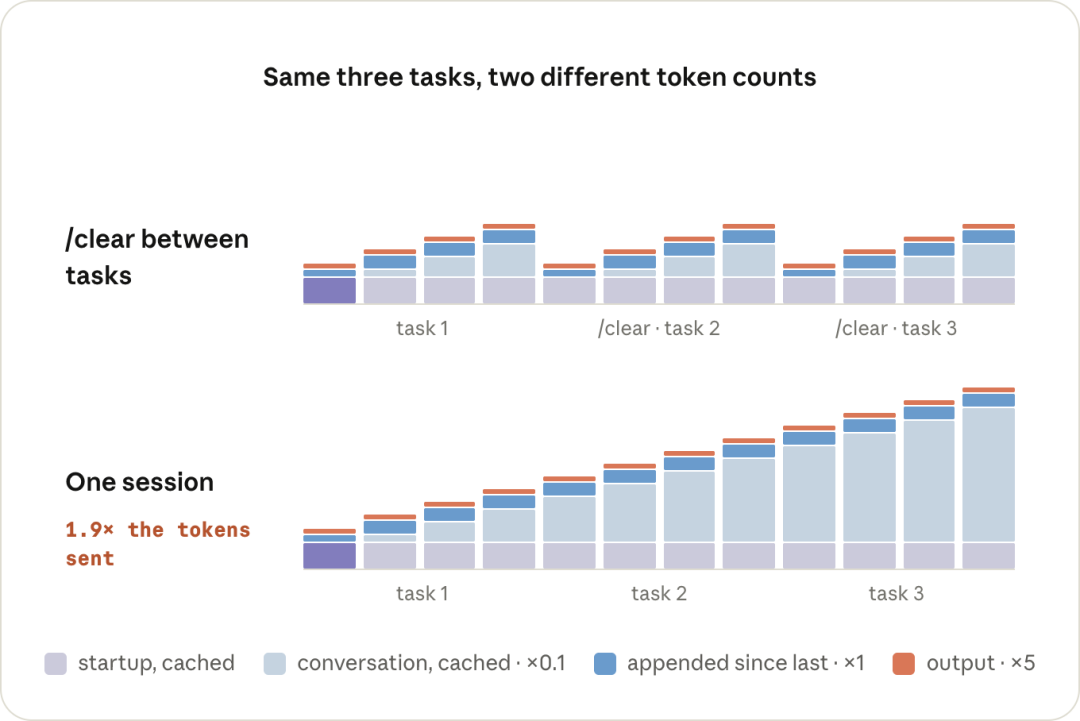
If you need to preserve the old session for later, Anthropic recommends using /rename before /clear.
If you are still working on the same task and only need to compress the older part of the conversation, /compact is the better tool.
Use /rewind When Only the Last Few Turns Went Wrong
There is another useful option that is easy to overlook:
/rewind
If the session only went off track during the last few turns, rewinding can remove those turns without rewriting the entire earlier conversation.
That matters for caching. Anthropic says the portion before the rewind point can remain cached, whereas /compact rewrites the conversation and therefore has its own cost.
So the three commands serve different purposes:
| Command | Best Use |
|---|---|
/clear |
You are starting a genuinely new task |
/compact |
You are continuing the same task but need a shorter context |
/rewind |
Only the latest turns are wrong or no longer useful |
Managing Tokens Is Becoming a Developer Skill
Once these mechanics are clear, a broader pattern emerges.
Efficient AI-assisted coding now requires a new kind of operational judgment. Developers need to know not only how to write and debug code, but also:
- Which model is appropriate for the task
- How much reasoning effort is justified
- What belongs in the active context
- When a session should be cleared or compacted
- Which jobs should move to subagents
- Which commands produce unnecessary output
- What changes will invalidate a prompt cache
A year ago, these decisions barely existed in day-to-day software development. Now they can determine whether two developers pay very different amounts to complete essentially the same work.
Anthropic itself illustrates how important this is at scale.
The company reported in 2026 that more than 80% of the code merged into Anthropic’s codebase was authored by Claude, and that the typical engineer
was merging around 8× as much code per day as in 2024. In a separate internal optimization benchmark, a Claude-based system progressed from roughly 3× speedups in 2025 to around 52× by April 2026.
At that level of AI use, inference efficiency is not a small accounting detail.
The deeper lesson from Anthropic’s guide is therefore not merely “spend fewer tokens.” It is to understand where the tokens are going and make sure they are spent on useful reasoning, code changes, and tool work rather than stale history and avoidable output.
FAQ
Why does Claude Code become more expensive during long sessions?
Each new turn carries forward the relevant conversation history, including messages, files, tool calls, and command output. Prompt caching makes repeated prefixes much cheaper, but the growing context still consumes tokens and context-window capacity.
How much can Claude prompt caching save?
A prompt-cache hit is billed at 0.1× the normal base input-token price, which is a 90% reduction for that cached input portion. Cache writes cost more than normal input, but repeated cache reads can quickly offset that initial write cost.
Should I use /clear or /compact in Claude Code?
Use /clear when you are moving to a different task and no longer need the current context. Use /compact when you are staying on the same task but want Claude to summarize older conversation history into a smaller working context.
What does /rewind do in Claude Code?
/rewind lets you jump back to an earlier message and remove the turns after it from the active context. It is useful when only the latest part of a conversation went in the wrong direction and you do not need to compact or clear the whole session.
Does changing the Claude model increase token cost?
It can. Each model uses a separate prompt cache, so switching models in the middle of a long conversation can force the existing history to be processed again at full input price for the new model.
Why should I use @ when referencing a file?
An @ file reference attaches the file directly to the message, which can save Claude from searching for the file or making an additional Read call. The file content still consumes context, so the benefit is avoiding unnecessary discovery steps rather than making the file itself free.
When should I use a Claude Code subagent?
Use a subagent for work that produces a lot of intermediate output you do not need in the main conversation, such as inspecting logs or running a broad search. The subagent works in a separate context and sends only its final answer back to the main session.
How can I check what is already consuming context?
Run /context in a fresh Claude Code session. Anthropic recommends using it to inspect startup context such as CLAUDE.md and MCP tool definitions so you can remove instructions or integrations you do not need.
Related Tools
- Claude Code: Anthropic’s agentic coding tool for working with codebases from the terminal, IDE, web, and other supported environments.
- Claude: Anthropic’s main assistant interface and account entry point.
point for Claude plans that include Claude Code.
- Claude Agent SDK: The SDK exposes the same agent loop, tools, and context-management foundations used by Claude Code.
- Vitest: A JavaScript testing framework used in Anthropic's example of reducing noisy test output with
--reporter=dot.
Related Links
- Maximizing the Value of Your Claude Code Sessions: Anthropic's official August 2026 guide that forms the technical basis of this article.
- Claude Code Cost Management: Official documentation for tracking usage, controlling spend, and reducing token consumption.
- Claude API Pricing: Current model, prompt-cache, fast-mode, and API pricing.
- Prompt Caching Documentation: Official explanation of cache TTLs, write multipliers, cache reads, and implementation behavior.
- Claude Code Session Management: Anthropic's guide to choosing between continuing, rewinding, compacting, and clearing a session.
- Choosing a Claude Model and Effort Level: Guidance on matching model capability and reasoning effort to task difficulty.
- Prompt Caching Is Everything: Anthropic's engineering lessons on preserving prompt-cache efficiency in agentic workflows.
- When AI Builds Itself: Anthropic's report on internal AI-authored code, engineering output, and model-driven optimization experiments.
Summary
Claude Code costs are shaped by more than the model price. Context length, reasoning effort, command output, session length, cache hits, file discovery, and subagent use can all change how many tokens a task consumes.
The highest-value habits are simple: clear context when the task changes, avoid unnecessary mid-session model or effort switches, keep noisy output short, reference known files directly, compact before a long break, and isolate high-output work when a subagent is more appropriate.
These practices do not aim to minimize token usage at all costs. They aim to make sure the tokens you pay for are contributing to the task rather than repeatedly carrying irrelevant history.
Efficient Claude Code use is increasingly a form of context engineering: keep the context relevant, preserve the cache when it helps, and spend reasoning where it actually improves the result.