How Claude Design Grew From a Side Project Into a Million-User Visual Workbench
Claude Design began as a practical response to an uncomfortable change inside Anthropic.
How Claude Design Grew From a Side Project Into a Million-User Visual Workbench
Introduction
Claude Design began as a practical response to an uncomfortable change inside Anthropic.
In the fall of 2025, product designer Nate Parrott was the only designer working with two engineers on the Claude Code extension for Visual Studio Code. Their goal was to bring Claude Code’s terminal-based capabilities into a graphical interface that ordinary users could understand more easily.
The team shipped its beta at the end of September. Then Claude Opus 4.5 arrived in November, and the engineers around Parrott began delivering work much faster than before.
His own design process had not accelerated at the same rate.
Rather than waiting for the workflow to rebalance, Parrott built a small tool in his spare time to help himself keep up. That side project eventually became Claude Design, an Anthropic Labs product used by more than one million people during its first week after launch.
The story is not simply about an AI design product becoming popular. It shows how AI can speed up one part of a team before the others, creating new bottlenecks—and how the people affected by that imbalance can use the same technology to redesign their own work.
Engineering Accelerated Before Design
The original team was small: two engineers and one product designer.
Before the release of Opus 4.5, their working pace was reasonably aligned. Engineering and design could move through a feature together without one function consistently outrunning the other.
After the new model arrived, that balance changed.
The engineers could use Claude Code to implement, test, revise, and ship more work. Parrott continued designing at roughly his previous pace, which made design the slower stage in the pipeline.
This illustrates a wider effect of AI adoption.
AI does not improve every role by the same amount or at the same time. A company may see software implementation accelerate while product strategy, design review, legal approval, content, testing, or customer support remains unchanged.
The result is not always immediate job replacement. More often, the first effect is a mismatch between connected workflows.
When engineering speeds up, the rest of the organization must answer new questions:
- Can design explore enough directions before implementation begins?
- Can product managers make decisions quickly enough?
- Can reviewers evaluate a larger volume of changes?
- Can brand standards keep up with faster production?
- Can teams align before developers commit to building?
Parrott’s response was to create a tool for the part of the process that had become the bottleneck.
The First Attempt: Asking AI to “Do the Design”
Claude Code was primarily text-based, so Parrott initially treated design as another text task.
He copied terminal output into Claude, added interface screenshots, described the feature, and asked the model to design it.
The results were disappointing.
The problem was not that Claude lacked all visual or coding ability. The request gave the model no strong medium in which to express, test, and revise a visual idea.
A design description in chat is still only a description. It cannot be clicked, resized, animated, or experienced as a working flow.
Parrott continued experimenting for roughly a month as a side project. The turning point came when he stopped asking Claude to produce “a design” in the abstract and instead asked it to create HTML.
HTML Became the Visual Canvas
HTML is usually treated as a format for websites, but Parrott recognized that it can serve as a broad visual and interactive medium.
A web page can contain:
- Layouts and typography.
- Motion and animation.
- Interactive controls.
- Clickable prototypes.
- Charts and diagrams.
- Slide-like sequences.
- Video and audio.
- Forms and product flows.
- Responsive versions of the same idea.
That made HTML a useful bridge between conversation and visual work.
Parrott created a split-view interface:
- A conversation with Claude on the left.
- A live HTML preview on the right.
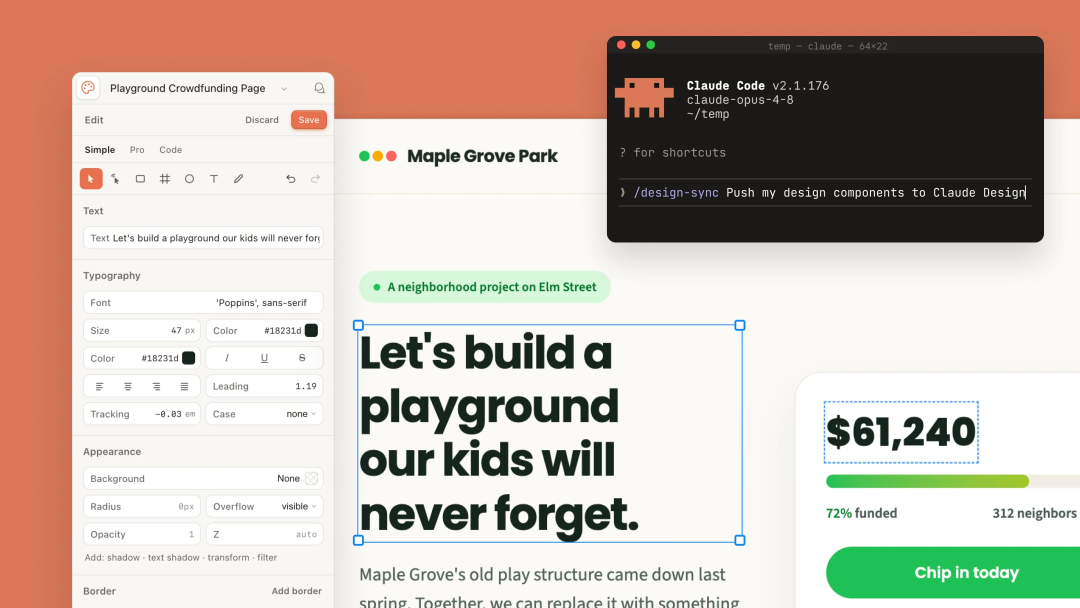
When the user described a change, Claude updated the underlying page and the result appeared on the canvas.
This was more useful than generating a static image because the output could behave like a product. A button could work, a transition could run, and a prototype could contain multiple states without every screen being drawn and linked manually.
HTML Alone Was Not Enough
A technically functional prototype can still look generic or inconsistent.
Parrott believed that product design depends on understanding the product and brand behind every decision. A model that knows how to create HTML does not automatically know which fonts, colors, components, spacing rules, and visual principles belong to Anthropic.
He therefore distilled Anthropic’s visual system into the tool’s working context.
This included:
- Typography.
- Color choices.
- Existing assets.
- Interface components.
- Layout patterns.
- Design principles.
The change made the generated work feel less like a random AI interface and more like something that belonged inside Anthropic’s product family.
That internal experiment later became a core Claude Design feature.
During onboarding, Claude Design can analyze source material such as a codebase, design references, slide decks, documents, screenshots, logos, color palettes, and typography specifications. It then generates a reusable design system containing elements such as colors, typography, components, and layout patterns.
For Team and Enterprise organizations, the system can be published for the whole team. Administrators can approve a standard system and restrict edits so projects remain aligned with company guidelines.
The Prototype Spread Inside Anthropic
Parrott packaged the HTML workflow and Anthropic brand context into a small internal prototype.
Product designers began using it for interactive prototypes.
In a traditional click-through workflow, a designer may need to draw every state of every screen and connect them manually. With the internal Claude Design prototype, a designer could supply assets, explain the intended behavior, and ask Claude to make the experience work.
Each result had a shareable link.
That changed the role of the prototype. It was no longer only a private file inside a design application. It became something colleagues could open, click, discuss, and revise much like a shared document.
The decisive moment came during an Anthropic Labs offsite.
Parrott saw participants using the tool to create presentation slides for an idea-pitch session—sometimes while the meeting was already in progress and shortly before they were due to present.
The spontaneous adoption convinced the Labs team that the side project addressed a real need. Claude Design received dedicated staff and moved from an informal internal experiment into a product.
Why Anthropic Labs Was a Natural Home
Anthropic Labs was expanded in January 2026 to incubate experimental products built around emerging Claude capabilities.
The team is designed for a different kind of product development:
- Build rough experiments at the edge of what the models can do.
- Let real users try them early.
- Observe which workflows people repeatedly choose.
- Add staff and infrastructure to the experiments that prove useful.
- Scale successful ideas into dependable products.
Anthropic points to Claude Code as an earlier example of this path. It began as a research preview and grew into what Anthropic described as a billion-dollar product within six months.
Claude Design followed a related pattern:
- One person built a side project.
- Internal designers adopted it.
- Colleagues used it for purposes the creator had not originally planned.
- An internal pitch session demonstrated clear demand.
- Labs assigned resources.
- The project launched publicly as a research preview.
- It later moved into beta.
This bottom-up path matters because AI-native products are often difficult to specify in advance. Model capabilities change quickly, and users discover workflows that the original team did not predict.
In this case, the product became broader because people repeatedly used it for visual communication rather than only interface mockups.
From Product Mockups to Visual Communication
Claude Design was initially understood as a product-design tool.
That description became too narrow.
Teams began using it to create:
- Interactive product prototypes.
- Wireframes and mockups.
- Design explorations.
- Pitch decks.
- Presentations.
- Landing pages.
- Printable one-pagers.
- Marketing materials.
- Emails.
- Animations.
- Social media visuals.
- Code-powered visual experiments.
Parrott describes the tool as sitting one level above production product design.
Its primary role is helping people explore and communicate ideas before a team commits to building them.
That distinction creates a clearer division of work:
| Claude Design | Claude Code |
|---|---|
| Early visual exploration | Production software development |
| Prototypes and concept testing | Implementation and repository work |
| Presentations and visual communication | Code changes, testing, and deployment |
| Alignment before building | Building after direction is agreed |
| Editable canvas and visual controls | IDE and terminal-based coding workflow |
The tools can work together, but they are not interchangeable.
Moving Between Claude Design and Claude Code
Anthropic has added a two-way workflow between design and code.
Inside Claude Code, the command:
/design-sync
can pull an existing design system into the workflow so visual work begins with the organization’s current components.
The command:
/design
supports creating, editing, and synchronizing Claude Design projects from the terminal.
A team can begin in either direction.
Starting in Claude Design
- Explore several visual directions.
- Build a realistic interactive prototype.
- Collect feedback and align the team.
- Package the result for handoff.
- Continue implementation in Claude Code.
Starting in Claude Code
- Work from an existing application or component library.
- Sync the design system.
- Turn code into a live visual prototype.
- Refine it in Claude Design.
- Bring the updated direction back into the code workflow.
This is more reliable than handing developers a screenshot and asking them to reconstruct the intended behavior.
The handoff can include the working prototype and relevant design context rather than only a flat image.
Design Systems Became the Key to Daily Use
Claude Design’s early popularity revealed that generation alone was not enough.
Teams needed the tool to remain consistent across projects and to respect established brand systems.
Anthropic rebuilt its design-system import workflow so users can bring in one or several systems from:
- GitHub repositories.
- Codebases and component libraries.
- Design references.
- Slide decks.
- Documents.
- Screenshots.
- Raw brand assets.
Claude builds with those components, checks the output against the system, and can correct inconsistencies before showing the result.
This makes the tool more useful for recurring work.
A one-off AI-generated landing page may look impressive but still be difficult to use inside a real company. A system-aware workflow can begin with the organization’s existing choices rather than inventing a new visual language every time.
Direct Editing Reduces Unnecessary Prompting
The beta version of Claude Design includes direct canvas controls.
Users can:
- Select an element.
- Edit text.
- Drag and reposition items.
- Resize objects.
- Adjust colors.
- Change spacing.
- Align elements.
- Add inline comments.
- Ask Claude to apply a change across the design.
This matters because prompting is not the best interface for every adjustment.
A user should not need to write several sentences to move a title slightly to the left or reduce the width of a card. Small visual corrections are often faster with direct manipulation.
Parrott recommends using Claude for broad exploration and structural changes, then handling the final small adjustments manually.
Direct edits also avoid spending model tokens on changes that are easier to judge by eye.
Exporting and Continuing in Other Tools
Claude Design can export work as:
- PDF.
- PPTX.
- Standalone HTML.
- A project folder.
- An internal shareable link.
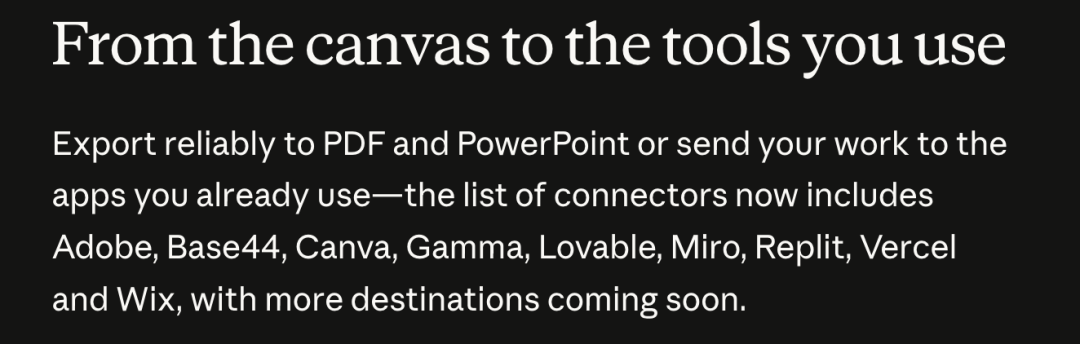
Anthropic also provides connectors that can send work into other creative and development tools.
The official connector list includes Adobe, Base44, Canva, Gamma, Lovable, Miro, Replit, Vercel, and Wix, with additional destinations planned.
The goal is not to replace every specialist tool.
A presentation can begin in Claude Design and continue in Gamma or Canva. A concept can move to Miro for collaboration. A prototype can continue into Replit, Vercel, Lovable, or Wix for further building and deployment.
Claude Design acts as an early visual workspace that helps an idea reach the next appropriate tool with less manual rebuilding.
What Claude Design Is Not Designed to Do
Claude Design has clear limits.
It Is Not an Image-Generation Model
Anthropic says Claude Design does not have a dedicated image model.
It is therefore a poor choice for generating a final logo or creating original image assets from scratch.
Users should bring existing logos, product images, illustrations, photography, and brand assets.
Claude can arrange and use those materials within a larger visual composition.
It Is Not a Production Software Platform
Claude Design can create interactive prototypes and code-powered visual work, but Anthropic recommends using Claude Code for production software.
A prototype may communicate the intended experience without meeting requirements for security, accessibility, testing, maintainability, performance, backend reliability, or production deployment.
It Does Not Remove the Need for Taste
Claude can generate many options quickly.
Someone still has to decide which direction is appropriate, which details feel generic, whether the work communicates the right idea, what should be removed, and whether a prototype is ready to influence production.
The designer’s role moves away from manually producing every variation and toward setting direction, building systems, judging quality, and aligning the team.
Practical Ways to Use Claude Design More Effectively
1. Think Before Prompting
A clear brief usually produces better results than repeatedly correcting an unclear request.
Define the audience, objective, content, desired feeling, constraints, and output format before asking Claude to build.
2. Describe the Visual Direction
Without guidance, an AI system may fall back on familiar aesthetics.
Specify fonts, colors, references, moodboards, and examples of what the work should—or should not—resemble.
3. Build a Reusable Design System
Upload real brand examples, not only abstract specifications.
A completed landing page, presentation, or interface can reveal the visual character of the brand more clearly than a color list alone.
4. Generate Several Directions
Ask for multiple options and compare them.
The purpose of faster generation is not to accept the first answer. It is to explore more possibilities before committing.
5. Use Sketches When Words Are Not Enough
A hand-drawn layout can communicate spatial relationships more efficiently than a long written explanation.
6. Wireframe Before Adding Detail
When the main question concerns structure or flow, begin with low-fidelity wireframes.
This keeps the model focused on hierarchy and interaction instead of decorative styling.
7. Make the Last Mile Manual
Use direct editing for final alignment, spacing, sizing, and small visual adjustments.
8. Give Claude Real Product Context
Connecting an existing codebase, design system, components, and screens helps Claude create work that fits the actual product.
Who Can Use Claude Design?
Claude Design is currently available in beta on:
- Claude Pro.
- Claude Max.
- Claude Team.
- Claude Enterprise.
Access is included with the relevant subscription and uses the account’s Claude usage limits.
For Enterprise organizations, Claude Design is disabled by default. An administrator must enable it in organization settings.
Anthropic says organization-scoped sharing allows a design to remain private, be viewed by colleagues with a link, or be opened for collaborative editing.
Product availability and plan terms can change, so teams should review the current Claude Design page and help documentation before standardizing a workflow around it.
常见问题
What is Claude Design?
Claude Design is an Anthropic Labs product for creating and refining visual work through conversation and direct editing. It can produce prototypes, presentations, landing pages, one-pagers, animations, marketing assets, and other interactive HTML-based artifacts.
Who created Claude Design?
The original internal prototype was built by Anthropic product designer Nate Parrott. He created it as a side project after Claude Code accelerated the engineering team’s delivery pace faster than his existing design workflow.
Did Claude Design really reach one million users?
Anthropic says more than one million people used Claude Design during its first week after launch. The figure was published in Anthropic’s June 2026 product update.
How does Claude Design use HTML?
Claude generates visual work as interactive web content rather than only describing a design or producing a static image. HTML provides a flexible canvas for layouts, controls, animations, prototypes, slides, and other visual experiences.
Can Claude Design use an existing brand system?
Yes. It can analyze codebases, component libraries, slide decks, documents, screenshots, logos, colors, typography, and other assets to generate a reusable design system. Team and Enterprise organizations can publish a shared system for projects.
Can Claude Design create logos?
Anthropic says Claude Design does not include an image-generation model and is not a good fit for logo creation. Existing logos and image assets should be uploaded and used within the design.
What is the difference between Claude Design and Claude Code?
Claude Design is intended for early ideation, prototypes, visual communication, and team alignment. Claude Code is the recommended tool for implementing and maintaining production software.
Which plans include Claude Design?
Claude Design is currently available in beta for Pro, Max, Team, and Enterprise users. Enterprise administrators must enable it before members of the organization can use it.
相关工具
- Claude Design: Anthropic’s visual workspace for prototypes, presentations, landing pages, and branded creative work.
- Claude Code: Anthropic’s coding agent for repository work, implementation, testing, and software development.
- Model Context Protocol: An open protocol used to connect AI applications with external tools, services, and data.
- Canva: A collaborative design platform that can receive editable work from Claude Design.
- Miro: A collaborative visual workspace connected to Claude Design for team refinement and alignment.
- Vercel: A web-development and deployment platform included among Claude Design’s connected destinations.
Related Links
- Nate Parrott’s Claude Design Retrospective: The creator’s first-person account of how the product began and how he uses it.
- Introducing Claude Design: Anthropic’s official launch announcement, feature overview, plan availability, and export options.
- Claude Design’s Million-User Update: Anthropic’s update covering first-week adoption, design systems, Claude Code sync, editing, and connectors.
- Set Up a Claude Design System: Official instructions for importing brand assets and publishing a reusable team design system.
- Introducing Anthropic Labs: Anthropic’s explanation of the experimental product-incubation team behind Claude Design.
- Claude Code in VS Code: Official documentation for the graphical Claude Code interface that Parrott originally helped design.
- Introducing Claude Opus 4.5: The November 2025 model release associated with the engineering acceleration described in Parrott’s story.
Summary
Claude Design began because one designer needed to keep pace with two engineers whose output had accelerated after the release of Claude Opus 4.5.
Nate Parrott’s breakthrough was to stop asking AI to produce design as an abstract answer. He gave Claude an HTML canvas, embedded the company’s brand system, and made the result interactive and shareable.
Internal adoption turned the side project into an Anthropic Labs product. Claude Design later passed one million users in its first week and expanded into a workspace for prototypes, presentations, landing pages, animations, one-pagers, and other visual communication.
The product does not replace production coding, specialist image generation, or human design judgment. Its value is earlier in the process: exploring more directions, making ideas tangible, building alignment, and handing stronger concepts to the tools and people responsible for the final result.
As AI makes implementation faster, the designer’s most valuable work moves upstream—from drawing every screen to choosing the right direction, defining the system, and helping a team agree on what should be built.