Claude for Teachers: A Free AI Workspace for U.S. K-12 Educators
A teacher finishes the school day, leaves the building, and starts driving home. While the teacher is away from the desk, Claude reviews the day’s exit tickets, identifies which students understood the lesson, finds the concepts that still need attention, and prepares an adjusted plan for the next morning.
Claude for Teachers: A Free AI Workspace for U.S. K-12 Educators
Introduction
A teacher finishes the school day, leaves the building, and starts driving home. While the teacher is away from the desk, Claude reviews the day’s exit tickets, identifies which students understood the lesson, finds the concepts that still need attention, and prepares an adjusted plan for the next morning.
The teacher sets up the recurring task once. Claude Cowork can then run it on a schedule.
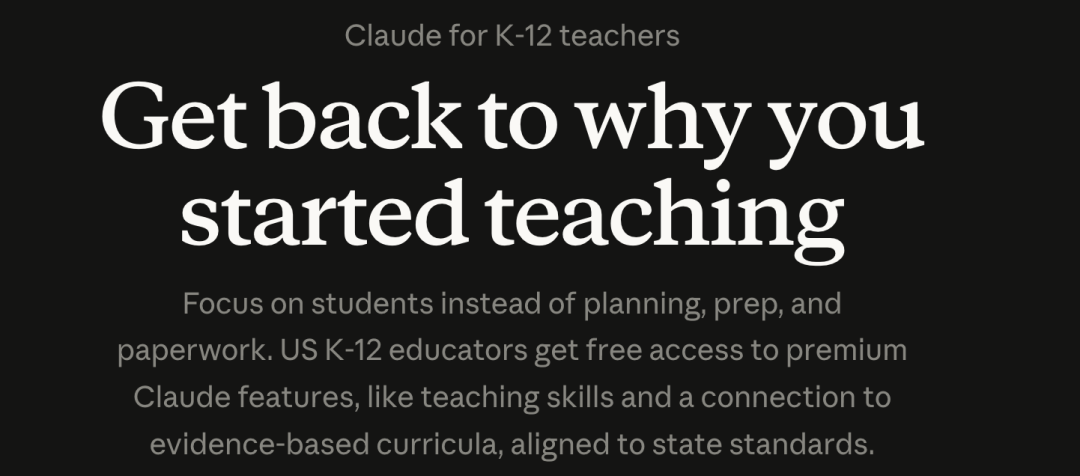
That scenario captures the idea behind Claude for Teachers, a new educator-focused offering introduced by Anthropic on July 14, 2026. Verified U.S. K-12 educators receive free access to premium Claude capabilities, a library of teaching skills, standards-aligned curriculum resources, education connectors, Claude Code, and Claude Cowork.
The product is designed for teachers rather than students. Anthropic’s goal is not to place Claude directly in front of children or replace professional judgment. It is to reduce the repetitive planning, preparation, analysis, and administrative work that takes time away from teaching.
Why Teachers Need More Than a General AI Chatbot
U.S. public-school teachers reported working an average of 49 hours per week in 2025, according to RAND’s State of the American Teacher survey. That was ten hours more than their average contracted workweek.
The extra time is spread across lesson planning, grading, meetings, documentation, family communication, student-data review, and preparation for different learning needs. Much of this work continues during evenings and weekends.
Generative AI can produce a worksheet or lesson outline quickly, but speed alone does not make the output useful. A generic response may:
- Target the wrong grade level
- Skip prerequisite knowledge
- Misalign with a state standard
- Conflict with the school’s selected curriculum
- Miss common student misconceptions
- Provide materials that require extensive teacher revision
- Offer one version of a lesson for a classroom with very different needs
When teachers have to verify and rebuild the generated material, the promised time saving disappears.
Claude for Teachers attempts to address this gap by connecting the model to academic standards, curriculum materials, learning progressions, and educator-specific skills before the teacher receives the output.
Claude Connects to Academic Standards in All 50 States
The central integration is Learning Commons, a nonprofit education infrastructure project that organizes learning standards and curriculum information.
Through the Learning Commons connector, Claude can access:
- Academic standards from all 50 U.S. states
- The smaller competencies beneath each standard
- Prerequisite knowledge
- Typical learning progressions
- Curriculum context
- Resources from providers such as OpenSciEd
- Illustrative Mathematics content, including IM v.360
This changes the lesson-planning process.
Instead of receiving a visually polished but disconnected presentation, a teacher can request a lesson tied to a particular grade, standard, learning objective, and curriculum. Claude can then build the sequence around what students should already know, what they are expected to learn next, and where misunderstandings commonly appear.
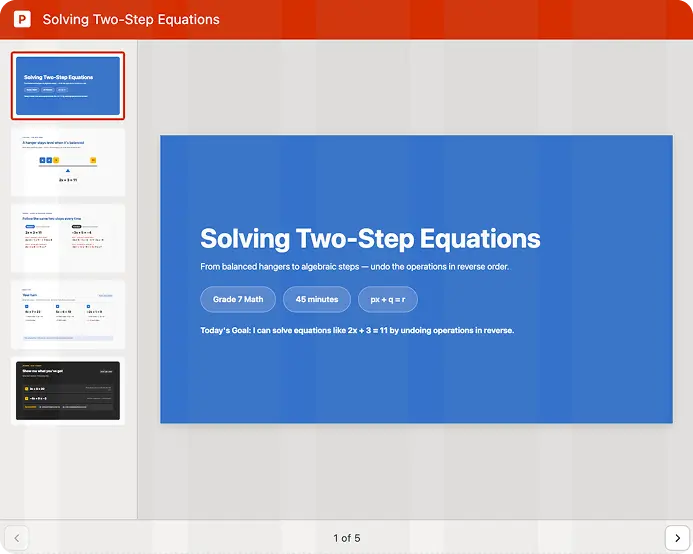
For example, a teacher preparing a lesson on two-step equations can specify the grade level, class duration, state or national standard, prior knowledge, and required student materials. Claude can draft the lesson, worked examples, independent practice, and an exit ticket within the same workflow.
Teachers still review and revise the result. Standards alignment makes that review more focused because the first draft begins with relevant curriculum context rather than a generic internet-style explanation.
Three Core Ways Teachers Can Use Claude
Anthropic highlights three major instructional workflows: lesson alignment, differentiation, and class-data analysis.
1. Plan Standards-Aligned Lessons
A teacher can ask Claude to create or update a lesson based on:
- Grade level
- Subject
- Learning objective
- State standard
- Existing curriculum
- Lesson duration
- Previously mastered skills
- Common misconceptions
- Required student-facing materials
- Assessment method
A detailed request might look like this:
Plan a 45-minute seventh-grade math lesson on solving two-step equations.

My students have already mastered one-step equations. Align the lesson to the relevant California standard and use the learning progression available through Learning Commons.

Include:
1. A five-minute do-now
2. One worked example
3. Guided practice
4. Independent practice
5. An exit ticket
6. Two likely misconceptions and how I should address them

Create a teacher plan and separate student-facing materials.
The teacher remains responsible for checking the lesson against local expectations and deciding what enters the classroom.
2. Differentiate Materials for Different Learners
A single classroom may include students who need additional scaffolding, students working at grade level, advanced students, English-language learners, and students with documented accommodations.
Claude can adapt one core lesson into several versions without changing the central learning goal.
Possible adaptations include:
- Sentence starters
- Vocabulary support
- Worked examples
- Reduced reading complexity
- Additional visual explanations
- Step-by-step scaffolds
- Extension questions
- More demanding applications
- Language-transition support
- Materials for below-, at-, and above-proficiency groups
A teacher can provide relevant classroom context and request differentiated versions:
Adapt the attached science lesson into three versions:

- Below grade level
- At grade level
- Above grade level

Keep the same learning objective and essential content in all three versions.

For the below-grade-level version, add vocabulary support, sentence starters, and one worked example.

For the advanced version, add an evidence-based extension task.

Do not make decisions about individual students. Present the adaptations for my review.
Anthropic’s open-source teacher-skills repository includes a k12-lesson-differentiation skill designed for this type of workflow.
3. Analyze Class Data to Plan Instruction
Teachers can provide approved classroom files such as:
- Rosters
- Diagnostic results
- Attendance records
- Reading levels
- Formative-assessment results
- Teacher notes
- Exit tickets
- Previous lesson materials
Claude can organize the information, identify patterns, and prepare a draft instructional plan.
For example, it may highlight:
- Students who need reteaching
- Standards with low class-wide mastery
- Groups ready for extension work
- Recurring misconceptions
- Gaps between fluency and comprehension
- Suggested small groups for the next lesson
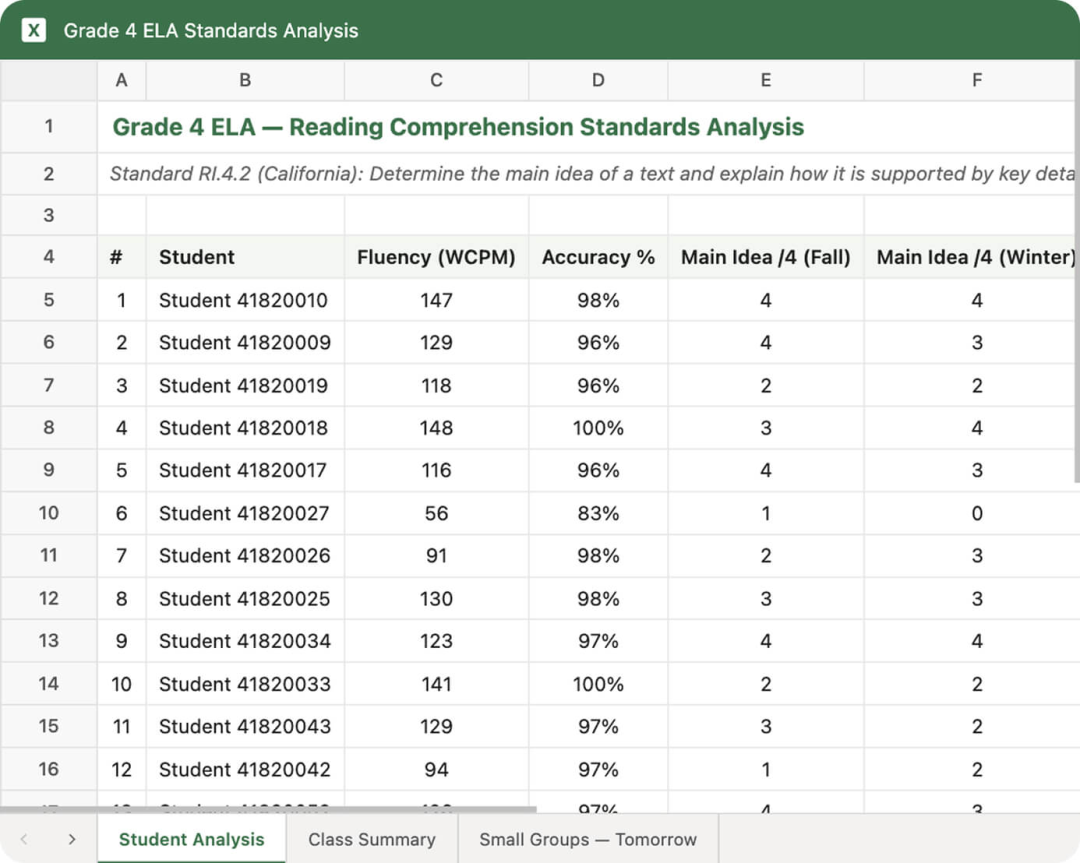
A teacher could use the following prompt:
Analyze the attached fourth-grade ELA assessment data.

Create:
1. A short class-level summary
2. A standards-by-standard performance table
3. Three temporary groups: reteach, on-level, and extension
4. A suggested 20-minute activity for each group
5. A list of missing information that prevents a reliable conclusion

Do not make final placement decisions. Treat the groups as a draft for teacher review.
This is a planning aid, not an automated decision system. Educators should review the source data, local policy, and classroom context before acting on any recommendation.
Claude for Teachers Includes Nine K-12 Connectors
Claude for Teachers can connect with a wider education ecosystem instead of forcing teachers to abandon tools they already know.
| Connector | Main Use |
|---|---|
| ASSISTments | Generate standards-aligned math practice and assessment items that can be automatically scored |
| Brisk Teaching | Create interactive activities and classroom-ready, standards-aligned lessons |
| Canva Education | Turn lesson content into presentations, worksheets, and interactive designs |
| Coteach | Create curriculum-grounded mathematics diagrams |
| Diffit | Adapt instructional materials for different learners |
| Eedi | Create diagnostic questions that reveal student reasoning in English and Spanish |
| MagicSchool | Turn instructional ideas into classroom-ready content |
| Snorkl | Analyze classes, assignments, and student progress |
| TeachFX | Provide instructional feedback based on classroom talk |
The value of these connections is workflow continuity. A teacher may begin with a standards-aligned plan, create differentiated materials, turn them into a presentation, generate diagnostic questions, and review classroom evidence without rebuilding the task in several disconnected systems.
Availability, account requirements, and third-party terms may differ by connector.
Claude Code and Cowork Move Beyond One-Off Chat
Claude for Teachers includes access to Claude Code and Claude Cowork.
These tools matter because teaching work is not always a single question followed by a single answer.
Claude Cowork
Cowork can work with files and carry out longer tasks across a desktop workflow. Teachers can use scheduled tasks for recurring work such as:
- Drafting weekly family newsletters
- Reviewing exit tickets every afternoon
- Organizing lesson folders
- Preparing weekly resource lists
- Summarizing approved classroom data
- Updating a recurring planning document
A scheduled parent-newsletter workflow might be defined as:
Every Friday at 3:00 p.m., review the lesson plans in my approved Planning folder.

Draft a family newsletter that includes:
- What the class learned this week
- What we will study next week
- One activity families can try at home
- Any dates already listed in the lesson files

Prepare a draft only. Do not send the email.
The final instruction is important. Teachers should decide which actions Claude may perform automatically and which must stop for human review.
Claude Code
Claude Code can be useful when educators or instructional technologists want to build small internal tools, process local files, or work with open educational resources.
It does not mean every teacher needs to become a programmer. In this product, the broader significance is that Claude can handle more structured, multi-step work than a basic chat window.
Organizations should still apply security controls, restrict file and system access, and avoid giving an agent unnecessary permissions.
How to Get Started with Claude for Teachers
Claude for Teachers is available to individual educators working in U.S. K-12 schools.
Eligible roles listed by Anthropic include:
- Classroom teachers from kindergarten through grade 12
- Instructional coaches
- Specialists
- Interventionists
- Librarians
- Counselors
- Other certificated school staff
Step 1: Open the Official Teacher Page
Go to the official Claude for K-12 Teachers page and select the verification option.
Step 2: Verify with a School Email
Use a qualifying school email address to verify educator status.
Claude for Teachers is intended for educational use by verified educators. If a school or district already has a separate written agreement with Anthropic, that agreement governs use of the service.
Step 3: Complete the Account Setup
After verification, sign in to the educator account and review the teacher-specific terms, privacy information, and local school or district policies.
Step 4: Connect Approved Resources
Enable Learning Commons and any permitted education connectors needed for the workflow.
Do not connect tools or upload data that your institution has not approved.
Step 5: Start with a Low-Risk Task
Begin with a task that is easy to review, such as:
- Drafting a lesson outline
- Adapting a worksheet
- Creating discussion questions
- Preparing an ungraded formative check
- Drafting a family newsletter
Avoid beginning with high-impact student decisions or unsupervised external actions.
Step 6: Review Before Classroom Use
Check:
- Standards alignment
- Curriculum consistency
- Factual accuracy
- Reading level
- Accessibility
- Cultural and linguistic appropriateness
- Accommodations
- Assessment quality
- Student-data handling
The teacher makes the final decision.
Step 7: Schedule Repeated Work Carefully
After a workflow is reliable, it can be converted into a scheduled Cowork task.
Keep drafts reviewable and avoid automatic sending, grading, placement, disciplinary action, or other high-impact decisions unless the institution has explicitly approved the process.
Anthropic says educators who complete verification by June 30, 2027 can receive a full year of free access. The offer is currently designed for individual educators; a dedicated school and district offering is planned separately.
Student Data, FERPA, and Local Policy
Claude for Teachers includes K-12-specific terms and a Data Processing Addendum written around FERPA requirements.
Anthropic states that:
- Inputs and outputs in Claude for Teachers are not used to train its models
- Educators retain rights to their inputs
- Educators own the outputs
- Student information is handled under the K-12 Data Processing Addendum
- Teacher accounts include education-focused privacy protections
- The user controls what information is shared
- District and state policies determine whether and how educational data may be used
The last point is essential. A product’s privacy terms do not replace local rules.
Before uploading student information, educators should confirm:
- The school or district permits the tool
- The intended data use is allowed
- Only necessary information is included
- Sensitive identifiers are removed where possible
- Connected services are also approved
- Retention and deletion requirements are understood
- Human access and sharing permissions are appropriate
A safer default is to use de-identified or aggregated information whenever the task does not require individual student records.
Claude for Teachers Is Not a Student Product
Claude for Teachers is an educator-only offering.
Anthropic requires users of its consumer service to be at least 18 years old. Most K-12 students therefore cannot create and use their own Claude accounts.
This boundary shapes the product’s role:
- Teachers use Claude to prepare and review materials
- Teachers decide what reaches students
- Claude does not replace teacher-student interaction
- The product is not a direct student tutor account
- Student benefit depends on the educator’s judgment and implementation
Anthropic positions the tool as support for the professional work behind teaching, not as a substitute teacher.
This approach also avoids some of the most contested questions around student-facing generative AI, including cheating, cognitive offloading, early-age use, and the effect of automated answers on foundational learning.
The Debate Over Student-Facing AI Remains Unresolved
Education systems are taking very different approaches to generative AI.
In June 2026, Norway announced that students in grades one through seven, generally aged 6 to 13, should not use generative AI in school as a general rule. Students aged 14 to 16 may use it cautiously under teacher supervision, while older secondary-school students are expected to learn responsible use.
Norway’s approach emphasizes reading, writing, mathematics, handwriting, books, and other foundational skills before broad AI adoption.
Claude for Teachers takes a different but compatible route: give the technology to educators while keeping the teacher between the system and the student.
This reduces some immediate risks, but it leaves a longer-term question unanswered. Students will enter a world where AI is common in higher education and work. Schools still need to decide when students should begin using these tools, what responsible use looks like, and which skills must be developed without AI assistance.
The Goal Is Not to Replace Teachers
Claude can draft, organize, compare, adapt, and analyze. It cannot replace the professional and human parts of teaching.
Teachers make judgments that depend on relationships, local knowledge, observation, trust, and responsibility. They notice changes in behavior, understand family context, respond to emotions, motivate students, manage a classroom, and make decisions that should not be delegated to an automated system.
A practical division of work is:
| Suitable for AI Assistance | Requires Teacher Leadership |
|---|---|
| Drafting a lesson outline | Selecting the final learning objective |
| Creating differentiated versions | Deciding what an individual student needs |
| Summarizing exit-ticket patterns | Interpreting the student’s broader situation |
| Drafting a family newsletter | Handling sensitive family communication |
| Generating practice questions | Assigning grades or high-stakes consequences |
| Organizing approved data | Making placement or disciplinary decisions |
| Preparing resource lists | Building relationships and classroom culture |
The desired outcome is not fewer teachers. It is more teacher time available for students.
Anthropic Is Competing for the Teacher Workflow
Claude for Teachers enters a market that already includes ChatGPT for Teachers and many specialized education-AI platforms.
OpenAI introduced ChatGPT for Teachers in November 2025. It offers verified U.S. K-12 educators a secure workspace with file uploads, search, connectors, image generation, collaboration features, and administrative controls. OpenAI says that offering is free through June 2027 and is also not intended for students.
Claude’s current differentiation includes:
- Direct Learning Commons integration
- Standards and learning progressions across all 50 states
- Open-source lesson-planning and differentiation skills
- A collection of K-12 education connectors
- Claude Code
- Scheduled and file-based Cowork workflows
OpenAI’s offering currently places more emphasis on a shared school or district workspace, collaboration, domain administration, and centralized controls.
The products may evolve quickly. Schools should compare current official terms, privacy controls, connectors, administration features, data-processing agreements, and local support rather than choosing only by model benchmark results.
Trust Is the Real Adoption Barrier
In education, model capability is only the starting point.
A tool may produce excellent lesson materials and still fail to gain adoption if teachers, parents, unions, school leaders, or privacy officers do not trust how it handles data.
Anthropic says Claude for Teachers includes:
- No model training on educator inputs and outputs
- FERPA-aligned terms
- A K-12 Data Processing Addendum
- Teacher control over shared information
- Privacy work informed by the American Federation of Teachers’ developing Gold Standard
- An AI fluency course co-created with Teach For America
- A train-the-trainer module co-created with the American Federation of Teachers
Anthropic has also released its lesson-planning and differentiation skills in a public GitHub repository under the Apache 2.0 license, together with evaluation materials.
Transparency does not remove every risk. Schools still need governance, staff training, procurement review, incident procedures, and clear rules about appropriate use.
Open-Source Teaching Skills
Anthropic’s k12-teacher-skills repository contains two core skills:
k12-lesson-planningk12-lesson-differentiation
The repository also includes evaluation materials and a plugin structure that can be used outside Claude for Teachers.
Educators using Claude for Teachers do not need to install these skills manually. They are already included.
Developers or institutions working in another supported Claude environment can inspect the source, adapt the materials, and review how the skills are evaluated.
The repository’s openness is useful because lesson-planning behavior can be examined rather than treated as a completely hidden prompt.
Frequently Asked Questions
What is Claude for Teachers?
Claude for Teachers is a free educator-focused version of Claude for verified individual U.S. K-12 educators. It includes premium Claude features, teaching skills, Learning Commons, education connectors, Claude Code, and Cowork.
Who is eligible for Claude for Teachers?
Anthropic lists classroom teachers, instructional coaches, specialists, interventionists, librarians, counselors, and other certificated staff working in U.S. K-12 schools. Verification uses a qualifying school email.
How long is Claude for Teachers free?
Anthropic says verified educators who sign up by June 30, 2027 receive a full year of access. Future availability, eligibility, and pricing may change, so educators should check the current official page.
Can students use Claude for Teachers?
No. It is an educator-only offering, and Anthropic’s first-party Claude services require users to be at least 18. Teachers review and decide which Claude-assisted materials are used with students.
Does Claude train on teacher or student data?
Anthropic states that inputs and outputs in Claude for Teachers are not used for model training. Student data use must still comply with the school’s, district’s, and state’s policies.
Can Claude automatically grade student work?
Some connected tools can generate or score practice items, but Claude for Teachers is not presented as an autonomous high-stakes grading system. Teachers should review assessments and retain control over grades, placement, discipline, and other consequential decisions.
What is Learning Commons?
Learning Commons is an education infrastructure project that connects standards, competencies, learning progressions, and curriculum context. Its Claude connector provides academic standards from all 50 states and supports standards-aligned lesson planning.
Does Claude for Teachers replace ChatGPT for Teachers?
No. They are separate products from different companies, with different workflows, connectors, eligibility terms, and administration models. Schools should evaluate both using current privacy, governance, curriculum, and implementation requirements.
Related Tools
- Claude for Teachers: Anthropic’s official workspace for verified U.S. K-12 educators.
- Learning Commons: Connects academic standards, competencies, learning progressions, and curriculum resources.
- ASSISTments: Provides standards-aligned mathematics practice and assessment workflows.
- Canva for Education: Helps educators create presentations, worksheets, and classroom visuals.
- MagicSchool: Provides AI-assisted tools designed for educator workflows.
- TeachFX: Analyzes classroom talk and provides instructional feedback for educators.
Related Links
- Anthropic’s Claude for Teachers Announcement: The official launch announcement, feature overview, connector list, privacy summary, and eligibility information.
- Claude for K-12 Teachers: The official product page with verification access, examples, prompts, and teaching workflows.
- Claude for Teachers Data and Terms: Official guidance on eligibility, model training, FERPA-aligned terms, and student information.
- K-12 Teacher Skills GitHub Repository: Open-source lesson-planning and differentiation skills with evaluation materials.
- RAND Teacher Well-Being Report: The 2025 report documenting average teacher hours, well-being, pay, and retention intentions.
- Norway’s School AI Restrictions: Reuters coverage of Norway’s age-based restrictions on generative AI use in schools.
- OpenAI’s ChatGPT for Teachers Announcement: Official information about OpenAI’s free U.S. K-12 educator workspace.
Summary
Claude for Teachers gives verified U.S. K-12 educators free access to an AI workspace designed around teacher workflows. Its main advantages are standards-aligned curriculum context, lesson-planning and differentiation skills, nine education connectors, file-based work, and scheduled Cowork tasks.
The product can help teachers draft lessons, adapt materials, analyze approved class data, create assessments, and prepare recurring communications. It remains an educator tool: students do not receive Claude for Teachers accounts, and teachers retain responsibility for every classroom decision.
Privacy terms, FERPA alignment, the Learning Commons connection, and teacher-focused training are central to Anthropic’s strategy. Even so, schools must apply their own district and state policies before using educational data.
Claude for Teachers is most useful when it automates preparation and organization while keeping instructional judgment, student relationships, and high-impact decisions firmly with educators.