Claude Code Experience Declining? The Difference Between Model and Effort Level
Even if the underlying model remains unchanged, Claude Code may sometimes appear less capable. This article explains the distinction between model selection and effort level, illustrating how effort affects file reading, testing, tool invocation, and task completion, as well as when to increase effort or switch models.
Does Claude Code Feel Worse? Understanding Models vs. Effort Levels
Introduction
When Claude Code produces weak results, many developers immediately switch to a larger, more expensive model.
This reaction is understandable, but it often targets the wrong setting.
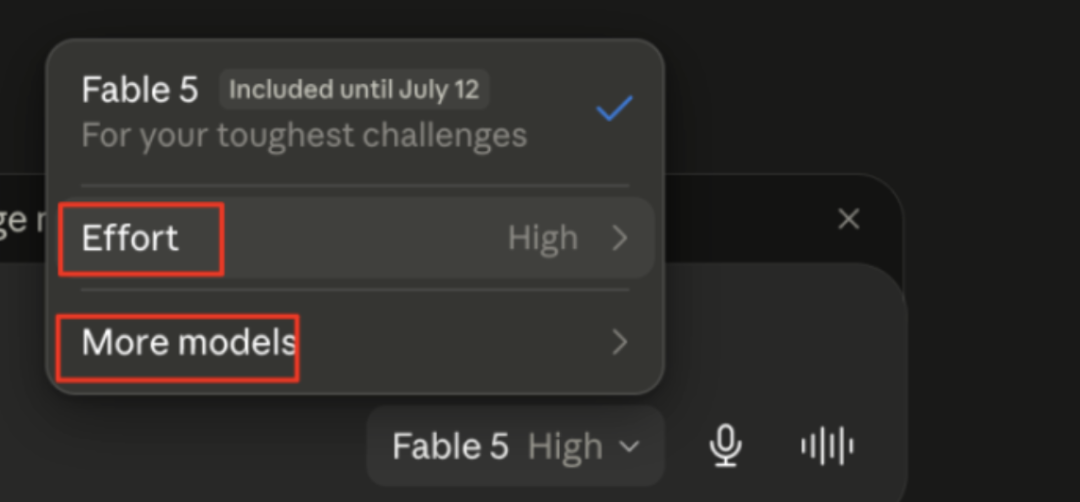
Claude Code offers two controls that can improve output: model and effort level. They're related, but their roles are different. Model selection changes the system's underlying capability, while effort level adjusts how much work Claude is willing to put into the current task.
This distinction explains why Claude can suddenly feel less thorough even when the model itself hasn't changed. It also explains why a smaller model with high effort can sometimes outperform a larger model running at low effort.
Why Claude Code Suddenly Felt "Less Intelligent"
This confusion becomes especially apparent when developers notice Claude Code's behavior changing.
Users report that Claude skips files it should read, avoids running tests, stops in the middle of multi-step work, or turns to the user for more information instead of exploring on its own.
A widely discussed GitHub issue described Claude Code as "unusable for complex engineering tasks." The analysis cited in the original article reviewed thousands of sessions and reported a sharp decline in reasoning or work effort.
![Image showing a GitHub issue interface titled "[MODEL] Claude Code is unusable for complex engineering tasks with the Feb updates #42796," with status "Closed." This image is located in the "Why Claude Code Suddenly Felt 'Less Intelligent'" section of the document and is closely related to the context, where users reflect that Claude Code is unusable in complex engineering tasks. It visually presents user feedback on Claude Code's poor performance in complex tasks, serving as strong evidence for the discussion on behavior changes in Claude Code.](https://we0-cms.oss-cn-beijing.aliyuncs.com/cms-assets/image/2026/07/762ad7a8-aba2-436c-ae0d-f5d686154fb8-81513f1e-5ec0-4646-8530-3a3a7d4055e3.png)
Many users initially thought their prompts, repository instructions, or local configuration were the problem. The original source article pointed out that the more direct cause was a change in the default effort level setting.
To reduce latency, Anthropic temporarily lowered the default effort level for some Claude Code users from high to medium. The model weights didn't get weaker, but Claude was encouraged to spend less time, fewer tokens, and fewer tool calls on each task.
The visible effects are easy to misinterpret:
- Fewer files checked.
- Fewer tests run.
- Multi-step tasks ending prematurely.
- Claude asking users for context more frequently.
- Faster responses, but less investigation.
Anthropic later restored higher default settings for affected users. But by then, this incident had made an important point clear: Even when the model itself hasn't changed, when the effort strategy changes, the model can feel "dumber."
Model Changes the Brain, Effort Changes the Workload
Anthropic's explanation boils down to a practical statement:
Model changes the brain. Effort determines how thoroughly that brain works on the current task.
Model Selection Determines Capability Ceiling
A model is defined by a fixed set of training weights.
Once training is complete, these weights determine the model's general knowledge, learned patterns, reasoning ability, programming experience, and capability range. Prompts, repository files, CLAUDE.md, and in-context documentation can guide the model, but they cannot rewrite these weights.
This means model selection mainly answers this question:
Can this model solve this type of problem?
If a library was released after the model's training data cutoff, you can provide documentation for the model to use in the current session. But this doesn't permanently teach the model about this library. The relevant knowledge exists only within the current context.
The same limitation explains why a model might confidently make up a non-existent API. It's generating the most likely next content based on learned patterns, not querying an internal database that guarantees function validity.
How Text Reaches the Model
Before Claude processes code or text, the input is split into tokens.
For example, this line of code:
const x = await fetch(...)
gets converted into token IDs from the model's vocabulary. The model processes these numerical representations, rather than reading characters like a human would.
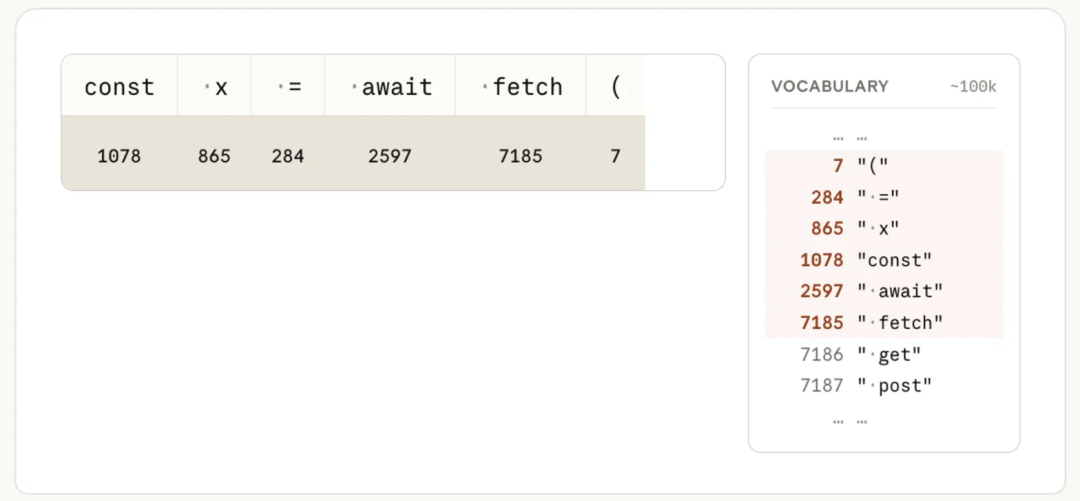
The model then predicts one token at a time. After each token is generated, the sequence is reprocessed to predict the next one.
This iterative generation process is one of the main sources of latency and cost. More capable models can make better predictions, but that doesn't mean the model automatically checks every file, runs every test, or persistently completes every phase of every long task.
And this is precisely where effort comes into play.
Effort Controls More Than Just Thinking Time
Many users interpret higher effort as "letting the model think for a few more seconds."
This understanding is incomplete.
Anthropic's effort parameter affects the model's overall willingness to spend tokens and perform work. It can influence:
- How many files Claude will read
- How many tools it will call
- Whether it will run tests
- How much verification is performed
- Whether it rechecks edits
- How deeply it persists in multi-step tasks
- How quickly it asks the user for more information
- How much extended reasoning is done
At low effort, Claude is optimized for speed and token efficiency. It may only read the most obvious file, make a narrow edit, and quickly return.
At high effort, Claude is more likely to check surrounding code, read configuration, run tests, verify results, and persist until the task is more complete.
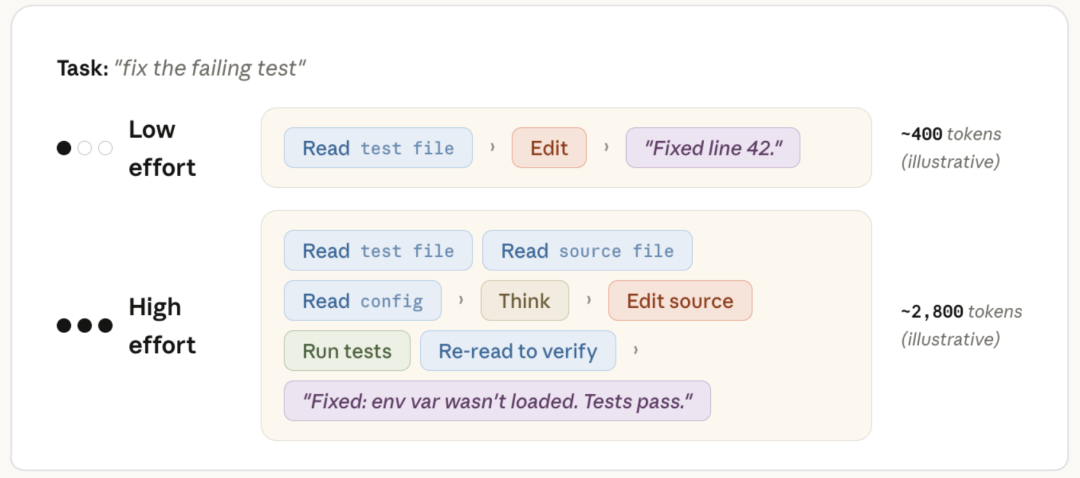
The chart in the Anthropic guide uses an illustrative example:
- The low-effort path may use about 400 tokens.
- The high-effort path may use about 2,800 tokens.
The specific multiplier is not a fixed rule. Effort is a behavioral signal, not a strict token budget. Different tasks may produce different usage patterns.
The key point is that the extra tokens are not only used for hidden reasoning. They can also be used to read files, generate tool parameters, run verification steps, and write more complete responses.
A small model with high effort can outperform a large model with low effort
This leads to a result that is initially counterintuitive:
A small model with sufficient context and high effort can outperform a large model that is only allowed shallow processing.
Imagine two developers:
- One is a strong generalist with the entire afternoon to inspect the repository, run the application, test changes, and verify results.
- The other is a more experienced expert, but only given five minutes and can only inspect a few files.
The expert may have better intuition, but the generalist has more opportunity to gather evidence.
This is analogous to the difference between model capability and effort.
A large model sets a higher upper bound on quality. Higher effort determines how far the model is willing to move toward that upper bound in the current task.
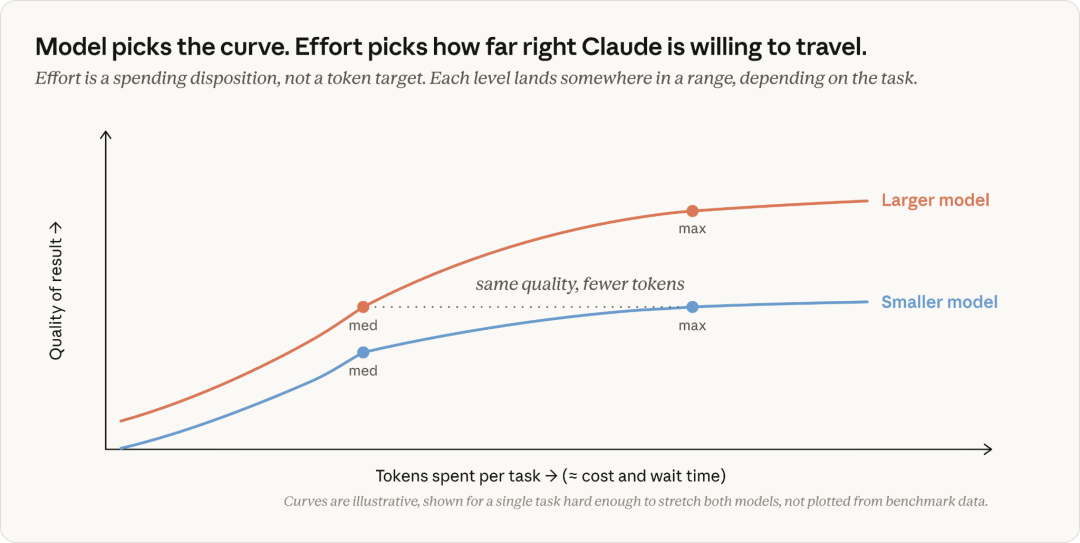
This does not mean model size is unimportant. Some tasks are still beyond the capabilities of a small model, regardless of effort. The model cannot compensate for missing capabilities simply by spending more tokens.
It does mean that scaling up the model is not always the first choice or the cheapest solution.
Does Claude fail because it cannot solve the task, or because it didn't try hard enough?
Anthropic's most useful advice is a diagnostic framework.
When Claude produces poor results, don't immediately switch models. First, determine the type of failure.

Step 1: Check the input and context
Before changing any settings, verify the task itself.
Ask:
- Is the prompt clear?
- Does Claude have the files it needs?
- Are the correct tools available?
- Is the
CLAUDE.mdaccurate? - Is the task scope clearly defined?
- Are important constraints missing?
- Is Claude working in the correct directory or repository?
Many things that appear to be model problems are actually context problems.
If the model receives incomplete requirements, outdated instructions, or the wrong files, neither higher effort nor a larger model can reliably solve the problem.
Step 2: Look for signs of insufficient effort
When Claude does the following, the problem is likely insufficient effort:
- Skipped relevant files
- Did not check the configuration
- Avoided running available tests
- Stopped during refactoring
- Made a single edit without verification
- Asked for information that could be found with the available tools
- Returned before completing the requested workflow
In these cases, increase the effort level.
The model may already be capable enough.
It just needs a stronger signal that the task requires more thorough completion.
Step 3: Look for signs of capability limits
The problem is more likely with the model itself when:
- Claude has the correct context
- It read the relevant files
- It performed the expected checks
- It clearly tried to solve the problem
- It still arrived at the wrong conclusion
- Rephrasing the task doesn't help
- Increasing effort produces longer but still incorrect results
In these cases, switch to a more powerful model.
Higher effort gives the same weights more room to function, but it does not replace those weights with a stronger capability set.
How to choose between Sonnet, Opus, and Fable
The specific model lineup and default settings change over time, so always check Anthropic's current documentation. Practical selection logic is more durable than any specific model name.
Use smaller or balanced models for routine work
For the following tasks, faster models like Sonnet are usually sufficient:
- Narrow edits
- Reformating
- Straightforward bug fixes
- Known migrations
- Repetitive code updates
- Documentation changes
- Tasks with strong tests
If the task involves multiple files or requires verification, increase the effort level before switching to a more expensive model.
Use larger models for ambiguous or difficult work
A stronger model like Opus is more appropriate when:
- The root cause is unclear
- The task spans multiple systems
- Requirements conflict
- The codebase contains unfamiliar patterns
- Architectural judgment is needed
- The solution relies on experience not present in the repository
The advantage is not just more tokens. Larger models may have learned stronger patterns and have a higher capability ceiling.
Reserve the highest capability models for the most challenging problems
The source article describes Fable as an expert model to call in when other models are still stuck.
This type of model is most valuable for:
- Long-cycle Agent tasks
- Complex engineering diagnostics
- Difficult architectural work
- Debugging with deep ambiguity
- Problems other models haven't solved despite significant effort
Since the highest capability models also have the highest token costs, they should only be used when their extra capabilities can change the outcome.
Practical Model and Effort Matrix
| Task Type | Starting Model Strategy | Recommended Effort Level |
|---|---|---|
| Renaming, formatting, small text edits | Fast or balanced model | Low or Medium |
| Narrow bug with clear tests | Balanced model | Medium |
| Multi-file bug fix | Balanced model |
| High |
| Well-defined large-scale refactoring | Balanced or stronger model | High or Very High |
| Unclear architectural failure | Stronger model | High |
| Long autonomous coding workflow | Strong model | Extremely High or Maximum |
| Repeated failure after thorough investigation | Switch to a more powerful model | Keep high enough for verification |
This is a starting point, not a fixed rule.
The optimal settings depend on:
- Repository size
- Task ambiguity
- Test quality
- Tool availability
- Cost constraints
- Latency requirements
- Review requirements
Why You Shouldn't Frequently Adjust Effort Level
Constantly changing the effort level for each prompt makes cost and latency unpredictable.
Anthropic recommends starting with the default effort level of the chosen model, then adjusting it as a broader work preference.
For example:
Use lower effort for quick questions and many subtasks.
Use medium effort for routine development.
Use higher effort for difficult coding and agent workflows.
Only use xhigh or max when extra thoroughness is needed.
For API users, the effort parameter applies to visible text, tool calls, tool parameters, and extended thinking. It is not limited to a single hidden reasoning budget.
This makes effort a direct operational control over how much work the model is encouraged to do.
Multi-Agent Orchestration and Ultracode
The source article also mentions Claude Code's ultracode mode.
An important idea is that some long tasks benefit from multiple agent threads. Rather than having one Claude instance sequentially examine every part of a large task, a coordinator can delegate independent work to specialized agents.
Examples include:
- One agent reviewing security
- One agent checking tests
- One agent reading documentation
- One agent implementing changes
- A coordinator consolidating results
Anthropic's Managed Agents documentation describes multi-agent sessions where agents can operate in parallel with independent conversation histories. This can improve coverage and reduce completion time when tasks are appropriately decomposed.
Multi-agent execution is not automatically superior.
It may increase:
- Token usage
- Number of tool calls
- Coordination overhead
- Duplicate work
- Review complexity
Only use it when the task contains independent workflows, not just because it's available.
From Model Ranking to Agent Scheduling
The broader takeaway is that AI coding is moving beyond model ranking.
In the past, the workflow was simple:
- Select the strongest available model.
- Send the task.
- Accept or reject the result.
Modern agent coding requires more proactive scheduling.
A team might use:
- A lower-cost model for simple changes
- A balanced model with high effort for repository-wide work
- A larger model for architecture and diagnostics
- Several specialized agents for parallel research
- Deterministic tests to verify final results
This is more akin to managing a technical team than using a search box.
Those operating the system need to understand:
- Which tasks require stronger capabilities
- Which tasks need more research
- Which tasks can run in parallel
- Which tasks need human approval
- Which tasks should stop when the budget is exhausted
The goal is not to consume the most tokens, but to spend tokens where they increase the probability of an acceptable result.
Practical Troubleshooting Checklist
When Claude Code produces weak results, troubleshoot in this order:
- Check the task: Is the request specific and testable?
- Check the context: Does Claude have the correct files and instructions?
- Check the tools: Can it read, edit, run, and verify what the task needs?
- Check the behavior: Did it skip research or stop early?
- Increase effort: When the model is not working thoroughly enough, increase effort.
- Check capabilities: Did it research adequately but still misunderstand the problem?
- Switch model: When the capability ceiling is the issue, switch to a stronger model.
- Independent verification: Run tests, check diffs, and review results.
- Measure cost per accepted task: Don't judge solely by price per token.
- Log repeated failures: Add them to your internal evaluation set.
FAQ
What is the difference between Model and Effort in Claude Code?
Model selection changes the underlying training weights, thus altering the overall capability range. Effort controls how much work Claude is encouraged to put into the current task, including reasoning, file reading, tool calls, testing, and verification.
Can using more effort make a smaller model outperform a larger model?
Yes, on certain tasks. A smaller model with sufficient context and high effort may research more deeply than a larger model with low effort. However, effort cannot overcome true capability ceilings.
Why does Claude Code sometimes skip tests or files?
Claude may be running with a low effort level, the task scope may be poorly defined, or it may lack the required tools and context. First, check the prompt and repository instructions; if Claude stops before completing available verification, then increase the effort.
When should I switch to a stronger Claude model?
Switch when Claude has the right context, researches the task clearly, runs relevant checks, yet still arrives at a wrong conclusion. If it simply skipped the work, increasing effort is usually a better first step.
Is effort level equivalent to a token budget?
No. Anthropic describes effort as a behavioral signal rather than a strict token limit. It influences how inclined Claude is to invest tokens in responses, tool calls, function parameters, and extended thinking.
What effort level should I use for coding?
Use default or medium effort for everyday tasks, high effort for difficult coding and agentic tasks, and very high or maximum for long-running or especially high-demand workflows. Re-evaluate cost and latency based on your own tasks.
What is ultracode in Claude Code?
The source article describes ultracode as a high-intensity mode in Claude Code that combines very high effort and, when necessary, allows coordinating multiple agents. Since product behavior may change, consult the current Claude Code documentation before relying on a specific implementation.
Does changing the effort level permanently train Claude?
No. The effort level only changes behavior for the request or session. It does not update the model weights or permanently teach Claude new knowledge.
Related Tools
- Claude Code: Anthropic's agentic coding tool for reading repositories, editing files, running commands, and completing software tasks.
- Claude Platform: Anthropic's official developer platform for using Claude models and APIs.
- Claude Managed Agents: A managed agent toolkit including sandboxes, tools, sessions, and multi-agent orchestration.
- Model Context Protocol: An open protocol for connecting AI applications to external tools and data sources.
- GitHub: Commonly used as a source code platform with Claude Code for managing repositories, issues, code reviews, and pull requests.
- Claude Agent Skills: Reusable instruction packs that extend Claude's capabilities with task-specific workflows and resources.
Related Links
- [How to Choose Claude
Model & Effort Level: Anthropic's official explanation of model selection and effort level in Claude Code.
Claude Effort Level Documentation: Official documentation on effort level, supported models, and API behavior.
How to Choose the Right Claude Model: Anthropic's model selection guide based on capability, cost, and task type.
Claude Code Changelog: Official release history of Claude Code changes and default settings.
Claude Managed Agent Multi-Agent Sessions: Official documentation on coordinating multiple Claude agents.
Build Orchestration Patterns: Anthropic's usage guide on combining high effort with multi-agent orchestration.
Claude Code GitHub Repository: Official source code repository, issue tracker, and changelog for Claude Code.
Summary
Even if the underlying model has not changed, Claude Code can sometimes feel less capable. The cause may be a low effort setting, incomplete context, missing tools, or an unclear task scope.
Model selection determines the capability ceiling. Effort determines how fully Claude leverages that capability by reading files, calling tools, running tests, and verifying work.
Start by fixing the inputs first. Increase the effort level when Claude skips available work. Switch models when Claude has thoroughly explored the task but still cannot solve it.
The best Claude Code configuration is not always the largest model—it is the right model with sufficient effort, context, tools, and task validation.