Beyond Prompting: Anthropic’s Approach to Agent Memory, Dreaming, and Graph Workflows
name: deploy-production description: Validate and deploy the application to production. --- 1. Read checklist.md . 2. Run the full test suite. 3. Confirm the migration plan. 4. Run
name: deploy-production
description: Validate and deploy the application to production.
Beyond Prompting: Anthropic’s Approach to Agent Memory, Dreaming, and Graph Workflows
- Read
checklist.md. - Run the full test suite.
- Confirm the migration plan.
- Run
scripts/verify-release.sh. - Stop and request human approval before deployment.
The important mechanism is **progressive disclosure**.

Claude sees a short description that helps it decide whether a Skill is relevant. The full Skill body and supporting files are loaded only when the procedure is needed.

Mukta compared this to a bookshelf.

A person does not need to memorize every book before beginning a conversation. They need to recognize which book might contain the relevant information and retrieve it at the right moment.

Skills help solve the “ever-growing context file” problem:

- Stable high-level facts can remain in `CLAUDE.md`.
- Detailed procedures can move into Skills.
- Supporting material can remain outside the active context until needed.

Anthropic’s official Skills documentation recommends creating a Skill when a team repeatedly pastes the same instructions, checklist, or multi-step procedure into conversations—or when a section of `CLAUDE.md` has grown into a procedure rather than a concise fact.

### Skills Still Require Curation

Skills are reusable, but somebody still has to decide:

- Which workflows deserve a Skill
- How the procedure should be structured
- Which files should be included
- When the Skill is outdated
- Who is allowed to edit it

The agent can help write and maintain Skills, but the system is still partly human-curated.

That led to the fourth approach.

## Generation 4: Treat the Filesystem as Memory

Mukta described filesystem-based memory as Anthropic’s current preferred pattern for many agent-memory systems.

The reasoning is practical.

Agents are already good at:

- Listing files
- Searching filenames
- Running `grep`
- Reading Markdown
- Navigating directories
- Editing text
- Comparing versions

Instead of inventing a highly specialized memory interface, teams can organize memory as files and give agents ordinary filesystem tools.

A possible layout might look like this:

```Plaintext
memory/
├── organization/
│   ├── principles.md
│   ├── terminology.md
│   └── security-policy.md
├── teams/
│   ├── engineering/
│   │   ├── architecture.md
│   │   └── release-process.md
│   └── support/
│       ├── escalation-rules.md
│       └── response-style.md
├── projects/
│   └── billing-redesign/
│       ├── decisions.md
│       ├── known-issues.md
│       └── current-status.md
└── agents/
    └── agent-104/
        └── scratchpad.md
This layout supports different levels of memory:
- Organization-wide rules
- Team knowledge
- Project context
- User preferences
- Agent-specific working notes
It also mirrors progressive disclosure.
An agent can search the directory and load only the files relevant to the current task.
Files Are an Interface, Not Necessarily the Physical Storage
A filesystem-style interface does not require every enterprise memory to live as unmanaged files on a laptop.
The underlying implementation can still use:
- A database
- Versioned object storage
- Access-control services
- Search indexes
- Audit logs
- Transactional APIs
The important point is that the agent receives a simple, navigable abstraction.
During the Q&A, an audience member asked whether this amounted to reinventing a database.
Mukta agreed that the architecture returns to familiar software-engineering principles. Once teams learn which behaviors should be deterministic, they can move those behaviors into the harness rather than asking the model to improvise them every time.
Four Guardrails for Production Memory
A folder full of Markdown may work for one user.
It becomes dangerous when thousands of agents can update shared organizational memory.
Mukta highlighted four production principles:
- Versioning
- Concurrency control
- Permissioning
- Portability
1. Version Every Memory Change
Every memory update should have a history.
Useful metadata includes:
- Previous version
- New version
- Timestamp
- Human or agent author
- Source session
- Supporting transcript
- Reason for the change
- Approval status
A memory entry without provenance is difficult to trust.
Suppose an agent adds:
- Production deployments do not require approval on Fridays.
Without a source, reviewer, and revision history, another agent may treat the statement as authoritative.
Versioning enables:
- Review
- Rollback
- Auditing
- Comparison
- Root-cause analysis
A versioned memory system should make it easy to answer:
Which interaction caused this rule to appear?
2. Prevent Concurrent Agents From Overwriting One Another
Two agents may read the same memory at 10:00.
Agent A writes an update at 10:02.
Agent B, unaware of that change, writes its own version at 10:03 and accidentally removes Agent A’s update.
Mukta described a hash-based concurrency pattern:
Agent reads memory and records hash A
        ↓
Agent drafts an update
        ↓
Agent reads memory again and records hash B
        ↓
If hash A == hash B:
    commit the update
Else:
    reload, rebase, and try again
This is optimistic concurrency control.
The model may decide what change to propose, but the harness should deterministically prevent a stale write from replacing a newer version.
3. Separate Read and Write Permissions
Not every agent should be allowed to edit every memory.
A sensible permission model might look like this:
| Memory Scope | Typical Access |
|---|---|
| Organization principles | Read for most agents; write only through review |
| Security policy | Read for relevant agents; restricted human-controlled writes |
| Team procedures | Team read; designated maintainers write |
| Project decisions | Project agents read; proposed edits require approval |
| Agent scratchpad | Individual agent read/write |
| User preferences | User-scoped agent access |
| Sensitive customer context | Strict role-based access |
An agent should not be able to convert one uncertain observation into an organization-wide rule.
Permission boundaries also need to apply to Dreaming. A consolidation job should only receive transcripts and memories that its identity is authorized to access.
4. Make Memory Portable
Memory can become one of an organization’s most valuable AI assets.
It contains:
- Decisions
- Corrections
- Workflows
- Preferences
- Failure patterns
- Tool knowledge
- Domain-specific instructions
Mukta argued that teams should avoid designing this asset so that it works only inside one product.
A portable memory system should have:
- A clean API
- Exportable formats
- Documented schemas
- Stable identifiers
- Standard access controls
- Tool-independent provenance
Portability allows the same curated context to support:
- Claude Code
- Claude Managed Agents
- Internal tools
- Other agent systems
- Human documentation workflows
Why In-Session Memory Is Not Enough
Even a well-designed memory tool has two structural limits.
Limit 1: The Agent Is Distracted
The agent has to complete the task and curate memory at the same time.
Writing memories consumes resources that could otherwise be used for the current objective.
The agent may:
- Save too much
- Save too little
- Store an unverified conclusion
- Skip memory work under time pressure
- Focus on local details instead of broader patterns
Limit 2: The Agent Sees Only One Session
One agent may notice that a command failed once.
It cannot see that the same command failed in 300 other sessions.
One support agent may see a customer confused by a policy.
It cannot see that the same confusion appeared across an entire region.
A fleet-wide learning system needs a process with broader visibility.
That process is what Anthropic calls Dreaming.
Dreaming: An Out-of-Band Process for Curating Memory
Dreaming is an asynchronous process that reviews agent history after normal work has taken place.
Anthropic’s current API release notes describe Dreams for Claude Managed Agents as a research preview.
A Dream reads:
- An existing memory store
- Past session transcripts
It then creates a reorganized output memory store in which it can:
- Merge duplicate entries
- Replace stale information
- Surface missing insights
- Reorganize content
- Propose improved memories
This is not model retraining.
The underlying model weights do not change.
The improvement comes from changing the persistent context that future sessions can retrieve.
The School Analogy
Mukta used a school to explain the difference between ordinary memory and Dreaming.
Imagine:
- Students complete assignments.
- Teachers grade individual assignments.
- A head teacher reviews results across the whole school.
A teacher may help one student correct one mistake.
The head teacher can notice that every geography student missed the same topic because the curriculum never included it.
The system-level fix is not to correct each paper individually.
It is to update the curriculum.
In agent terms:
- Student work = individual sessions
- Teacher feedback = in-session memory updates
- School curriculum = shared memory store
- Head-teacher review = Dreaming
- Curriculum update = proposed memory changes
This allows the system to learn from patterns that no single agent can see.
How Dreaming Works Mechanically
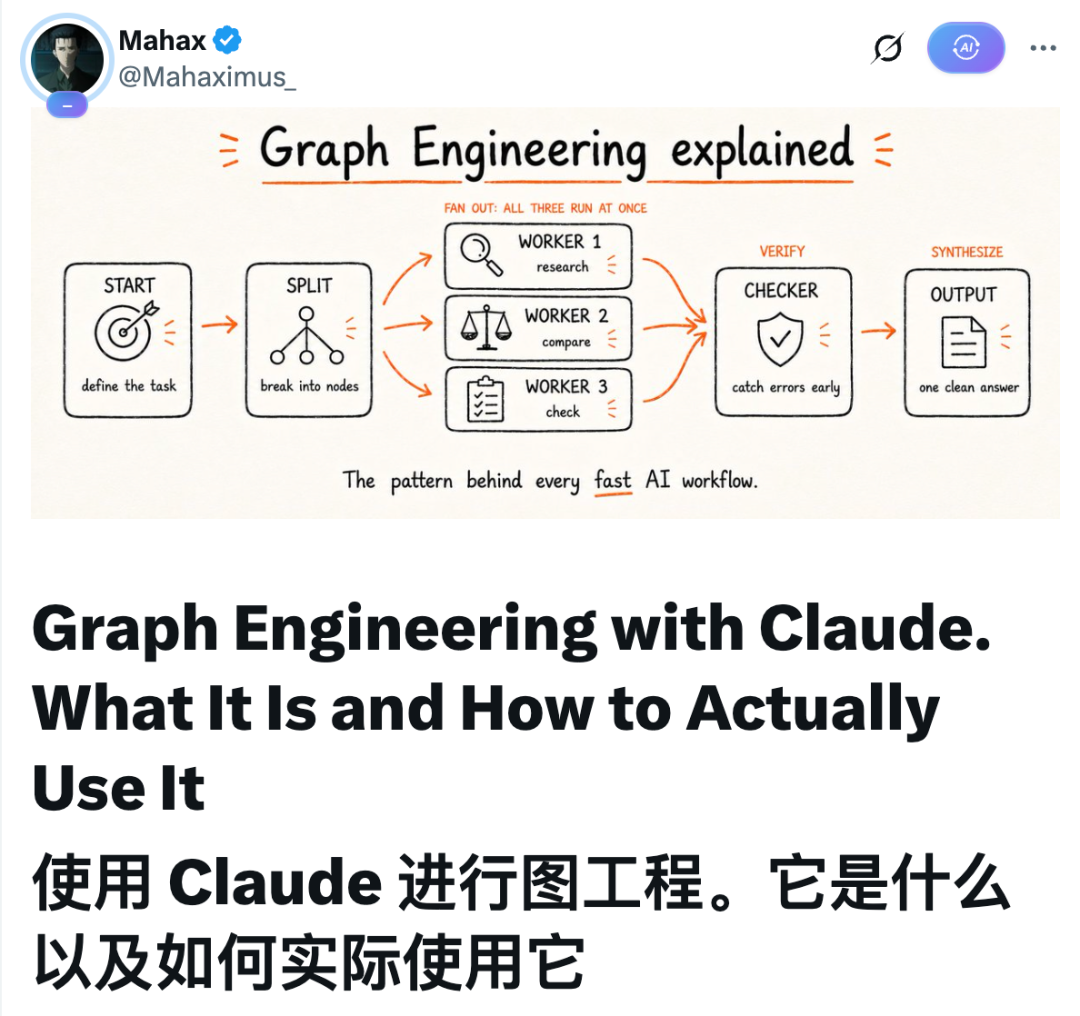
A simplified Dreaming pipeline looks like this:
flowchart TD
    A[Existing Memory Store] --> D[Dream Orchestrator]
    B[Session Transcripts] --> D
    C[Tool Calls and Metadata] --> D
    D --> E1[Review Agent 1]
    D --> E2[Review Agent 2]
    D --> E3[Review Agent 3]
    E1 --> F[Pattern Aggregator]
    E2 --> F
    E3 --> F
    F --> G[Proposed Memory Changes]
    G --> H{Human Approval}
    H -->|Accept| I[Updated Memory Store]
    H -->|Reject| J[Keep Existing Memory]
The review process can examine more than user and assistant messages.
Useful evidence includes:
- Tool calls
- Tool failures
- Retry counts
- Execution metadata
- Human corrections
- Evaluation scores
- Accepted and rejected outputs
- Skill usage
- Model versions
- Latency and cost
The Dreaming agent then looks for patterns such as:
- The same command fails repeatedly.
- Several agents misunderstand one internal term.
- A memory entry is no longer valid.
- Two files contain duplicate rules.
- A team repeatedly corrects the same formatting problem.
- One tool configuration causes errors across many projects.
- A missing policy forces agents to guess.
Mukta said Anthropic’s design can include examples of the relevant transcripts and statistics showing how often a pattern occurred.
That evidence helps a human decide whether the proposed memory change is justified.
Dreaming Should Propose, Not Silently Rewrite Everything
A Dreaming process has broad access and can affect future behavior across an entire agent fleet.
That makes automatic, unreviewed updates risky.
A safer workflow is:
- Analyze authorized transcripts.
- Identify a recurring pattern.
- Link the pattern to supporting sessions.
- Draft a proposed memory change.
- Estimate how prevalent the problem is.
- Ask a human or policy-controlled reviewer to approve it.
- Commit the approved update with provenance.
- Measure whether future performance improves.
For example:
## Proposed Memory Update

**Target:** `teams/engineering/test-process.md`

**Observed problem:**
Agents used the unit-test command for integration tests in 18 of 63 relevant sessions.

**Evidence:**
Sessions `s-102`, `s-111`, `s-118`, `s-124`, ...

**Proposed addition:**
- Use `npm run test:integration` for all tests that require the database container.
- Do not use `npm test` for files under `tests/integration/`.

**Confidence:** High

**Human decision:** Pending
This preserves human oversight while allowing the agent fleet to perform most of the analysis.
Why Dreaming Can Reduce Cost Despite Using More Tokens
Dreaming requires additional model calls.
At first, that sounds like an unnecessary expense.
Mukta argued that a cleaner memory store can reduce total cost because future agents are more likely to complete tasks correctly on the first attempt.
A useful economic comparison is:
Cost of Dreaming
vs.
Cost of repeated failures, retries, corrections, and oversized context
Potential savings can come from:
- Fewer retries
- Fewer repeated explanations
- Less irrelevant context
- Better tool selection
- More accurate first attempts
- Faster onboarding of new agents
- Fewer repeated human corrections
Anthropic has not published a universal benchmark showing how much every organization will save. The value will depend on:
- Task repetition
- Memory quality
- Error cost
- Session volume
- Review design
- Model and tool pricing
Dreaming is most likely to pay off when many agents perform related work and repeatedly encounter the same patterns.
A Simple Weekly Dreaming Workflow Without Managed Agents
A team does not need to wait for a full platform integration to test the concept.
A manual version can run once a week.
Step 1: Export Relevant Sessions
Collect only transcripts the reviewer is authorized to see.
Organize them by:
- Project
- Team
- Workflow
- Permission scope
- Time period
Step 2: Provide the Current Memory
Include:
CLAUDE.md- Relevant Skills
- Project memory files
- Team instructions
- Known-issues documents
Step 3: Ask for Evidence-Backed Proposals
A prompt can say:
Review these authorized session transcripts and the current memory files.

Identify recurring failures, repeated user corrections, stale instructions,
missing procedures, and duplicate entries.

For every proposed change:
1. Name the target file.
2. Show the supporting session IDs.
3. State how often the pattern occurred.
4. Draft the smallest useful change.
5. Do not edit the files directly.
Step 4: Review the Proposals
Reject changes that are:
- Based on one ambiguous event
- Unsupported by evidence
- Too broad
- Security-sensitive
- Outside the reviewer’s permission scope
- Better implemented as deterministic code
Step 5: Commit Approved Changes
Use version control and include the source evidence in the commit or audit record.
Step 6: Measure the Result
Track whether the same failures decline in later sessions.
Without measurement, Dreaming can become a documentation-generation exercise rather than a learning system.
From Memory Over Time to Structure Within a Task
Memory answers:
What should the agent remember from earlier work?
Graph engineering answers a different question:
Which pieces of the current task actually depend on one another?
The BAAI source article links the memory talk with a graph-engineering guide circulating in the AI-development community.
The guide’s core argument is that many “workflows” are already graphs—but poorly designed ones.
A workflow written as a list often becomes artificially sequential:
Research
    ↓
Summarize
    ↓
Compare
    ↓
Fact-check
    ↓
Write
Some of those steps may genuinely depend on earlier output.
Others may be waiting for no reason.
Nodes, Edges, and Real Data Flow
In a workflow graph:
- A node is one job.
- An edge is a real dependency.
- Data travels along the edge.
For example:
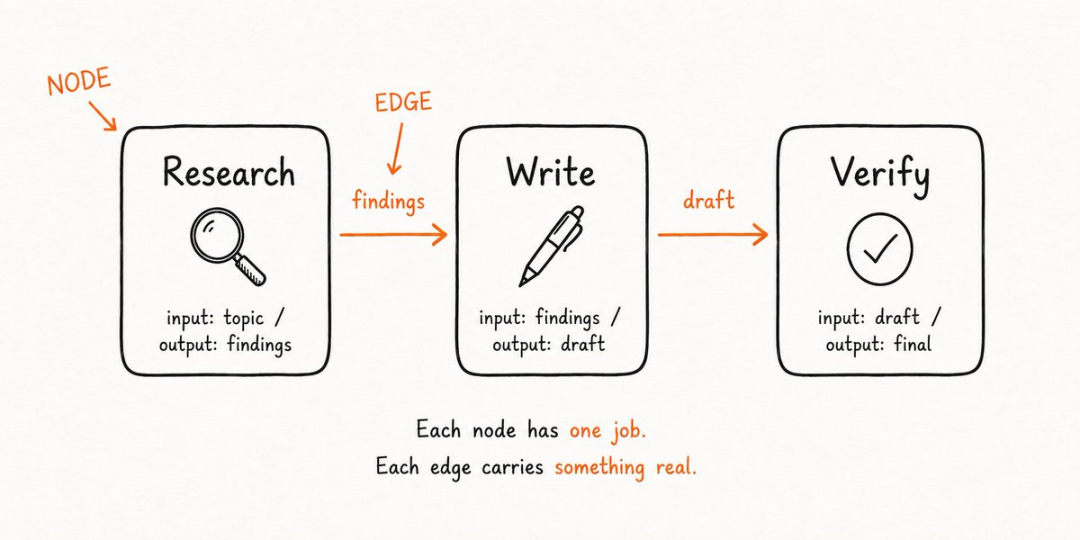
The research node produces findings.
The writing node consumes those findings and produces a draft.
The verification node consumes the draft and produces a checked result.
The arrows are justified because each downstream node needs the upstream output.
The Fake-Edge Test
The community graph guide proposes a simple test for every arrow:
Does the next job actually need the previous job’s output?
If the answer is no, the dependency is fake.
Consider this workflow:
Research competitor A
    ↓
Research competitor B
    ↓
Research competitor C
    ↓
Write comparison
Competitor B research usually does not require the output of competitor A research.
Competitor C research usually does not require the output of competitor B research.
Those jobs can run in parallel:
flowchart TD
    A[Define Comparison Criteria] --> B1[Research Competitor A]
    A --> B2[Research Competitor B]
    A --> B3[Research Competitor C]
    B1 --> C[Write Comparison]
    B2 --> C
    B3 --> C
Removing fake edges reduces waiting time.
If three research tasks take 10, 12, and 15 minutes:
- Sequential execution takes roughly 37 minutes.
- Parallel execution waits roughly 15 minutes, plus orchestration overhead.
The graph does not make any individual agent faster.
It changes the scheduling.
The Diamond Pattern
After fake edges are removed, a common shape appears:
- One task splits into several independent branches.
- The branches run in parallel.
- Results converge.
- A final node synthesizes them.
This is often called a diamond.
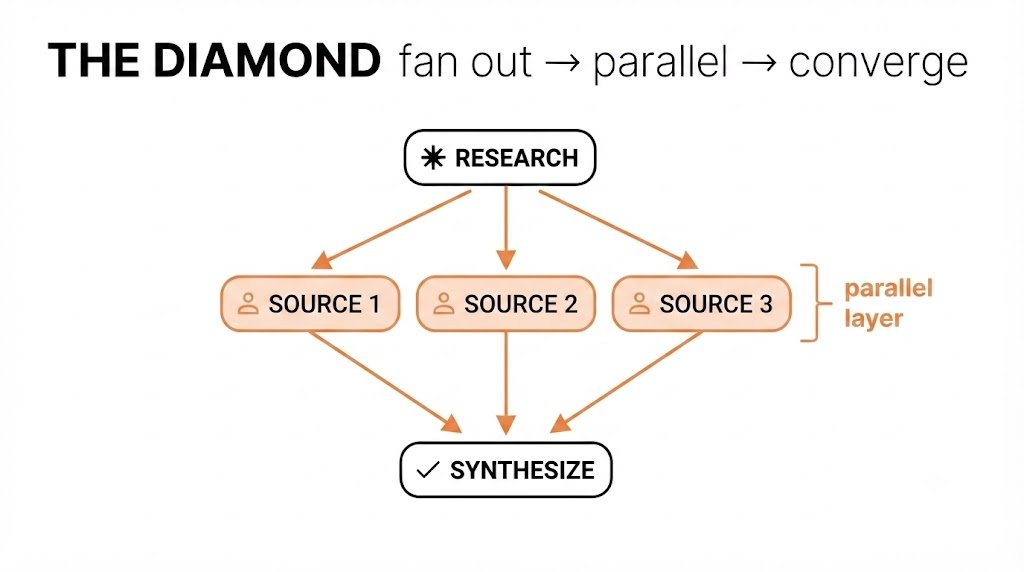
A research example might look like this:
flowchart TD
    A[Research Question] --> B1[Market Data]
    A --> B2[Customer Evidence]
    A --> B3[Competitor Analysis]
    B1 --> C[Checker]
    B2 --> C
    B3 --> C
    C --> D[Final Synthesis]
The total duration is driven mainly by the slowest branch rather than the sum of all branches.
Parallel Work Needs a Checker
Parallelism introduces a new risk.
One worker may produce weak, outdated, or unsupported output.
If the system merges everything without verification, one bad branch can contaminate the final answer.
The graph guide therefore places a checker before synthesis.
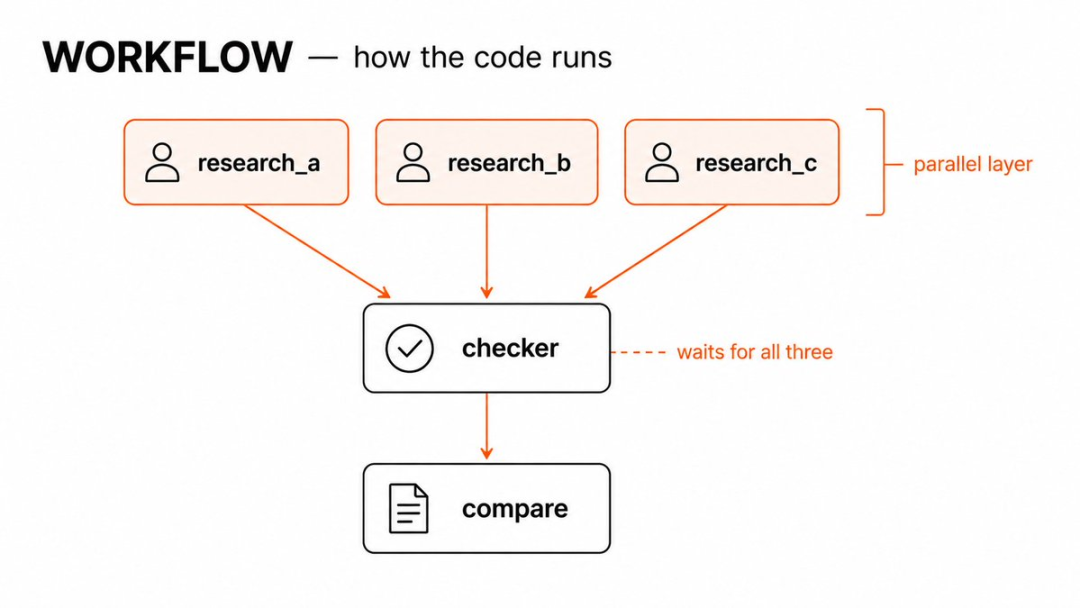
A checker can ask:
- Is this claim supported?
- Is the source current?
- Does the output match the requested schema?
- Did the worker complete its assigned job?
- Does the code pass tests?
- Does the result conflict with another branch?
- Is sensitive data present?
- Can this output safely proceed?
A useful checker should have explicit acceptance criteria.
For example: