TRAE Work Explained: From AI Coding Tool to All-Hands AI Office Platform
After TRAE SOLO upgraded to TRAE Work, its positioning expanded from a developer tool to an all-hands AI office platform. This article explains Work Mode, Code Mode, Skills, MCP, multi-device collaboration, enterprise security, and the competitive landscape behind execution-oriented AI work.
1. From “programmer tool” to “all-hands office platform”
If you are a developer, you may have heard of TRAE. It first entered the conversation as an AI coding tool, focused on code generation, refactoring, debugging, and project delivery.
But according to the source article, TRAE is no longer limited to developer scenarios. With TRAE SOLO becoming a standalone product and then upgrading to TRAE Work, its positioning expands from “developer productivity tool” to “all-hands AI office platform.”
The evolution can be summarized as:
TRAE IDE (developer plugin) -> TRAE SOLO (standalone app, development + office work) -> TRAE Work (all-hands AI office platform)Key milestones:
Time | Event |
Early stage | TRAE IDE launched as an AI coding assistant embedded in development environments |
2025 | SOLO Mode entered internal testing, emphasizing AI-led full-process development |
2026-03-31 | TRAE SOLO standalone app launched, covering PC and Web |
2026 | TRAE Work upgraded and positioned as an all-hands AI office platform |
The logic behind this upgrade is straightforward. AI coding tools have spread quickly among developers, but AI workflows for product managers, operators, marketers, data analysts, and other non-technical roles are still forming. TRAE Work targets this gap: AI should not only answer questions, but also help different roles move real work toward completion.
2. Work Mode: AI office capabilities for non-technical roles
The first core mode of TRAE Work is Work Mode. It is aimed not at people who write code, but at a broader office audience: product managers, operators, marketers, data analysts, project managers, and enterprise collaboration teams.
The source article describes six typical capabilities.
(1)Content creation: from files to PPTs or documents
Users can upload PPT, Excel, PDF, images, and other materials, letting AI integrate information and generate presentation drafts, proposal documents, or analysis reports.
For example, you can provide a research PDF, business data in Excel, and several reference images, then ask AI to create a quarterly report deck. The human role shifts from “creating from scratch” to reviewing and refining.
(2)Data analysis: from messy data to insights
After uploading Excel or CSV files, AI can help clean data, analyze trends, create visualizations, and output more readable insights.
(3)Proposal writing: fast PRD or campaign drafts
Product managers can describe product goals, user scenarios, and constraints in natural language, then get a PRD draft. Operations teams can use it to quickly generate retrospective reports, campaign plans, and content plans.
(4)App generation: dashboards from natural language
If a user says, “Build a sales dashboard showing this month's regional performance comparison,” AI can attempt to generate an interactive page or data dashboard, rather than only offering textual advice.
(5)Task progress: automatic weekly reports
With scheduled tasks, AI can automatically summarize project progress, metrics, and key items every week, producing a weekly report draft.
(6) Collaboration: structured meeting notes
Meeting recordings or discussion content can be turned into structured notes, including topics, key conclusions, owners, and next actions.
Typical scenarios:
What you want to do | How to do it | What AI gives you |
Organize meeting notes | Upload audio or recording | Structured meeting document |
Generate weekly report | Set a weekly scheduled task | Data summary + weekly report |
Create report deck | Upload PDF + Excel + images | Complete PPT draft |
Analyze data | Upload CSV file | Insights + visual charts |
3. Code Mode: developers are still a core audience
Although TRAE Work is expanding toward broader office work, Code Mode remains a key foundation. The source article describes Code Mode as a matrix of AI development agents, not just code completion.
SOLO Builder and SOLO Coder
Agent | Positioning | Use case |
SOLO Builder | From 0 to 1 | Start from an idea and generate requirements, technical choices, architecture, and runnable product |
SOLO Coder | From 1 to 100 | Iterate on existing code, refactor architecture, fix bugs, and understand cross-file logic |
The distinction matters: Builder is more like a prototype and new-project launcher, while Coder is more like an engineering collaborator inside an existing project.
Plan Mode: plan before changing code
After entering /plan, AI does not modify code immediately. It first generates an execution plan explaining which files to change, what each step does, and what risks may exist. Only after user review does it start executing.
This reduces the risk of AI misunderstanding a requirement and changing a large amount of code in the wrong direction.
Spec Mode: document engineering tasks
After entering /spec, AI generates three types of documents for complex system-level tasks:
spec.md: project background, architecture design, technical choicestasks.md: requirements broken down into executable taskschecklist.md: acceptance checklist for key features
These documents are stored under .trae/specs/ and can update with execution progress. For complex development work, this brings AI execution into engineering management.
SubAgent: parallel handling of complex tasks
For complex tasks, SOLO Coder can schedule multiple sub-agents to handle different modules. This reduces attention drift in long-context tasks and makes AI more like a parallel collaboration team than a single-threaded chat assistant.
White-box execution: AI is not a black box
Another important idea in the source article is “white-box” execution: what AI is doing, which files it changes, and which commands it runs should be visible, reviewable, and rejectable.
This includes:
Real-time following: observe what AI is doing.
DiffView review: inspect code changes file by file.
Todo tracking: record tasks, completion states, and summaries.
For developers, this is safer than letting AI directly submit a pile of code, and it better matches team collaboration habits.
4. Skills + MCP: from Q&A AI to execution AI
TRAE Work does not only put features into an interface. It also emphasizes the combination of Skills and MCP.
Skills are reusable workflows. Users can package repeated work into skills, such as generating weekly reports, organizing meeting notes, or creating PPTs from materials. Once AI learns the process, it can call the workflow again next time.
MCP (Model Context Protocol) allows AI to connect to external tools, databases, browsers, and third-party APIs. It defines what AI can operate and where the capability boundaries are.
Together:
Skills define “how to do it” (workflow) + MCP defines “what can be done” (capability boundary)
= AI evolves from Q&A into execution
This is the key difference between an AI office platform and a normal chatbot. The former enters real workflows; the latter often stays at the level of content generation and question answering.
5. Multi-device sync and enterprise security
For enterprise office work, a single tool is not enough. Multi-device collaboration and management security matter.
Multi-device forms:
Platform | Characteristics |
Desktop (PC) | Supports text, voice, attachments, skills, and real-time task progress |
Web | Lightweight access without installation, suitable for cloud environments |
Mobile | Assign tasks remotely, check progress, and review results |
Enterprise security capabilities:
Security capability | Description |
Sandbox mechanism | Isolates code execution and reduces host-system risk |
Command blacklist | Prevents AI from running dangerous commands |
MCP whitelist | Fine-grained control over external tools AI can access |
Content safety policy | Filters AI-generated content |
Auditable key actions | Stores audit logs for important operations |
Unified configuration | Centralizes models, quotas, and internal knowledge base settings |
These capabilities determine whether an AI office platform can move from individual experimentation to team deployment.
6. Competitive landscape: ByteDance, Alibaba, and Tencent
The source article places TRAE Work in the broader AI office platform race. ByteDance, Alibaba, and Tencent are all building AI workbenches, but their entry points differ.
Dimension | TRAE Work (ByteDance) | Wukong / DingTalk AI (Alibaba) | WorkBuddy / QClaw (Tencent) |
Core positioning | All-hands AI office platform | AI-native work platform | All-scenario workplace AI agent workbench |
Entry path | Development workflow | Enterprise organization and permissions | IM entrance and desktop |
Product form | Desktop + Web + Mobile | Embedded in DingTalk | Desktop + mini program |
Core advantage | Strong complex-task delivery | Deep enterprise permission system | Broad entrance coverage |
Target users | Developers + non-technical roles + enterprises | Enterprises already digitized by DingTalk | Broad workplace users |
This comparison should be understood as the source article's product-landscape view. Actual competition will depend on product iteration, enterprise ecosystems, distribution channels, and model capability changes.
TRAE Work's differentiation can be summarized as:
Delivery first: not only answering questions, but trying to complete tasks.
White-box execution: every AI step is visible and reviewable.
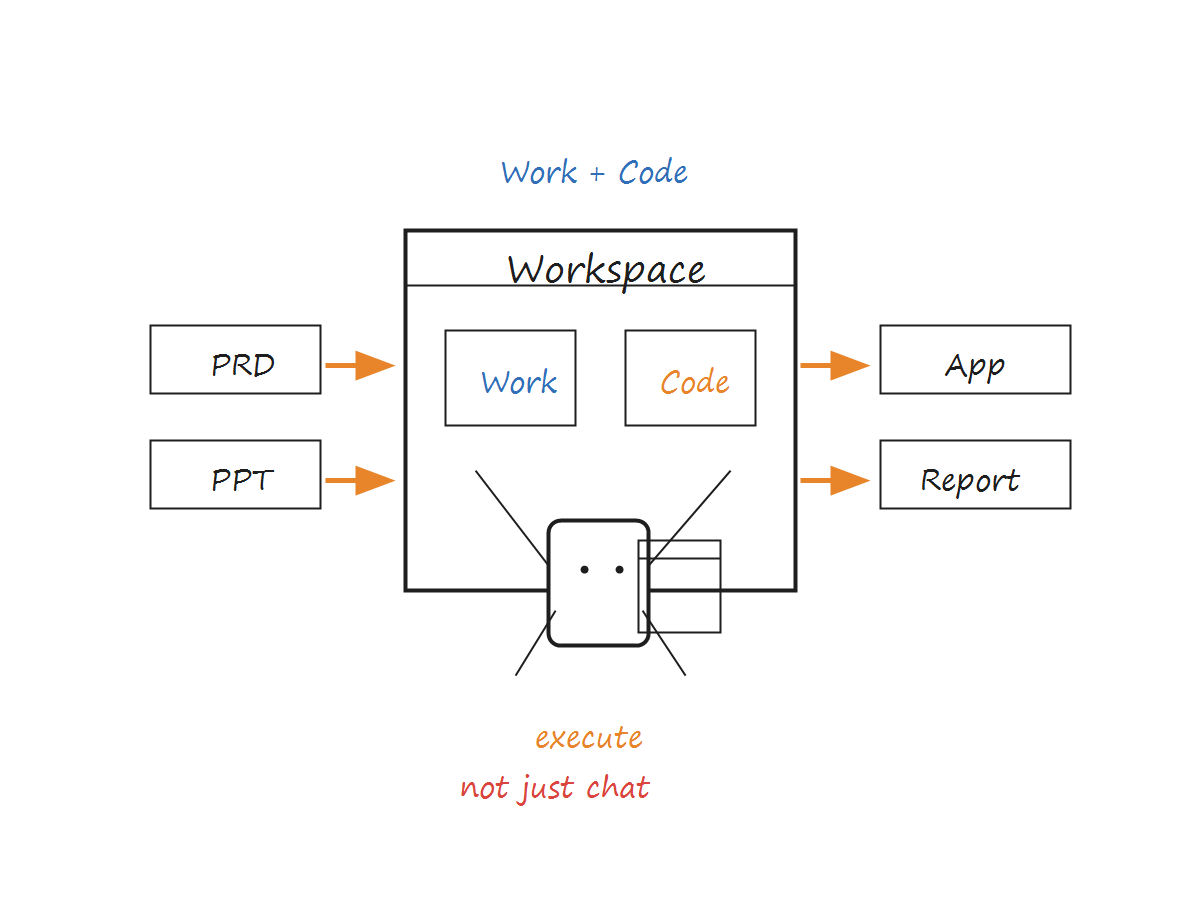
Dual-mode integration: Work and Code switch inside one workspace.
7. Design Mode and the future work chain
The source article mentions that a Design Mode for design scenarios is also on the way. If Work, Code, and Design modes gradually converge, TRAE Work could cover more of the work chain from content, data, and software development to visual design.
This means an AI office platform is no longer just a stronger chat box. It aims to connect input, generation, execution, review, and delivery in knowledge work.
8. Who should use TRAE Work?
User group | Recommended use |
Professional developers | Code Mode + SOLO Coder + Plan / Spec engineering management |
Product managers | Work Mode for PRDs + Code Mode for prototypes |
Data analysts | Work Mode for data processing + automatic report generation |
Operations / marketing | Work Mode for content creation + PPT + data analysis |
Enterprise managers | Enterprise unified control + cross-department collaboration |
Individuals / freelancers | Flexible mode switching + multi-device collaboration |
If your work only needs simple Q&A, a regular chatbot may be enough. If your tasks require multi-file, multi-system, multi-step execution, an execution-oriented platform like TRAE Work may be more valuable.
9. What this means for We0 AI content workflows
The TRAE Work upgrade also reminds content teams that AI competition is shifting from “who can generate content” to “who can complete work.”
For showcase website growth platforms like We0 AI, this trend matters. Companies do not only need a few lines of marketing copy; they need case pages, website content, SEO/GEO pages, product explanations, customer materials, and conversion paths to become one complete loop.
In other words, AI content systems should also move from “generate an article” to “complete a set of publishable assets around acquisition goals.” This is essentially the same direction as TRAE Work moving from chat box to workbench: AI must enter real workflows to produce stable value.
10. Conclusion
The core change of TRAE Work is that AI expands from a developer tool into a broader execution-oriented office platform. Work Mode serves non-technical roles, Code Mode continues serving developers, Skills and MCP help AI enter real business processes, while multi-device sync and enterprise security lay the foundation for team deployment.
Whether it becomes the entry point for all-hands AI office work still depends on product experience, ecosystem integrations, enterprise adoption, and user growth. But the direction is clear: AI is no longer just a window for answering questions. It is trying to become a work partner that advances tasks and delivers results.
English FAQs
What is the relationship between TRAE Work and TRAE SOLO?
According to the source article, TRAE SOLO was an important stage in TRAE's move from developer tool to standalone product, while TRAE Work is the upgraded positioning as an all-hands AI office platform.
Who is Work Mode for?
Work Mode is designed for non-technical roles such as product managers, operators, marketers, data analysts, and project managers. It supports PPT generation, meeting notes, data analysis, PRD writing, and weekly reports.
Is Code Mode still important?
Yes. Code Mode remains one of TRAE Work's core capabilities, serving developers through SOLO Builder, SOLO Coder, Plan, Spec, SubAgent, and code-review workflows.
What is the difference between Skills and MCP?
Skills are reusable workflows that define how to perform a task. MCP connects external capabilities and defines what AI can operate. Together, they make AI more like an execution partner.
What should enterprises pay attention to when using TRAE Work?
Beyond features, enterprises should pay attention to security boundaries, permission management, audit logs, external-tool whitelists, content safety policies, and model usage limits.
Related Tools / 相关工具
DingTalk
Related Articles / 相关文章
Sources / 来源