MemSlides 详解:用于个性化 PPT 生成和本地编辑的记忆驱动型 AI 智能体
了解 MemSlides 如何利用用户画像记忆、工作记忆、工具记忆和局部修订能力,生成个性化演示文稿并支持可靠的多轮编辑。
MemSlides: A Memory-Driven AI Agent for Personalized Slide Generation and Multi-Turn Editing
Introduction
AI presentation tools are good at producing a first draft. The harder part begins after that.
A user may ask for less text, more diagrams, a different visual rhythm, or a change to one small element on a single slide. In many systems, each new instruction risks overwriting earlier preferences or damaging content that was already correct.
MemSlides approaches presentation creation as a continuous, stateful authoring process rather than a one-click conversion task. Developed by researchers from Beijing University of Posts and Telecommunications, Tsinghua University, and Shanghai Jiao Tong University, the framework combines hierarchical memory with tightly scoped slide editing.
The system is designed to remember stable preferences across projects, retain temporary instructions within the current deck, reuse successful editing strategies, and modify only the region the user actually asked to change.
The MemSlides paper reached the top position in Hugging Face Daily Papers, while the project also released an open-source repository, project page, and online demo.
MemSlides: Generating Slides Is Not Enough
Presentation work is rarely completed in one pass.
A research presentation may need several rounds of revisions after feedback from a supervisor. A business pitch deck may go through repeated changes to its story, data emphasis, visual hierarchy, and final call to action. Preferences often become clear only after users see the first version.
This creates three practical requirements for an AI slide agent:
- It must remember preferences that remain stable across different presentation tasks.
- It must preserve temporary rules that apply only to the current deck.
- It must understand the boundary of a local edit and avoid rewriting unrelated content.
MemSlides does not solve this by placing the entire conversation history into one increasingly long prompt. Instead, it separates memory by lifespan and function.

The Hierarchical Memory Design
MemSlides uses two memory lifetimes:
- Long-term memory persists across presentation jobs.
- Working memory remains active during the current deck and its revision rounds.
Long-term memory is then divided by function:
- User profile memory records recurring user preferences.
- Tool memory stores reusable editing and execution experience.
The result is a layered system in which the agent can distinguish a permanent preference from a temporary request, while also keeping presentation style separate from operational editing knowledge.
| Memory component | Lifespan | Main purpose | Example |
|---|---|---|---|
| User profile memory | Across projects | Stores stable, intent-aware preferences | Prefers low text density and visual explanations |
| Working memory | Current deck | Keeps temporary rules and active revision state | New slides in this deck should use blue titles |
| Tool memory | Across similar edits | Reuses successful editing procedures | A reliable sequence for changing one chart without affecting layout |
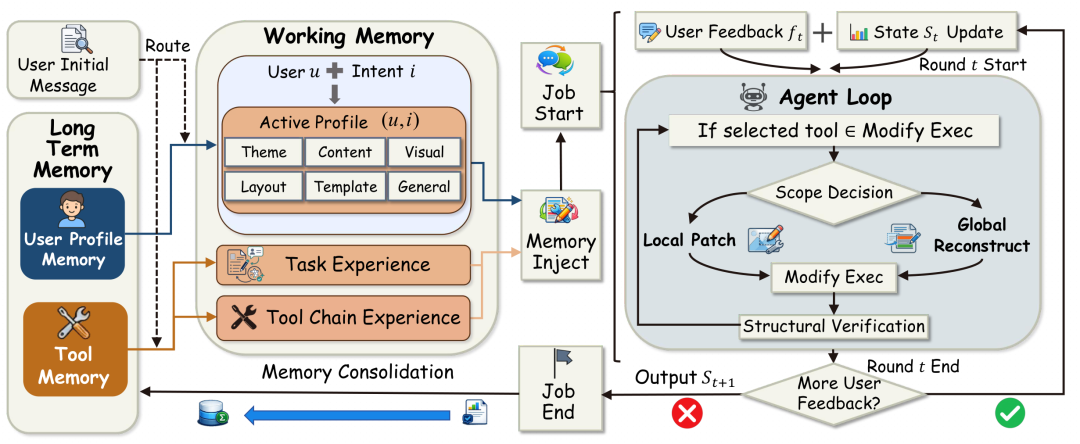
During a new task, MemSlides uses the source material, an optional template, and relevant profile memories to create the first deck. When new feedback arrives, it updates the current session state and performs a localized revision rather than automatically regenerating the entire presentation.
User Profile Memory: Learning Stable Presentation Preferences
Personalization is often reduced to a basic role description such as “academic researcher,” “financial analyst,” or “startup founder.” That information is useful, but it does not fully describe how a person prefers to communicate.
Two researchers may want very different presentations. One may prefer a single conclusion per slide and minimal equations. Another may want detailed derivations, experimental conditions, and dense supporting evidence.
MemSlides organizes user profile memory around presentation intent and several preference dimensions:
- Theme
- Content
- Visual style
- Layout
- Template use
- General presentation habits
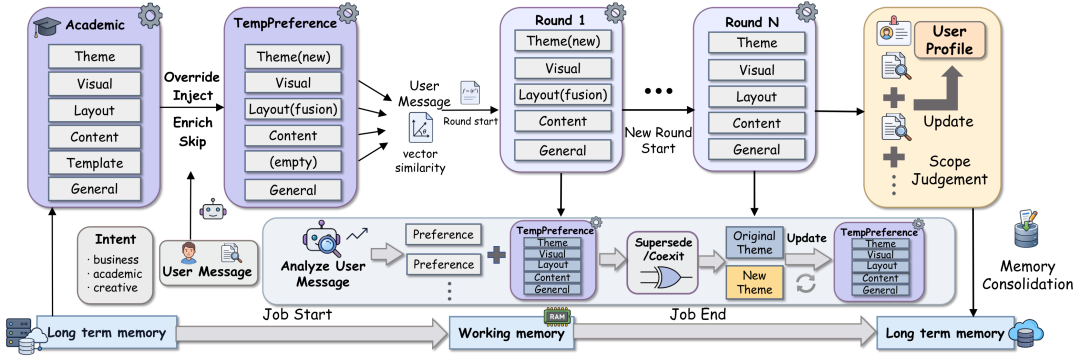
At the start of a new job, the agent retrieves the profile items that match the current intent. It then reconciles them with the user's latest request and any task-specific template.
How Preferences Enter the First Draft
User profile memory influences the initial, or round-zero, presentation.
Instead of mechanically breaking a paper or document into a fixed number of slides, the agent can use the active profile to decide:
- Which concepts require an early definition
- How much evidence should appear on each slide
- Whether mechanisms need diagrams
- How much text is acceptable
- Whether conclusions should appear before details
- Whether the final slide should include actions or a checklist
This makes personalization part of content planning and layout, not just a change in colors or fonts.
How Stable Preferences Are Consolidated
Not every instruction should become a permanent preference.
For example, a user may request blue titles for one presentation because it matches a client brand. MemSlides should not conclude that the user always prefers blue titles.
At the end of a task, the system consolidates only the interaction signals considered stable and reusable. Temporary choices remain inside the current job rather than being automatically written into the long-term profile.
This distinction helps prevent two common failures:
- Asking users to repeat basic preferences for every project
- Treating one-time instructions as permanent personal habits
Working Memory: Keeping Temporary Instructions Alive
Some instructions are important throughout one presentation but should disappear when that job ends.
Consider this request:
“If a new slide is added later, its title should also be blue.”
The instruction may not be relevant during the current editing round because no slide is being added. A stateless agent can easily forget it. MemSlides stores the instruction in working memory so it remains active until a later round creates a new slide.
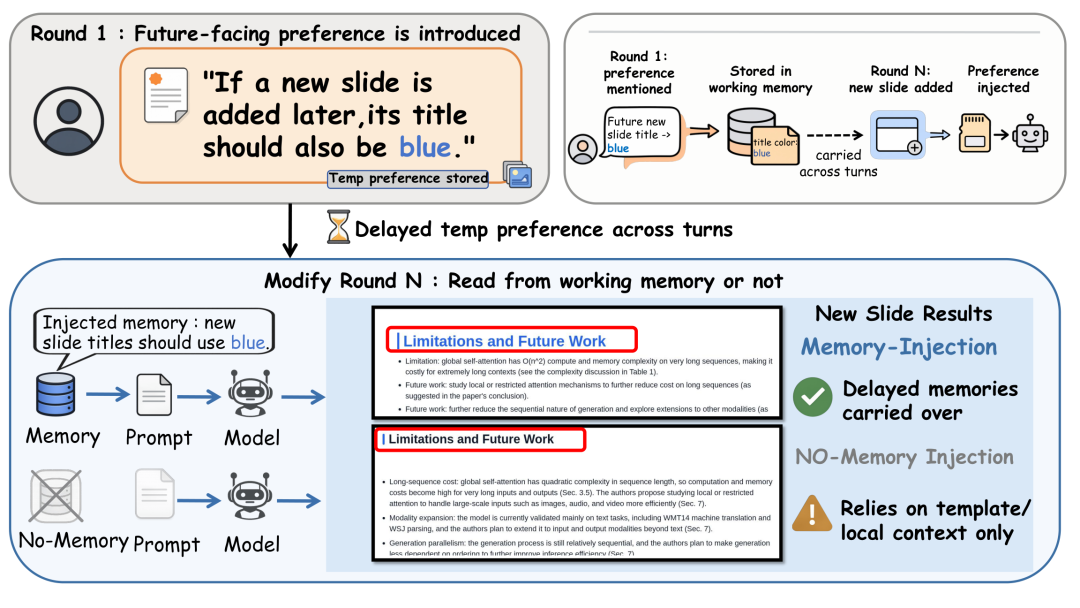
Working memory tracks information such as:
- Temporary presentation preferences
- Session-specific constraints
- The current presentation goal
- Previously edited regions
- Unfinished checks
- Revision history and active state
This turns a sequence of isolated prompts into continuous editing of the same deck.
Working memory is also useful when an instruction should override a long-term preference. For the current task, explicit user feedback has priority. The system can therefore apply a temporary exception without rewriting the user's persistent profile.
Tool Memory: Reusing Reliable Editing Experience
Understanding a request does not guarantee that an agent can execute it safely.
A small slide edit may involve selecting the right element, changing the correct property, preserving alignment, updating the underlying representation, rendering the result, and verifying that nothing else moved.
An agent can fail by:
- Selecting the wrong region
- Changing the wrong code or object
- Applying a broader edit than requested
- Stopping before the change is complete
- Repeating a tool sequence that previously failed
Tool memory focuses on this execution layer.
MemSlides records two kinds of experience:
- Round-level task experience, which summarizes lessons, errors, and useful patterns from an editing round.
- Operation-level tool-chain experience, which stores compact sequences of reasoning, tool calls, and observations for reuse during similar operations.
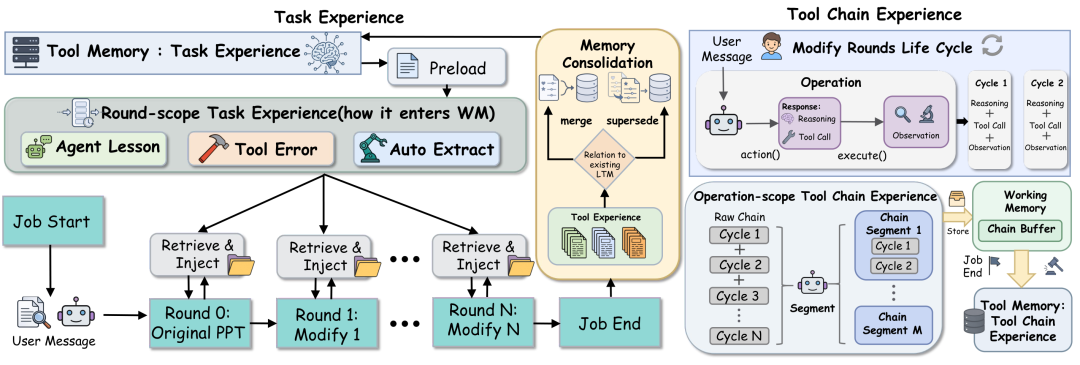
User profile memory determines what the presentation should become. Tool memory helps determine how to make that change reliably.
The agent can retrieve relevant experience before attempting a similar edit, reducing repeated mistakes and unnecessary trial-and-error.
Scoped Slide-Local Revision: Change Only What Was Requested
A major risk in multi-turn presentation editing is over-editing.
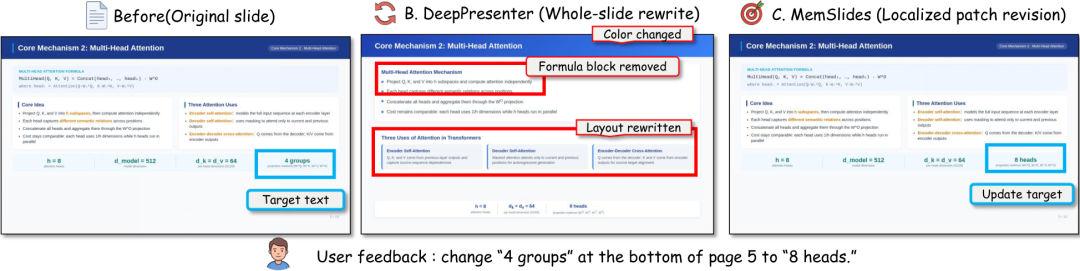
When a user asks to change one label, chart, or paragraph, a system that rewrites the entire slide—or the entire deck—may accidentally alter correct formulas, colors, spacing, or content.
MemSlides introduces a scoped slide-local revision process built around three stages:
1. Plan
The system converts the user's request into an execution contract. This identifies:
- Whether the edit is local or global
- Which slide or slides are affected
- The smallest target region
- Active rules and selector hints
- Verification requirements
2. Act
The agent applies the minimum effective change. Depending on the task, this may involve a local patch, a narrowly scoped style update, or a specific page insertion or deletion.
3. Guard
Before ending the revision round, the system verifies that the requested target was updated and that unrelated regions were not changed. If coverage is incomplete, the round is blocked and the agent must retry.
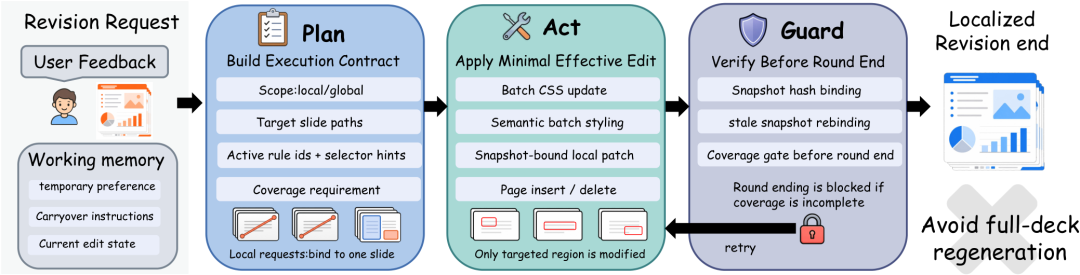
This mechanism protects content that is already correct.
The example below compares a broad whole-slide rewrite with a localized MemSlides patch. The requested change affects one item at the bottom of the slide. The broad rewrite changes colors, removes a formula block, and modifies the layout, while the scoped patch updates only the target.
Experimental Results
The MemSlides evaluation examines more than whether an edit eventually happens. It also measures whether the edit passes strict verification and how quickly the system reaches the first correct result.
Personalization and Working-Memory Behavior
The paper reports that user profile memory improves persona alignment during first-round generation. The system uses intent-matched preferences instead of applying one fixed profile to every task.
Qualitative working-memory cases also show that a preference introduced in an early round can remain active and take effect later, even when it is not repeated in the intervening feedback.
Tool-Memory Ablation
The research team tested tool memory through a diagnostic matched-pair setup. Each pair used the same source deck, model, persona, and requested edit. The main difference was whether tool memory was injected.
| Metric | With tool memory | Without tool memory |
|---|---|---|
| Closed-loop completion | 0.963 | 0.815 |
| Strict verification | 0.534 | 0.310 |
| First correct edit time | 242.5 seconds | 609.5 seconds |
| Core tool time ratio | 0.327× | 1.000× |
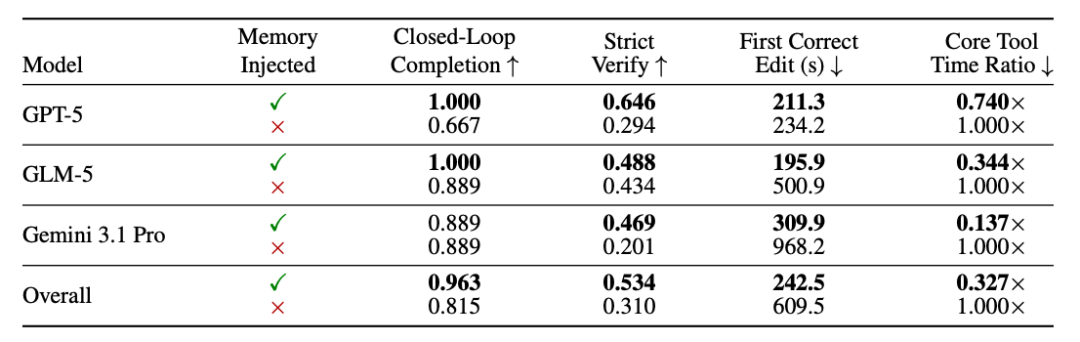
The results show a higher closed-loop completion rate, a stronger strict verification rate, and a much shorter average time to the first correct edit when tool memory is used.
These numbers come from a controlled diagnostic setting involving nine matched modification pairs. They should not be interpreted as proof that MemSlides will outperform every alternative in every presentation task. The study is narrower: it tests whether reusable tool experience improves local editing under matched conditions.
Running MemSlides Locally
The project is open source under the Apache 2.0 license. The official repository provides both a source installation and a Docker workflow.
Install from Source
sudo apt-get update
sudo apt-get install -y libreoffice fontconfig fonts-noto-cjk poppler-utils

conda env create -f environment.yml
conda activate memslides
pip install -e ".[research]"

python -m playwright install chromium ffmpeg
python -m memslides.experiment --help
Run the built-in smoke suite:
python -m memslides.experiment run smoke_minimal \
  --output-base .memslides/experiments \
  --parallel 1
Run with Docker
docker compose build
docker compose run --rm memslides python -m memslides.experiment run smoke_minimal \
  --output-base /app/.cache/memslides/experiments \
  --parallel 1
The smoke_minimal suite is intended as a small verification run. Real generation experiments require user-provided model and service credentials.
Keep credentials outside the repository. The project supports environment variables, .env files, and private YAML configuration selected through MEMSLIDES_CONFIG_FILE or --config.
Why the MemSlides Design Matters Beyond PPT Generation
The same memory problem appears in many long-running agent workflows.
A document agent needs to preserve writing preferences without treating every edit as permanent. A coding agent needs to remember project conventions while keeping temporary branch-specific instructions separate. A data-analysis agent needs to retain the current objective while reusing reliable tool procedures.
MemSlides demonstrates a broader design principle:
- Persistent user preferences should be separated from session state.
- Session state should survive across multiple rounds.
- Execution experience should be stored independently from user preferences.
- Local requests should operate within explicit boundaries.
- Verification should happen before a revision is considered complete.
The value of the framework is therefore not limited to making attractive slides. It offers a concrete example of how an agent can move from one-time generation toward reliable, iterative collaboration.
FAQ
What is MemSlides?
MemSlides is a memory-driven presentation agent for personalized slide generation and multi-turn local revision. It combines user profile memory, working memory, tool memory, and a scoped editing workflow.
Is MemSlides an AI PowerPoint generator?
Yes, but its main focus goes beyond producing a first draft. It is designed to remember preferences, carry instructions across revision rounds, and modify limited slide regions without unnecessarily rebuilding the full deck.
What does user profile memory store?
User profile memory stores recurring preferences organized by presentation intent and dimensions such as theme, content, visual style, layout, template use, and general habits. Only relevant profile items are routed into a new task.
What is the difference between working memory and long-term memory?
Long-term memory persists across presentation projects and contains stable user preferences and reusable tool experience. Working memory belongs to the current deck and tracks temporary instructions, active constraints, and revision state.
How does MemSlides avoid changing unrelated slide content?
It uses scoped slide-local revision. The system identifies the smallest affected region, performs a minimal edit, and verifies coverage before completing the round.
Can MemSlides be run with Docker?
Yes. The official repository includes Docker Compose files and a command for running the built-in smoke suite inside a container.
Does MemSlides require API keys?
Real generation experiments require credentials for the models and services selected by the user. The repository recommends storing them in environment variables, .env, or private configuration files rather than committing them to Git.
Is MemSlides open source?
Yes. The source code is available on GitHub under the Apache 2.0 license. The authors also provide a project page, paper, online demo, and Hugging Face paper page.
Related Tools
- MemSlides Demo: The official online workspace for trying the personalized slide-generation workflow.
- MemSlides GitHub: The open-source implementation, configuration files, experiment runner, and Docker setup.
- MemSlides Project Page: An overview of the framework, memory components, examples, and results.
- Docker: Runs the project and its dependencies in a reproducible container environment.
- LibreOffice: Used by the local workflow for presentation and document processing.
- Playwright: Provides browser automation used by the project setup and rendering workflow.
Related Links
- MemSlides Paper on arXiv: The official research paper describing the framework and experiments.
- MemSlides HTML Paper: A browser-readable version of the full paper.
- MemSlides on Hugging Face: The paper page, community discussion, and project links.
- MemSlides GitHub Repository: Source code, installation commands, Docker files, and experiment tools.
- MemSlides Project Website: Visual explanation of profile memory, working memory, and local revision.
- MemSlides Live Demo: The official web interface for testing the system.
- Apache License 2.0: The license used by the open-source repository.
Summary
MemSlides treats slide creation as an ongoing authoring process rather than a single generation request. Its hierarchical memory separates stable user preferences, temporary deck-level instructions, and reusable editing experience.
The scoped revision workflow then limits each change to the smallest necessary region and verifies the result before completing the round. In the paper's diagnostic matched-pair experiments, tool memory improved completion and verification while reducing the time required to reach a correct edit.
The central idea is simple: a useful presentation agent must remember the right information, forget temporary details at the right time, and change only what the user actually asked it to change.