LangBot 4.10.2 Update Explained: Sandbox, Skills, RAG Plugins, and Enterprise AI Bot Framework Features
A readable English adaptation of the LangBot Release 4.10.2 update, covering Sandbox, Skills, RAG pluginization, AI platform integrations, LangTARS, enterprise routing, IM support, workflow routing, and high-concurrency test results.
The Sandbox, also called Box Runtime, gives the built-in Agent an isolated execution environment. In simple terms, the Agent can work more like a developer: it can run commands, read and write files, edit files, and search through project content without directly touching the host environment.
The native tool set includes six core tools:
Tool | Purpose |
| Execute shell commands. |
| Read file contents. |
| Write files. |
| Edit existing files. |
| Match files by pattern. |
| Search inside file contents. |
The sandbox backend is pluggable. Depending on the deployment environment, LangBot can use Docker, nsjail, or E2B as the isolation backend. The system can automatically choose a suitable option.
The original author also points out an architectural advantage: LangBot already separates the plugin runtime from the main system. That makes the design easier to extend. For example, the WebUI can run on one machine, the LangBot backend can run on a NAS, and the Plugin Runtime can be deployed elsewhere, such as on a Raspberry Pi.
Box Runtime can also host stdio-mode MCP servers, giving LangBot a safer and more flexible way to expand tool capabilities.
To enable the full profile in a Docker deployment, use:
docker compose --profile all up
To disable the sandbox, set:
box:
  enabled: false
Skills System
Skills are on-demand instruction packages. A skill can include prompts, scripts, procedures, templates, or reference files. The key point is that the Agent does not need to load every skill into context all the time.
Instead, the Agent usually sees only a list of available skills. When a task needs a specific skill, the full skill content is loaded only at that moment. This reduces context waste and makes long-running or complex conversations easier to manage.
This design is useful when an Agent needs specialized abilities but should not carry every instruction in the system prompt. It keeps the default context lighter while still allowing deeper capability when needed.
Features That Already Arrived in v4.9.x
Some features originally planned for the v4.10.0 release had already been released earlier in the v4.9.x series.
Feature | What changed |
Plugin extension pages | Plugins can render custom UI through iframe and a page SDK. |
Monitoring and feedback | Feedback can be linked to message IDs, and feedback data can be exported. |
Security hardening | Security-related fixes and protection improvements were added for enterprise usage scenarios. |
LangBot v4.9.0: Knowledge Base Pluginization
LangBot v4.9.0 focused on restructuring the knowledge base, or RAG, capability into a plugin-based architecture. The author notes that this was a long-planned deep update, especially for better integration with platforms such as Dify.
In the new design, LangBot no longer treats built-in knowledge bases and external knowledge bases as two separate categories. Instead, all knowledge bases are managed in a unified way. Different knowledge engines are provided through plugins.
The main changes include:
Unified management: built-in and external knowledge bases are handled under one management model.
New component type: the KnowledgeEngine plugin component was introduced.
Dynamic forms: when creating a knowledge base, the form can render differently depending on the selected engine.
API-based core capabilities: embedding calls and vector database operations are wrapped inside
RAGRuntimeService, so plugins can call them through APIs.Automatic migration: knowledge bases created in older versions can be migrated automatically after upgrading to v4.9.0.
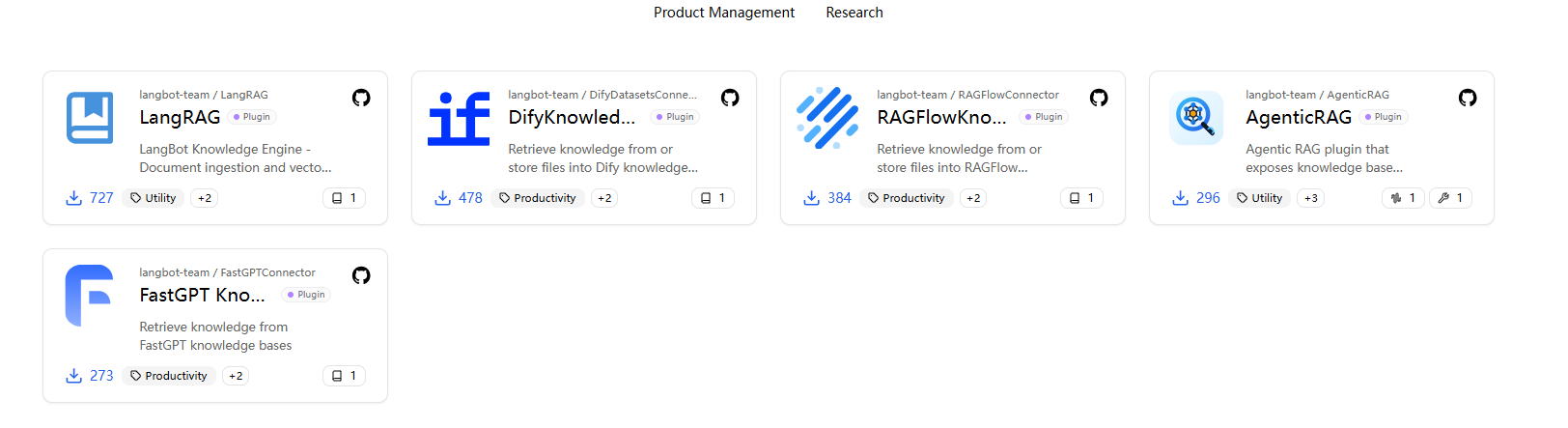
The screenshot shows several RAG-related knowledge engine plugins. The original post mentions five RAG options, including LangBot team's own research work.
Other Important Updates
LangBot Cloud has also officially launched. Users who do not want to self-host can experience LangBot through the official cloud service.
This release line also includes multiple fixes, covering areas such as Dify output parsing, WebSocket message sending, and configuration type conversion.
After the knowledge base became pluginized, developers gained a cleaner way to connect custom knowledge engines to LangBot. This is especially useful for teams with more complex business requirements.
Updates That Were Already Added but Rarely Written About
The original author then moves beyond public release notes and lists several features that had already changed but had not been fully explained in previous articles.
LangBot Plugin Market Has Passed 400 Items
According to the original post, the LangBot Plugin Market has already passed 400 items. The author also notes that the team reviews plugins and that entertainment-only plugins are relatively limited, with low duplication.
This point matters because plugin ecosystems are often more important than a single built-in feature list. A larger ecosystem means users can extend LangBot for different workflows instead of waiting for every capability to become part of the core product.
External AI Application Platform Compatibility Has Passed Seven Platforms
LangBot has continued expanding compatibility with external AI application development platforms. The original article mentions recent updates around Weknora and Deerflow, emphasizing that LangBot pays close attention to extensibility.
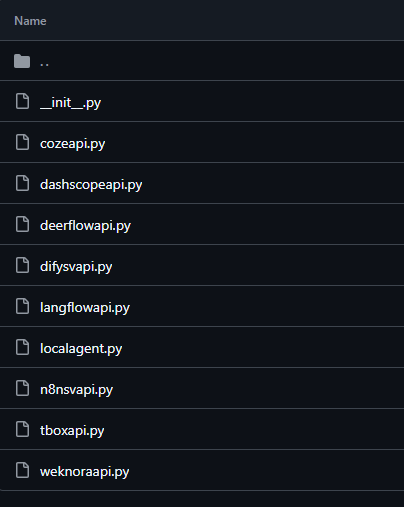
The screenshot shows connector-related files for multiple platforms, including Coze, DashScope, DeerFlow, Dify, Langflow, local agents, n8n, Tbox, and Weknora.
LangTARS and OpenClaw-like Capabilities Keep Improving
LangTARS is described as a modular capability layer. LangBot acts as the unified foundation that safely exposes models, tools, knowledge bases, and conversation history to local or third-party Agents.
This lets an Agent focus on business intelligence: understanding user intent, calling tools, retrieving knowledge, and organizing answers. The Agent does not need to worry about the low-level connection details.
The article also mentions that these capabilities can support both sandbox-based operation and personal computer control scenarios.
SaaS Platform Agent Updates
The SaaS platform has also received Agent updates. The author does not go into much detail here, but notes that SaaS users have already experienced these changes, while the open-source community may experience some features a few versions later.
Enterprise Model Callback Routing
LangBot has added enterprise-level model callback routing. When a model call fails, the message can be routed back to a prearranged fallback model.
The value of this design is that it helps break limitations around API keys and model vendors. For enterprise systems, this can improve reliability when one provider fails or reaches a limit.
LangBot Supports 30+ IM Platforms Directly or Indirectly
LangBot has already reached broad instant messaging platform compatibility. The original article states that LangBot directly or indirectly supports more than 30 IM platforms.
For bot frameworks, IM coverage matters a lot. A business may need one bot system to work across WeChat, QQ, Lark, DingTalk, Telegram, Discord, Slack, LINE, and other platforms. A unified bot framework can reduce duplicated integration work.
Pipeline Routing: Workflow-like Conversation Routing
The article also mentions pipeline routing, which behaves somewhat like Workflow.
With this feature, LangBot can route conversations to different pipelines based on business keywords or other conditions. Different pipelines can use different prompts, extensions, and databases. They can also be nested.
The original author adds an important note: after the visual Workflow update arrives, this pipeline routing feature may be removed or replaced because visual workflow orchestration will be more stable and easier to use.
QR-code Configuration
For some supported open platforms, LangBot can use QR-code based configuration. This makes it easier to configure an open platform without manually entering every detail.
Future Update Preview
Some upcoming features were already under development when the source article was written. The author notes that some of the content was so new that even the official website had not yet been updated at the time.
Visual Workflow Orchestration Is Already Developed
The visual workflow orchestration feature has already completed development, and the merge timing has been determined.
This is one of the more important future changes because it can make complex logic easier to build and maintain from the WebUI.
Integrating Other CLI-style Agent Capabilities
The article also mentions that the project connected with cc had gained some attention, so the team decided to add support for other CLI-style capabilities similar to Claude Code and Codex.
This direction fits the broader trend of letting AI agents work more directly with development environments, command-line tools, and local projects.
More Features Are Coming
The author keeps the remaining upcoming features as a teaser. The main message is clear: the current LangBot update is not the endpoint, and the roadmap still includes more Agent and Workflow-related improvements.
A Note About Unverified Comparisons
The original article also responds to another article that, according to the author, did not verify enough details before making comparisons.

The screenshot states that LangBot and AstrBot are both working toward useful AI bot ecosystems, but they emphasize different directions. LangBot focuses more on quickly connecting AI applications to chat ecosystems, while AstrBot focuses more on making the bot itself an extensible intelligent platform.
The practical takeaway is simple: comparisons should be based on verified features, use cases, and deployment needs. A framework may look “smaller” only if the comparison ignores plugin systems, runtime separation, platform integrations, or enterprise routing features.
We Are All Similar
The author briefly adds a reflective point: projects in the same ecosystem often look similar because they are responding to similar user needs.
AI bot frameworks are all trying to connect models, tools, knowledge bases, messaging platforms, and user workflows. Similarity is not necessarily a problem. The real difference is in architecture, extension model, deployment design, and how quickly a team can support real-world use cases.
Everyone Has Different Situations
Different teams build under different constraints. Some focus on local ease of use. Some focus on plugin richness. Some focus on enterprise deployment. Some focus on chat platform coverage.
That is why a serious comparison should not only ask “which one has more features?” It should also ask: which framework fits the deployment scenario, team size, platform requirements, maintenance ability, and long-term extension plan?
High-Concurrency Backlog Test
At the end of the original article, the author adds performance-related data. For a framework, high concurrency and multi-session handling are important indicators.
The test method was to force unprocessed sessions to accumulate to around 50–70, then gradually reduce speed and observe the TPS when the system reached load balance.
The author notes that there was session backlog during the test, so it represents a high-concurrency environment and is not exactly the same as normal production traffic. However, it still gives a useful view of framework performance under pressure.
Test conditions described in the source article:
Item | Test condition |
Hardware | Raspberry Pi 5 with 8GB memory |
System | Ubuntu 22 |
Deployment | Frontend and backend running together |
Container usage | No container deployment |
AI API | Same OpenAI interface |
Model/API latency | Same AI interface latency model and default parameters |
Unit | Replies per hour |
Domestic Frameworks A/B
The following charts are from the domestic framework A/B test shown in the original article.
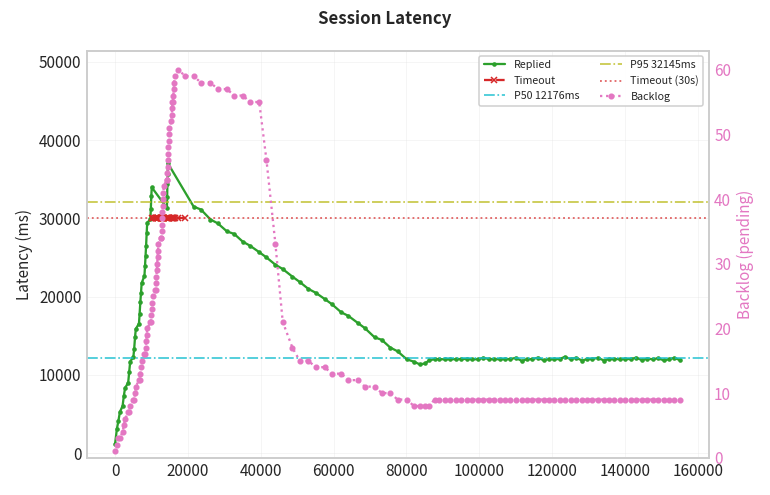
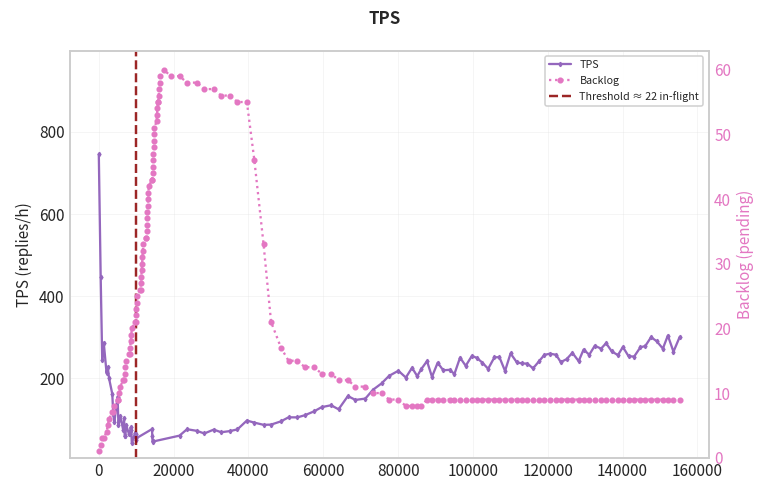
According to the original author's reading of the chart, the TPS is around 240 replies per hour.
LangBot
The following charts are from the LangBot test shown in the original article.
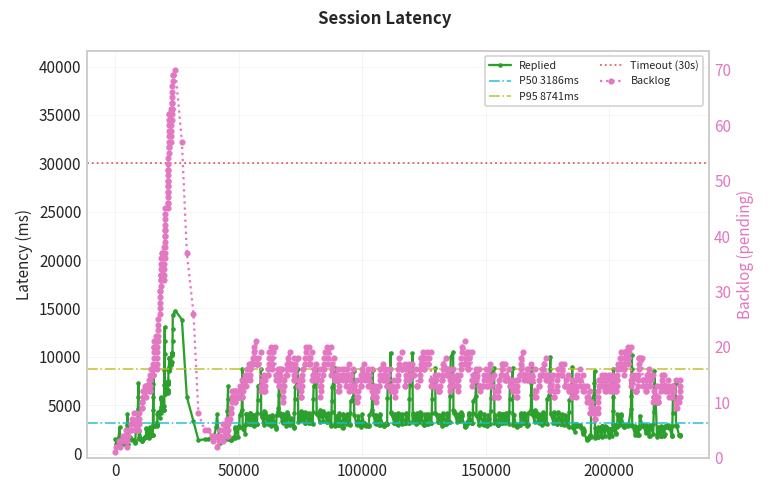
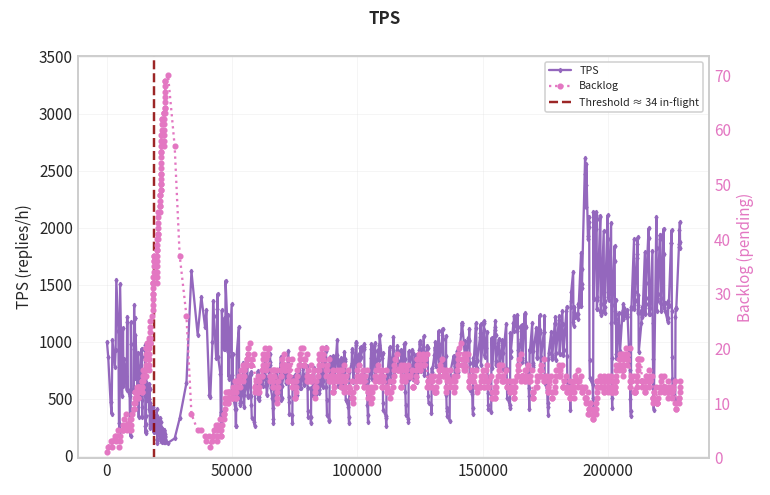
According to the original author's reading of the chart, LangBot reaches around 1260 replies per hour in this test.
The author also notes that this may still be somewhat unfair to LangBot because LangBot starts with one more Runtime component. Even with that extra component, the result is still significantly higher in the shown test.
Performance Reading Caution
These charts are useful, but they should not be treated as a universal production benchmark. The author used a Raspberry Pi 5 and a specific test method, so absolute numbers may change on different hardware, different APIs, different model latency, and different deployment topologies.
The more useful signal is the relative TPS ratio under the same test setup. The original author also says the related testing software may be open-sourced later.
FAQ
What is LangBot?
LangBot is an open-source, production-grade platform for building AI-powered instant messaging bots. It connects large language models and AI application platforms to chat platforms such as Discord, Telegram, Slack, WeChat, QQ, Lark, DingTalk, and more.
What changed in LangBot v4.10.x?
The most important update is the introduction of Sandbox and Skills. Sandbox gives the Agent an isolated workspace for command and file operations, while Skills let the Agent load specialized instructions only when needed.
What is LangBot Box Runtime?
Box Runtime is LangBot's sandbox execution environment. It can provide tools such as exec, read, write, edit, glob, and grep, while keeping execution isolated from the host environment.
How do I enable the LangBot sandbox in Docker?
For Docker deployment, the original article uses docker compose --profile all up to start the full profile. To disable the sandbox, set box.enabled: false in the configuration.
What are LangBot Skills used for?
Skills are on-demand instruction packages for the Agent. They can include prompts, procedures, scripts, and reference files, allowing the Agent to use specialized knowledge without loading everything into context at the start.
Is LangBot better than AstrBot?
The answer depends on the use case. LangBot focuses strongly on connecting AI applications to chat ecosystems, enterprise routing, plugin runtime separation, RAG, MCP, and multi-platform IM deployment. AstrBot also has strong Agent and bot framework capabilities, so the right choice depends on the deployment scenario and feature priorities.
Are the TPS numbers in this article production benchmarks?
No. The original test used a specific Raspberry Pi 5 setup and a controlled backlog scenario. The numbers are useful as a reference, but production performance will depend on hardware, API latency, deployment method, session load, and configuration.
Can LangBot be used for enterprise bots?
Yes, LangBot is designed for production and enterprise scenarios, especially where teams need multi-platform IM support, knowledge base integration, model routing, monitoring, and extensible plugin capabilities.
Related Tools
LangBot: Open-source platform for building AI-powered instant messaging bots.
LangBot Documentation: Official documentation for deployment, bot configuration, models, pipelines, plugins, sandbox, and skills.
LangBot Plugin SDK: Official plugin SDK, CLI, Plugin Runtime, and Box Runtime infrastructure for LangBot.
LangBot Cloud: Managed LangBot service for users who do not want to self-host.
AstrBot: Open-source AI Agent assistant and chatbot framework used here as the comparison reference.
Docker: Container platform used by LangBot deployments and the sandbox backend.
Dify: LLM application development platform that LangBot can connect to.
n8n: Workflow automation platform that can be connected to LangBot for chat-based workflow triggers.
Related Links
Original CSDN Article: Source article adapted into this English Markdown version.
LangBot v4.10.0 Sandbox and Skills Release Blog: Official LangBot article explaining Sandbox and Skills.
LangBot GitHub Repository: Main open-source repository for LangBot.
LangBot Releases: Official release history for LangBot versions.
LangBot Official Documentation: Entry point for LangBot usage, deployment, and configuration docs.
LangBot Skills Documentation: Official documentation for installing and using Skills.
LangBot Plugin SDK Repository: Official SDK and runtime repository for LangBot plugins and sandbox infrastructure.
AstrBot GitHub Repository: Official AstrBot repository for readers who want to compare framework directions.