Claude Code /checkup 详解:清理上下文、修复配置并提升智能体安全性
了解 Claude Code 的 /checkup 命令如何检查未使用的技能、MCP 服务器、插件、CLAUDE.md 文件、hooks、更新、权限和安全设置,帮助清理上下文并提升智能体安全性。
Claude Code /checkup Explained: Clean Context, Fix Configuration, and Improve Agent Safety
Introduction
Claude Code has gained a more capable built-in setup checkup. In version 2.1.205, Anthropic expanded the existing /doctor workflow so it can diagnose configuration problems and help fix them. /checkup is available as an alias for the same in-session workflow.
The change may look small because it is triggered by a single slash command. In practice, it addresses a common problem for long-running Claude Code setups: unused skills, stale Model Context Protocol servers, oversized instruction files, slow hooks, outdated installations, and repeated permission prompts gradually make the environment harder to understand.
The goal is not only to report that something is wrong. The updated checkup can inspect the setup, explain proposed changes, and ask for approval before applying them.
/checkup
You can also use the canonical command:
/doctor

A One-Command Setup Checkup
According to the Claude Code 2.1.205 changelog, /doctor is now a full setup checkup that can diagnose and fix issues, while /checkup is its alias.
This is different from the separate terminal command:
claude doctor
The terminal command prints read-only installation and settings diagnostics without starting an interactive session. The in-session /doctor or /checkup workflow can go further by proposing fixes and letting Claude coordinate the cleanup through its available tools.
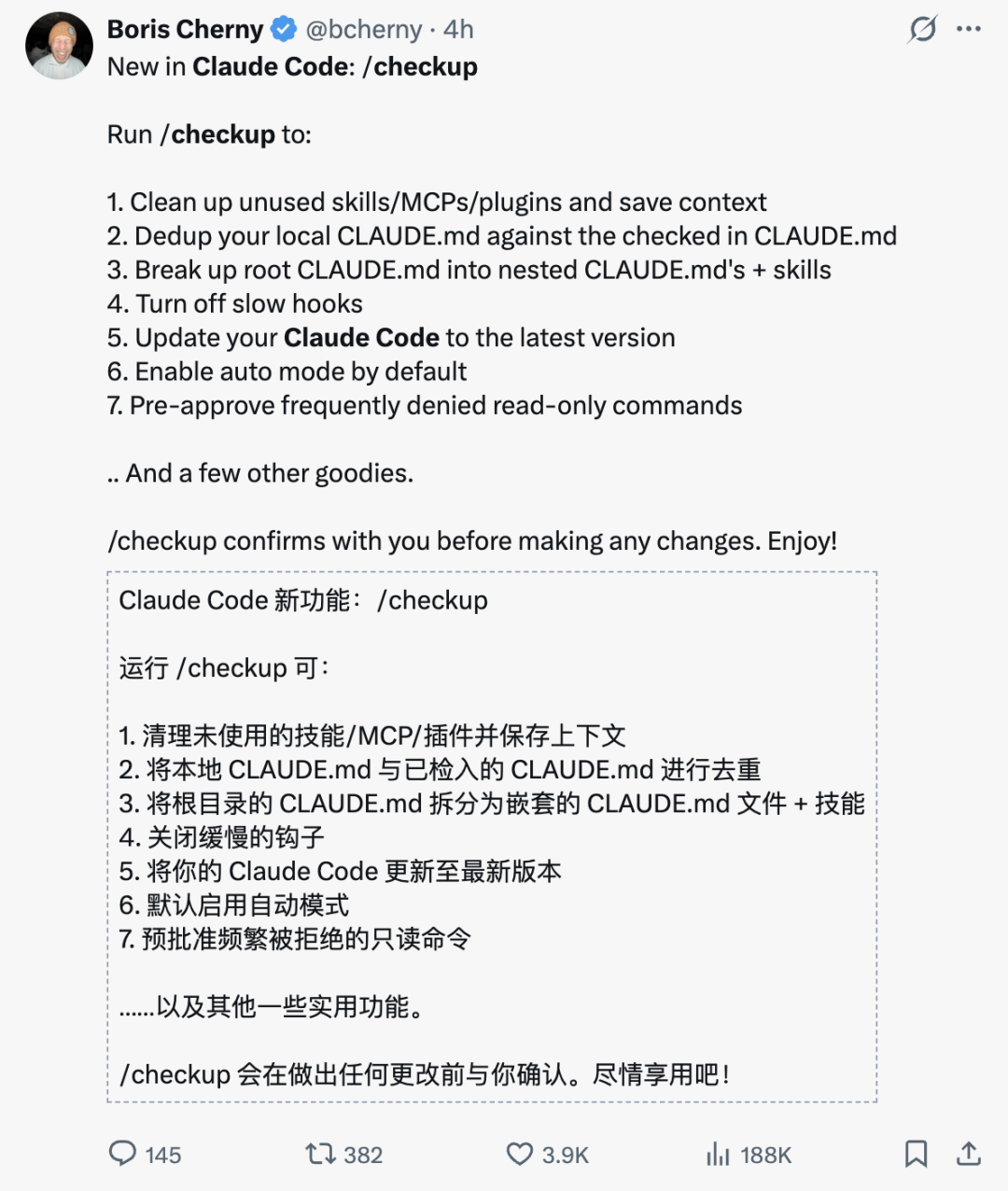
Claude Code creator Boris Cherny described several jobs the checkup is designed to handle:
- Clean up unused skills, MCP servers, and plugins.
- Deduplicate local
CLAUDE.mdinstructions against checked-in project instructions. - Break an oversized root
CLAUDE.mdinto nested files and reusable skills. - Identify and disable slow hooks.
- Update Claude Code to the latest available version.
- Enable auto mode by default when appropriate.
- Pre-approve frequently rejected read-only commands.
- Detect other setup problems that make the environment slower or less reliable.
The command asks for confirmation before making changes.
What the Checkup Actually Reviews
1. Unused Skills, MCP Servers, and Plugins
Claude Code can be extended with skills, plugins, hooks, and MCP servers. These integrations are useful, but a mature setup often accumulates components that are no longer relevant.
An MCP server may have been added for an old issue tracker. A skill may have been created for a workflow the team no longer uses. A plugin may still be enabled even though its commands have been replaced.
The checkup can surface those unused components and propose removing or disabling them.
This matters because tools and instructions can consume attention and context even when they are not actively helping with the current task. Fewer irrelevant integrations also make the permission model easier to audit.
2. Duplicated or Oversized CLAUDE.md Instructions
CLAUDE.md files provide persistent instructions for Claude Code. They can contain build commands, coding conventions, architectural notes, test requirements, and project-specific rules.
These files are loaded into the session context. Anthropic recommends keeping each file concise and reviewing nested instruction files regularly for outdated or conflicting rules.
Over time, a project may develop several common problems:
- The same rule appears in both local and checked-in files.
- Old instructions remain after the codebase changes.
- A root file grows into a long collection of unrelated procedures.
- Team-wide rules and directory-specific rules are mixed together.
- Detailed workflows are stored in
CLAUDE.mdeven though they would work better as on-demand skills.
The checkup can compare local and project instructions, identify duplication, and suggest a more focused structure.
A practical layout may look like this:
project/
├── CLAUDE.md
├── .claude/
│   ├── rules/
│   │   ├── frontend.md
│   │   ├── backend.md
│   │   └── testing.md
│   └── skills/
│       └── release/
│           └── SKILL.md
└── packages/
    └── api/
        └── CLAUDE.md
The root file can contain only the rules needed across the whole repository. More specific instructions can load when Claude works inside the relevant directory, while reusable procedures can become skills that load when invoked.
3. Slow or Redundant Hooks
Hooks are deterministic actions that run at specific points in the Claude Code lifecycle. They can format files, validate commands, enforce policies, send notifications, or integrate Claude Code with internal systems.
A hook is useful only when its value justifies its cost. A script that adds two or three seconds to every tool call can create a large delay over a long session.
The checkup can help identify hooks that are:
- Consistently slow.
- Triggering more often than intended.
- Duplicating another validation step.
- Referencing scripts that no longer exist.
- Producing errors that the user has learned to ignore.
- No longer connected to an active workflow.
Disabling an unnecessary hook does not only improve speed. It also reduces noise, making important failures easier to notice.
4. Installation and Update Problems
A broken launcher, stale installation, or partial update can create confusing behavior. The setup checkup can inspect installation health and recommend updating Claude Code.
To check the installed version manually, use:
claude --version
The exact update method depends on how Claude Code was installed. Managed enterprise deployments may intentionally pin a version, so users should not override organization policy simply because a newer release exists.
5. Repeated Read-Only Permission Prompts
Claude Code uses a permission system that separates low-risk inspection from actions that modify the environment.
Anthropic’s security documentation states that a built-in set of read-only commands, including commands such as ls, cat, and git status, can run without a prompt. Commands that edit files, run potentially modifying Bash operations, or access additional systems may require approval.
If a user repeatedly rejects or manually approves a harmless read-only command, the checkup can suggest a clearer permission rule. The objective is to reduce prompt fatigue without granting broad write access.
A good permission rule should be narrow. Approving a specific read-only pattern is safer than allowing an entire shell or tool category.
Why Context Maintenance Matters
An AI coding agent has to fit several kinds of information into one working context:
- The current conversation.
- Relevant source files.
- Tool results and command output.
CLAUDE.mdinstructions.- Skill descriptions.
- MCP tool definitions.
- Plans, task state, and intermediate findings.
The context window is finite. A large amount of irrelevant setup information can leave less room for the actual problem.
This does not mean every installed skill or MCP server is automatically loaded in full. Claude Code uses mechanisms such as on-demand skill bodies and tool discovery to control context usage. Even so, unnecessary configuration creates additional complexity and increases the chance that outdated instructions or integrations influence a session.
A healthy setup therefore needs the same kind of maintenance as a software project:
- Remove what is no longer used.
- Keep global instructions short.
- Move specialized procedures into scoped files or skills.
- Audit integrations and permissions.
- Measure the cost of hooks.
- Revisit the setup after major project changes.
From Diagnosis to Assisted Cleanup
Earlier diagnostic tools often stopped after listing errors. The user still had to understand every warning, find the relevant file, decide on a fix, and apply it manually.
The updated in-session checkup follows a more agentic pattern:
- Inspect the current environment.
- Identify specific problems.
- Estimate the benefit of a cleanup.
- Present proposed changes.
- Let the user choose a full cleanup, selected fixes, or a report-only option.
- Apply only approved changes.
- Leave file modifications visible for review.
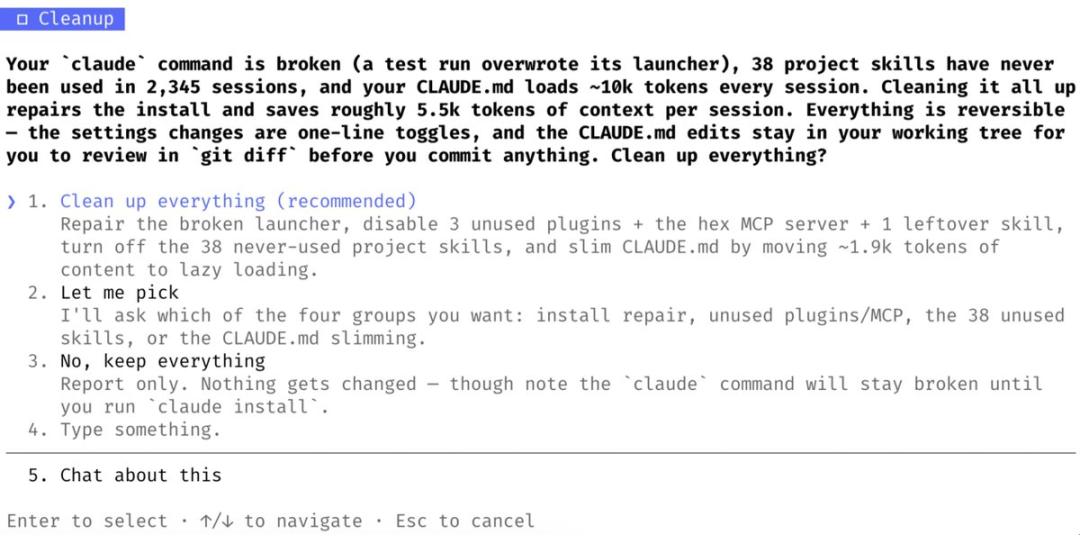
This makes the workflow closer to an interactive maintenance assistant than a passive error report.
The approval step is important. A tool should not silently remove a project skill, rewrite instruction files, or change permission behavior merely because it considers the setup inefficient.
Safety Improvements Around Autonomous Commands
The same release also included changes aimed at reducing risk when Claude Code acts more autonomously.
Protection Against Fabricated Approval in Session Logs
Background task notifications now explicitly state when no human input occurred. This is intended to prevent text inside a transcript from being mistaken for a real user approval.
For an agent, the difference between “the transcript contains approval-like text” and “the user actually approved this action through the interface” is critical. Security-sensitive decisions need a trusted approval channel.
Additional Confirmation for Risky rm -rf Commands
The changelog also notes an improvement to auto mode: Claude Code asks before running rm -rf when the path contains a variable it cannot resolve from context.
A dangerous example is:
rm -rf "$TARGET_DIR/"
If TARGET_DIR is empty or incorrectly expanded, the result can be very different from what the script author intended.
The correct lesson is not that one confirmation prompt makes destructive shell commands safe. Users should still inspect the resolved path, use a sandbox or disposable environment where possible, maintain backups, and avoid broad deletion commands in production systems.
Autonomy Needs Boundaries
The release combines two goals that may appear to conflict:
- Reduce unnecessary interruptions for routine, read-only work.
- Add stronger confirmation around uncertain or destructive actions.
These goals work together. A useful agent should move quickly inside a well-defined safe area and slow down when it approaches a boundary with irreversible consequences.
/doctor, /checkup, and claude doctor
The similar names can be confusing.
| Command | Where it runs | Main purpose | Can propose or apply fixes? |
|---|---|---|---|
/doctor |
Inside a Claude Code session | Full setup checkup | Yes |
/checkup |
Inside a Claude Code session | Alias for /doctor |
Yes |
claude doctor |
Terminal, without opening a session | Read-only installation and settings diagnostics | No |
For most users who want Claude to inspect and help clean up the active setup, /doctor or /checkup is the relevant command.
For scripts, support checks, or quick installation diagnostics outside a session, claude doctor is more appropriate.
A Safe Way to Run /checkup
Step 1: Check the Current Repository State
Before allowing a tool to modify configuration files, make sure important work is committed or backed up.
git status
Review uncommitted files and avoid mixing unrelated code changes with configuration cleanup.
Step 2: Start Claude Code in the Intended Project
cd /path/to/project
claude
Running the checkup from the correct repository matters because project instructions, hooks, plugins, and MCP settings may be scoped.
Step 3: Run the Checkup
/checkup
Read the report before accepting changes.
Step 4: Choose the Scope
Depending on what Claude finds, the interface may offer options such as:
- Apply the recommended cleanup.
- Select individual categories.
- Keep the current setup and generate a report.
- Discuss a recommendation before deciding.
Prefer selective cleanup when the repository has custom internal tooling or shared team configuration.
Step 5: Review the Diff
After configuration files change, inspect them:
git diff
Pay particular attention to:
CLAUDE.mdandCLAUDE.local.md.- Files under
.claude/. - Hook definitions.
- Plugin settings.
- MCP configuration.
- Permission rules.
- Any generated skills.
Step 6: Test a Normal Workflow
Run a task that represents everyday use. Confirm that required tools still work, relevant instructions still load, hooks still enforce important rules, and permission prompts behave as expected.
Step 7: Commit the Cleanup Separately
When shared project configuration changes, use a focused commit so teammates can review and revert it independently.
git add CLAUDE.md .claude/
git commit -m "chore: clean up Claude Code configuration"
Adjust the paths to match the files actually changed.
When Not to Accept Automatic Cleanup Immediately
Do not approve every recommendation without review when:
- The repository uses organization-managed settings.
- MCP servers provide business-critical integrations.
- Hooks enforce security or compliance policies.
CLAUDE.mdcontains intentional duplication for portability.- The project pins Claude Code to a tested version.
- Multiple teams depend on the same plugin or instruction hierarchy.
- The cleanup proposes changing permission behavior.
- The working tree contains unrelated uncommitted changes.
In those cases, use the checkup as an audit report first. Discuss or apply changes through the team’s normal review process.
FAQ
What is the Claude Code /checkup command?
/checkup is an alias for the expanded in-session /doctor workflow introduced in Claude Code 2.1.205. It audits setup issues and can propose fixes for configuration, context, integrations, hooks, installation health, and related problems.
Is /checkup different from /doctor?
In current Claude Code versions, /checkup is an alias for /doctor. They invoke the same full setup checkup inside an interactive Claude Code session.
Is claude doctor the same as /doctor?
No. claude doctor runs from the terminal and prints read-only installation and settings diagnostics without opening a session. The slash command can coordinate fixes after asking for approval.
Can /checkup delete skills or MCP servers automatically?
The workflow can identify unused components and propose cleanup, but it is designed to ask before making changes. Users should review each proposed removal, especially in shared or managed projects.
Why does a large CLAUDE.md affect Claude Code?
CLAUDE.md instructions enter the session context, so long or duplicated files consume space that could otherwise be used for the active task. Anthropic recommends concise instructions and scoped files for large projects.
Should every procedure be moved out of CLAUDE.md?
No. Stable project facts, coding rules, and required commands belong in CLAUDE.md. Long, reusable procedures are often better suited to skills because their full content loads only when needed.
Does /checkup make auto mode completely safe?
No. It may improve defaults and add protections, but users remain responsible for reviewing commands and permissions. Destructive operations, external writes, production access, and credential handling still require careful controls.
How often should I run the setup checkup?
There is no required schedule. It is useful after major configuration changes, when Claude Code feels slower or less consistent, after adding several integrations, or as part of a periodic project-maintenance review.
Related Tools
- Claude Code: Anthropic’s agentic coding tool for terminals, IDEs, desktop, and the web.
- Claude Code Skills: Create reusable, on-demand procedures that extend Claude Code.
- Model Context Protocol in Claude Code: Connect Claude Code to external tools, APIs, databases, and services.
- Claude Code Hooks: Run deterministic automation at defined points in the agent lifecycle.
- Claude Code Plugins: Package and distribute skills, agents, hooks, and MCP integrations.
- Claude Agent SDK: Build programmable agents with the same core tools and agent loop used by Claude Code.
Related Links
- Claude Code Changelog: Official release history, including the version 2.1.205 setup-checkup changes.
- Claude Code Commands Reference: Reference for built-in slash commands and bundled skills.
- Claude Code CLI Reference: Official reference for terminal commands and CLI flags.
- How Claude Remembers a Project: Guidance for structuring and maintaining
CLAUDE.mdfiles. - Claude Code Security: Permission behavior, sandboxing, approval controls, and safety guidance.
- Claude Code Settings: Configuration scopes, managed settings, plugins, MCP policies, and filesystem controls.
- Claude Code Troubleshooting: Official diagnostic and recovery guidance.
- Automate Actions with Hooks: Practical guidance for creating and auditing lifecycle hooks.
Summary
Claude Code 2.1.205 turns /doctor into a broader setup-maintenance workflow and adds /checkup as an alias. The command can inspect unused extensions, duplicated instructions, oversized CLAUDE.md files, slow hooks, installation problems, and repetitive permission behavior.
The most useful part of the update is not that it hides maintenance behind one command. It is that the workflow can explain proposed changes and keep the user involved before modifying the environment.
The release also reinforces an important pattern for agentic tools: routine read-only work should require less friction, while uncertain or destructive operations should receive stronger safeguards.
A healthier Claude Code setup is not the one with the most skills, hooks, and integrations—it is the one where every loaded component has a clear purpose and every powerful action has an appropriate boundary.