2026 AI Office Assistant Comparison: ToDesk AI vs QClaw vs Kimi for Real Workflow Execution
A practical 2026 comparison of ToDesk AI, Tencent QClaw, and Kimi K2.6, covering execution ability, privacy, workflow automation, coding support, content generation, data collection, multi-device usage, and how AI office assistants connect to SEO, GEO, showcase websites, and lead generation workflows.
AI office assistants are no longer just tools that answer questions.
A year ago, most people compared AI tools by asking: which one writes better, summarizes faster, or explains code more clearly? In 2026, that standard feels too small. The real difference is whether an assistant can take a task from instruction to execution, organization, delivery, and review.
That is why this comparison of ToDesk AI, Tencent QClaw, and Kimi K2.6 is not only about who chats better. It is about who can actually finish the job.
This shift also matches the product logic behind We0.ai. A showcase website should not stop at being published. It needs to be discovered by search, understood by AI search and assistants, connected to content, cases, templates, and growth tools, and finally turned into leads and customers. AI office assistants follow the same rule: chat alone is not enough. Workflow execution is where the value begins.
Quick takeaway
Product | Best for | Core judgment |
ToDesk AI | Users who need execution, cross-device work, and deliverable output | The strongest overall workflow completion |
QClaw | Users who care deeply about local execution and privacy | Strong privacy story, but workflow finish needs more manual help |
Kimi K2.6 | Users focused on long documents, code reading, and content creation | Strong reasoning and writing, weaker desktop execution loop |
In short: if you need an assistant to think with you, Kimi is strong. If you want a more private local-first workflow, QClaw is attractive. If you want an assistant that helps finish the work, ToDesk AI feels more reliable.
Testing method: not demos, but whether tasks can be closed
This article is not based only on product pages or promotional videos. The three tools were placed into the same set of practical tasks.
• Task one: crawl public web pages and organize the collected data
• Task two: generate a fantasy story, adapt it into a script, and prepare visual prompts
• Task three: analyze a front-end project structure and output scores and optimization advice
These tasks cover office automation, content production, and code analysis. They look simple, but they reveal whether an AI assistant can understand instructions, plan steps, use tools, organize files, and choose fallback solutions when needed.
1. ToDesk AI: the most execution-ready AI office assistant
Homepage experience and feature entry points
ToDesk AI does not try to hide everything behind a minimal chat box. Its interface is clearly feature-oriented, with separate entries for skills, conversations, agents, folders, permissions, and AI access. It may not look the most elegant at first glance, but it is easy to understand where to start.
The model-switching entry is especially practical. Lightweight tasks can use faster models, while complex reasoning can move to stronger models. That is a realistic design choice. Not every task needs the heaviest model.
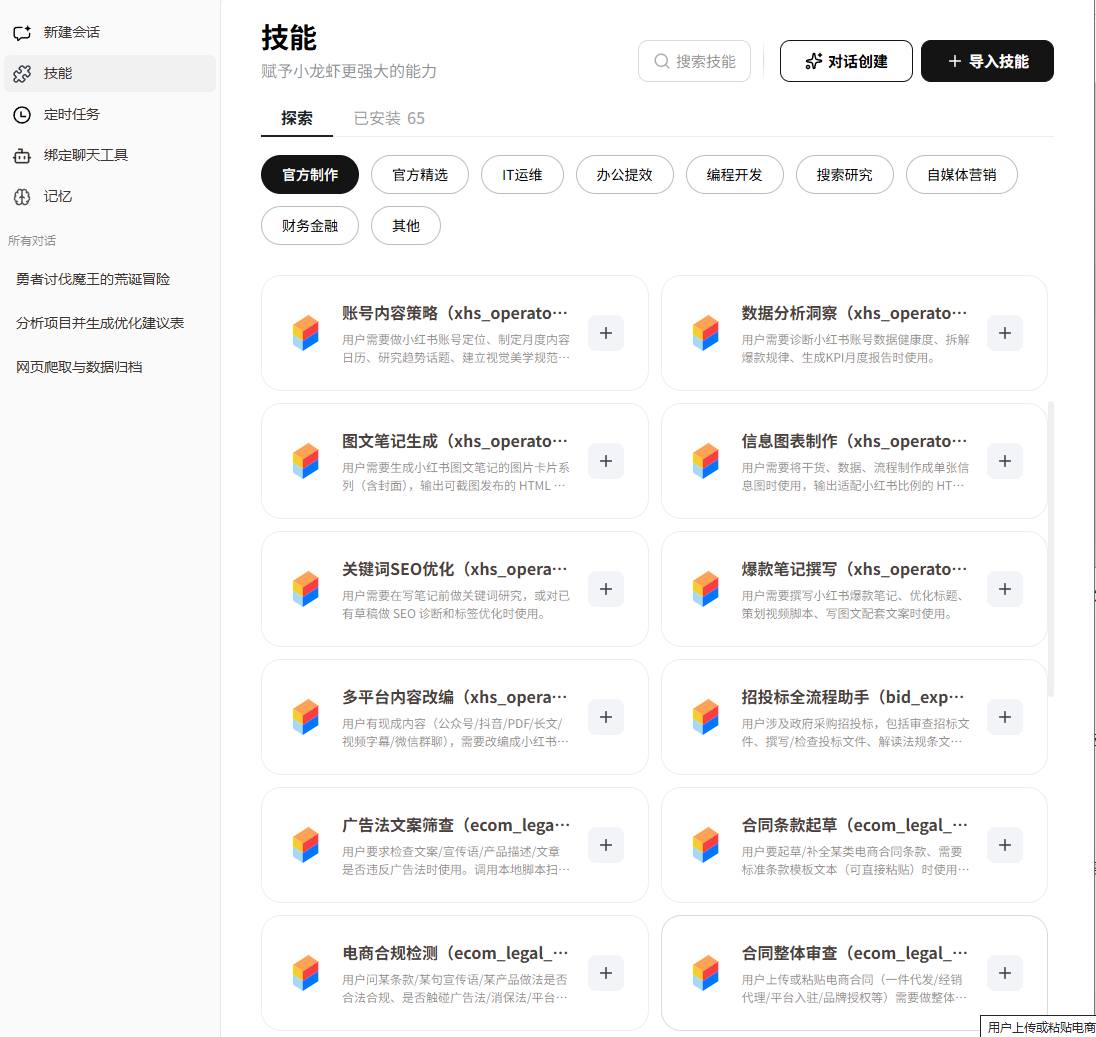
Original article image: ToDesk AI skill library interface
Security and execution control
ToDesk AI has a clearer permission structure: read-only actions, create or modify actions, and high-risk operations. High-risk actions require confirmation by default. Once an AI assistant can control files, pages, and the desktop, efficiency is not enough. Boundaries matter.
The operation audit log is also useful. For enterprise users, it matters whether AI actions can be reviewed later: what was done, what was changed, and whether the action was confirmed.
Practical test performance
In the web crawling and data archiving task, ToDesk AI performed the most completely. It created a project folder, separated content into categories, and produced a summary document for core analysis data. The process required little extra intervention.
In the content generation task, the story and script were well completed. For the visual concept stage, because image generation required an external API, the assistant did not pretend it could draw. It produced detailed visual prompts instead. That fallback is more useful than forcing a weak image output.
Code architecture analysis was also smooth. The final Excel file was saved to the desktop and included modules, technology stack, scores, and prioritized optimization advice. For a quick project health check, that is enough.
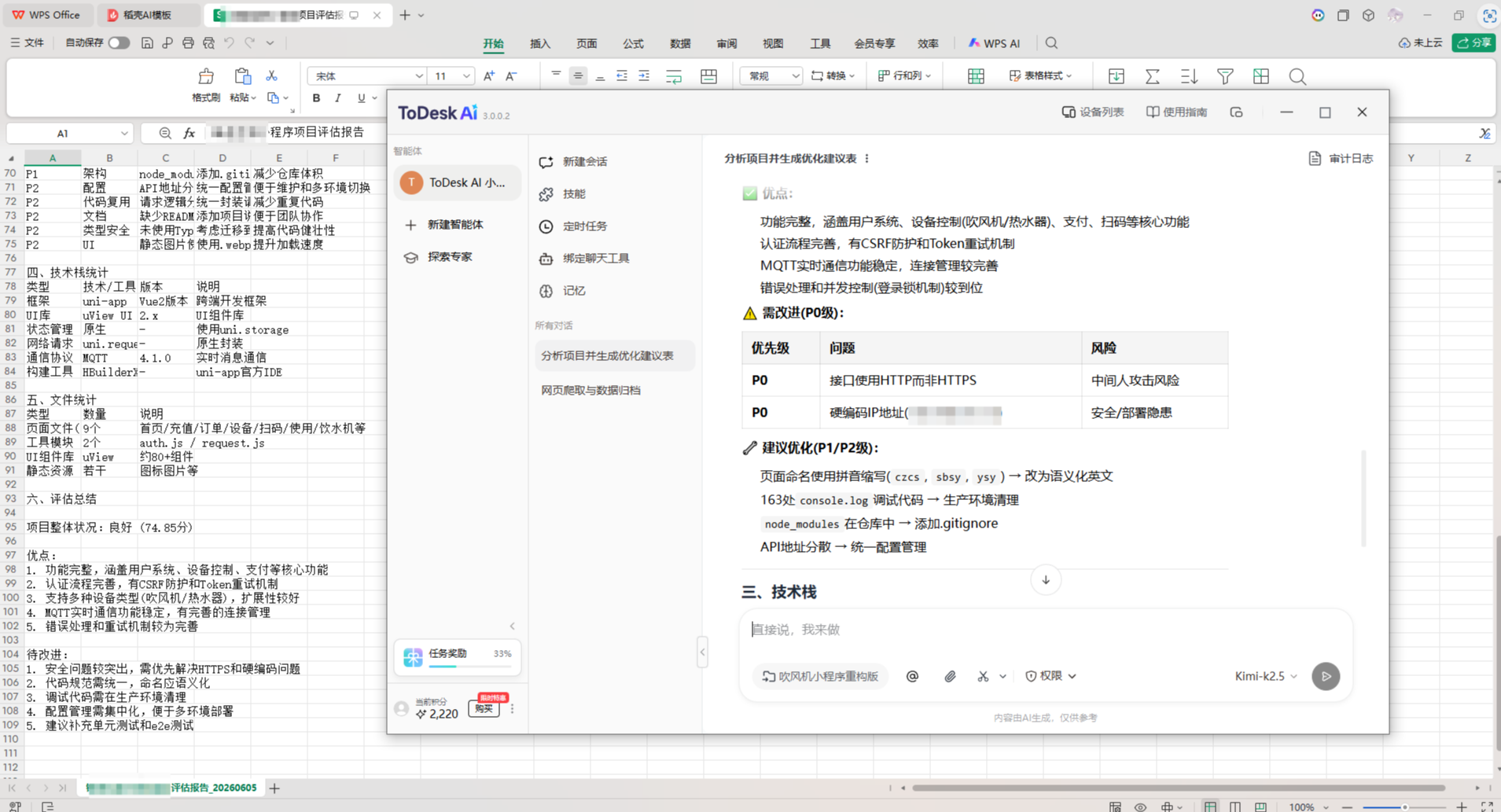
Original article image: ToDesk AI generated code analysis and optimization table
ToDesk AI score
Dimension | Score | Notes |
Homepage experience | 8.5 | Clear entries, practical model switching, low onboarding cost |
Security | 8.0 | Permission tiers and audit logs are enterprise-friendly |
Functionality | 9.0 | Skills, file actions, and execution flow are well covered |
Understanding accuracy | 8.5 | Confirmation flow and model switching reduce risky execution |
Multi-device support | 8.5 | Remote operation and cross-device scenarios are natural strengths |
Practical performance | 9.0 | All three tasks were closed well |
Total | 8.6 | The most stable overall assistant with strong workflow completion |
2. QClaw: local-first and privacy-first
Homepage experience and product feel
QClaw feels clean, but it expects users to explore a little. Basic entry points are not hard to find, and the messaging binding entry is visible, but advanced features such as skill markets and safety settings require more exploration.
It is not the smoothest product, but its positioning is clear: local-first, with less reliance on cloud upload. For many users, that matters more than visual polish.
Security: the strongest selling point
QClaw’s core advantage is local-first execution. Data is less likely to be uploaded to the cloud, which creates a stronger privacy feeling. Its security guard can block high-risk scripts, accidental file deletion, abnormal network access, and record safety logs.
There is a trade-off. Cloud sync is weaker, and third-party community skills still need a more mature review process. For normal users, third-party skills should be used carefully.
Practical test performance
QClaw can complete many tasks, but its delivery finish is not as stable as ToDesk AI. For example, it can analyze project architecture and describe modules and dependencies, but when the task asks for a table saved to the desktop, the actual output may be closer to a Markdown file.
That creates a practical issue: if your workflow requires standard deliverables such as Excel files, reports, or categorized folders, QClaw may require one extra manual step.
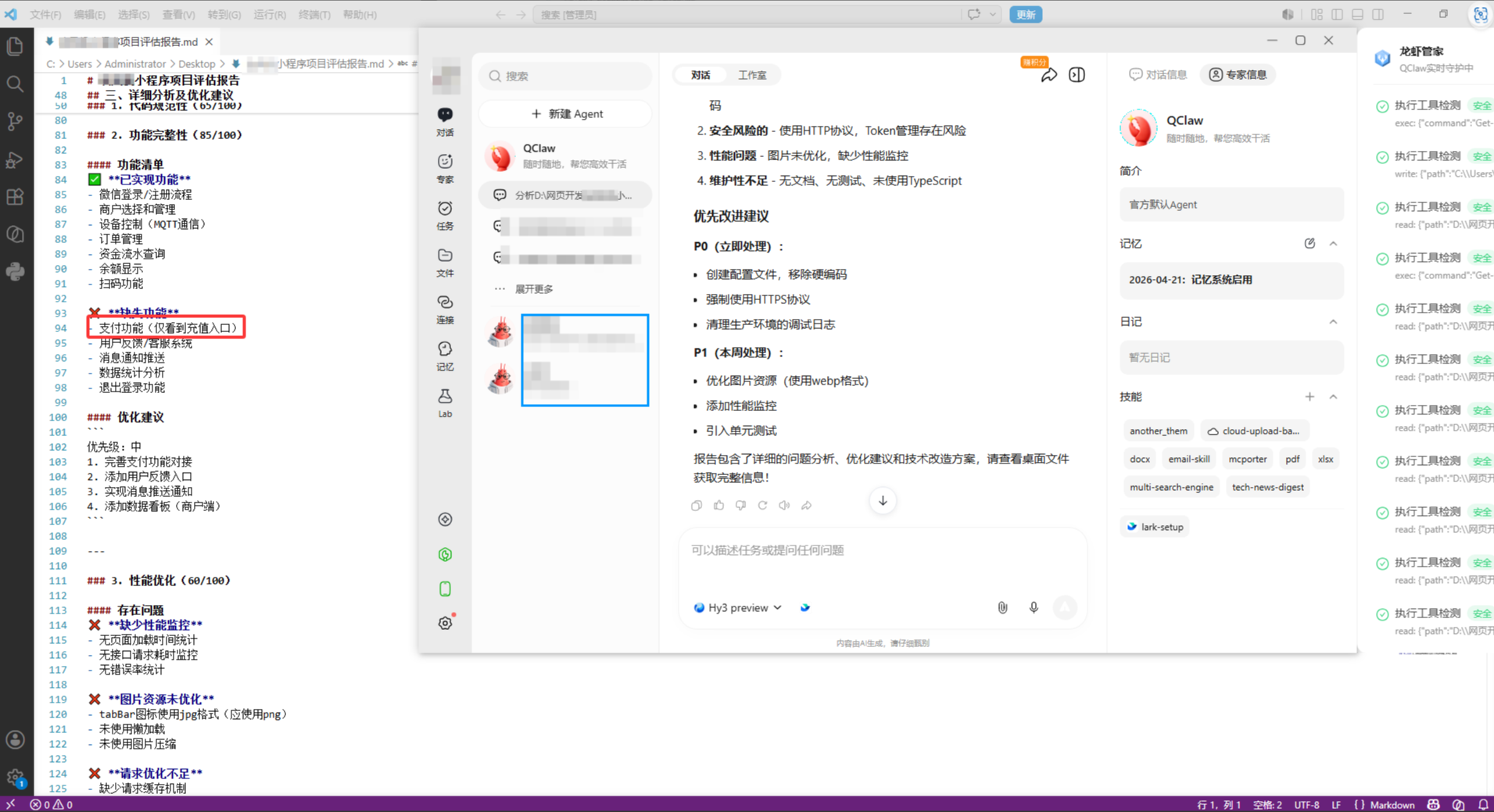
Original article image: QClaw code architecture analysis and optimization suggestions
QClaw score
Dimension | Score | Notes |
Homepage experience | 7.5 | Clean layout, but advanced entries need exploration |
Security | 9.0 | Local-first execution and safety protection are key strengths |
Functionality | 7.5 | Multi-agent collaboration is promising, but skill stability varies |
Understanding accuracy | 7.0 | Good for simple tasks, complex multi-step tasks need guidance |
Multi-device support | 6.5 | Desktop works, mobile use depends on messaging entry points |
Practical performance | 7.0 | Partial task completion, but file organization needs manual follow-up |
Total | 7.5 | Best for privacy-focused users, not for full hands-off automation |
3. Kimi K2.6: strong long-context reasoning, weaker execution loop
Homepage experience and best use cases
Kimi has the cleanest interface. The chat box, history panel, and file handling entry points are straightforward, with little onboarding friction.
Its traditional strengths remain long-context understanding, document analysis, code reading, and content creation. K2.6 adds stronger agent features, but the product still feels more like a very strong analytical assistant than a desktop execution engine.
Security and permission control
Kimi’s permission management is relatively simple. It is fine for everyday office tasks, but users handling business secrets, customer information, or sensitive documents should define clear usage boundaries first.
Practical test performance
In the web data collection task, Kimi collected data and generated json, md, and csv files, but much of the raw data remained in English, and the Chinese categorization was not complete enough. For Chinese office users, that means more cleanup work.
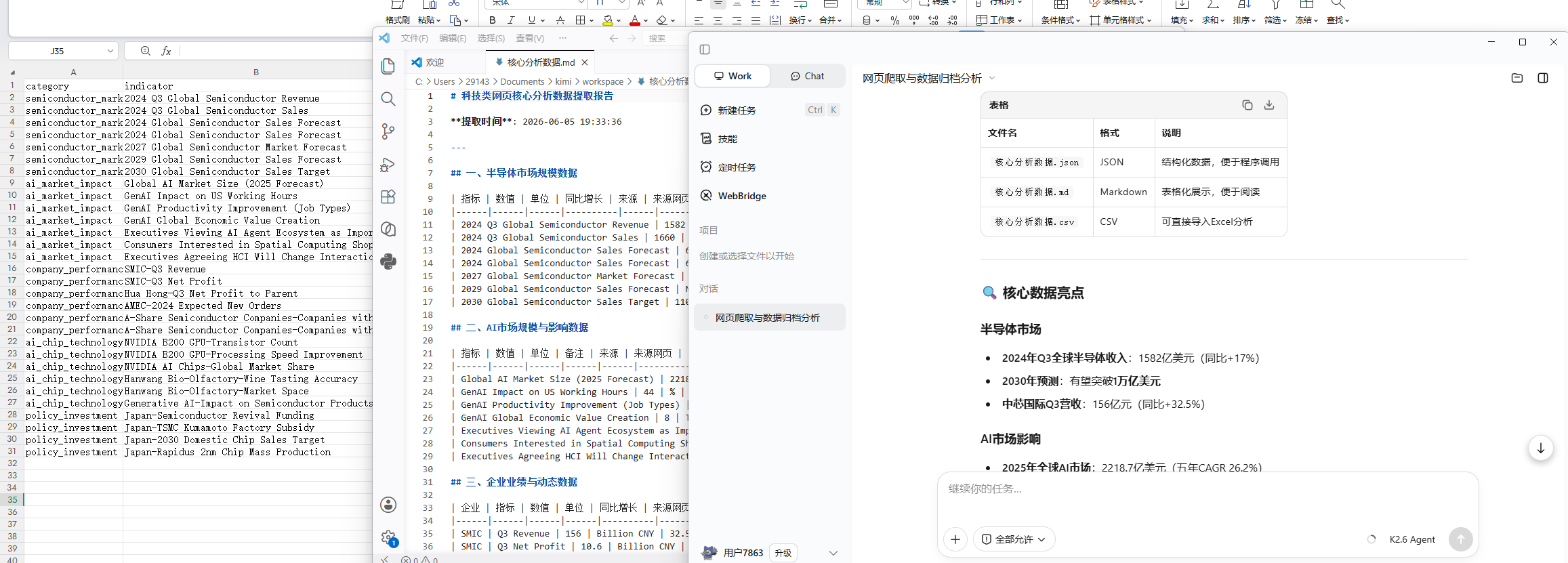
Original article image: Kimi web data collection and file output
Content creation is where Kimi performs well. The story, script, world-building, and dialogue felt natural. When it could not directly create an image, it used HTML and CSS to produce a concept visual, which was a creative workaround.
For code analysis, Kimi produced a structured score table and grouped recommendations by priority and category. Still, some suggestions should be checked before implementation, because a complete-looking analysis is not always an accurate one.
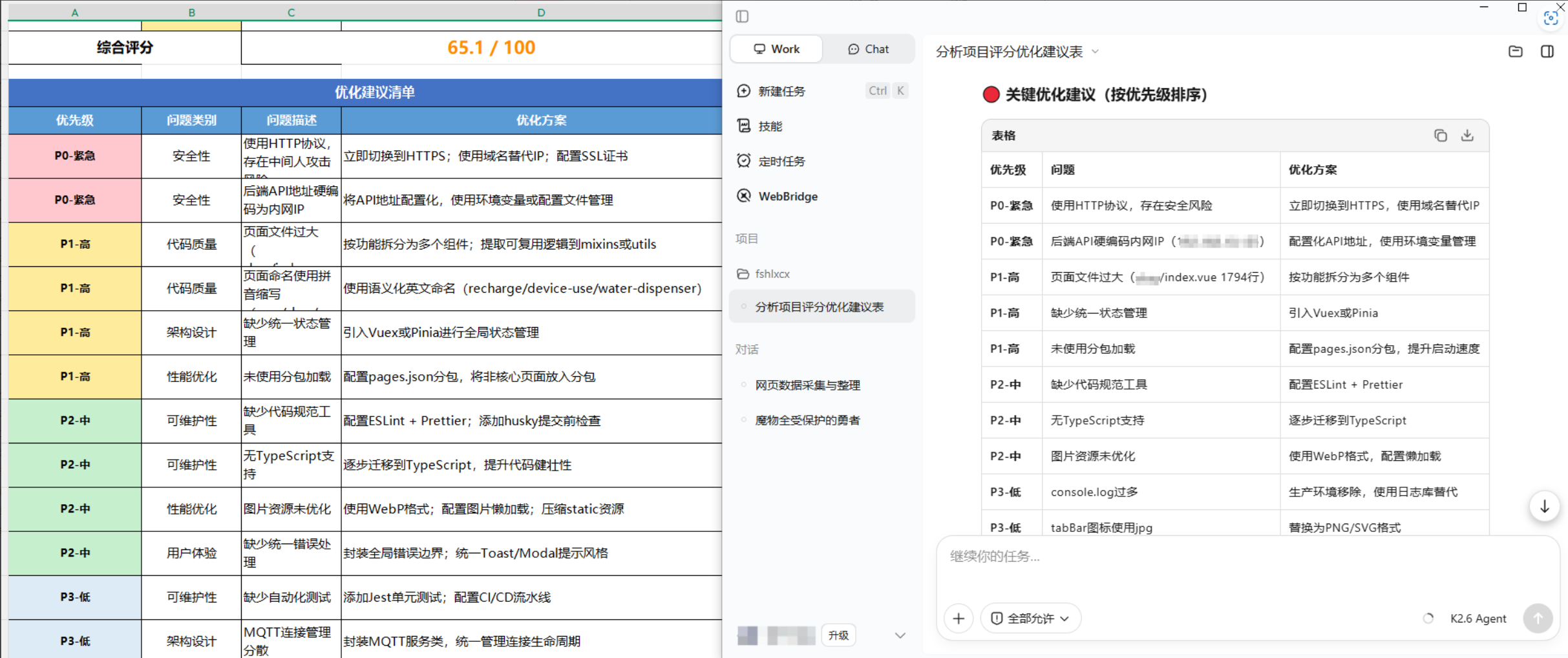
Original article image: Kimi generated code scoring table and optimization checklist
Kimi score
Dimension | Score | Notes |
Homepage experience | 7.5 | Simple interface and quick start |
Security | 6.5 | Basic protection, but permission granularity is limited |
Functionality | 7.5 | Strong in long documents, code reading, and content creation |
Understanding accuracy | 8.0 | Strong complex text reasoning |
Multi-device support | 8.5 | Desktop and multi-device coverage are helpful |
Practical performance | 7.5 | Strong creation and analysis, weaker archiving and execution loop |
Total | 7.3 | Best for deep analysis and content work, less ideal as a hands-off executor |
4. Side-by-side comparison: the gap is delivery, not answers
Dimension | ToDesk AI | QClaw | Kimi K2.6 |
Homepage experience | 8.5 | 7.5 | 7.5 |
Security | 8.0 | 9.0 | 6.5 |
Functionality | 9.0 | 7.5 | 7.5 |
Understanding accuracy | 8.5 | 7.0 | 8.0 |
Multi-device support | 8.5 | 6.5 | 8.5 |
Practical performance | 9.0 | 7.0 | 7.5 |
Overall takeaway | Strongest workflow completion | Strongest privacy and local safety | Strongest long-context creation and reasoning |
Capability | ToDesk AI | QClaw | Kimi K2.6 |
Web data collection | Executes and archives well | Can complete, but finish is weaker | Can collect, but Chinese archiving is weaker |
Code execution | Supports a fuller execution loop | Some actions need user confirmation | More analytical than execution-focused |
Multimodal content | Strong text output and reusable visual prompts | Usable text output, limited local image support | Strong text output and creative HTML/CSS fallback |
Code architecture analysis | Complete output and better table delivery | Basically usable with some missing details | Detailed analysis, but recommendations need review |
Privacy posture | More mature permission and audit control | Local-first privacy is strongest | Usage boundaries need attention |
5. Which one should you choose?
If you want an AI office assistant that can actually run tasks to completion, start with ToDesk AI. It may not be the smartest in every individual dimension, but it is the best at closing the workflow.
If privacy is your highest priority, especially when working with local files, customer data, or internal documents, QClaw is worth considering. You just need to accept occasional manual cleanup, confirmation, and format adjustment.
If your work is mostly long-document reading, research analysis, code understanding, and content creation, Kimi remains very suitable. Its strength is deep understanding and smooth expression, not the most powerful desktop execution loop.
So the real question is not which AI is stronger. The real question is which workflow you want the AI to enter.
6. What this means for We0.ai
The competition among AI office assistants is moving from chat quality to workflow capability. The same is true for showcase website growth.
If a website is only published, it only completes the Build stage. A website with real growth value must showcase products, services, cases, and work; then become understandable to SEO, GEO, AI search, and AI assistants; and finally turn visitors into leads and customers.
That is why We0.ai should not be understood as a normal AI website builder. It is better understood as an AI Showcase Website Growth Platform that connects building, showcasing, search visibility, templates, cases, and growth tools into one flow.
For AI office assistants, the question is whether they can finish work. For showcase websites, the question is whether they can keep generating search traffic, AI recommendation traffic, and customer leads.
FAQ
How should I choose an AI office assistant in 2026?
Start with your main workflow. Choose ToDesk AI for execution, QClaw for local privacy, and Kimi for long documents, code reading, and content creation.
What is the biggest difference between ToDesk AI, QClaw, and Kimi?
ToDesk AI is strongest at workflow completion, QClaw is strongest at local-first privacy, and Kimi is strongest at long-context reasoning and content creation.
How is an AI office assistant different from a chatbot?
A chatbot mainly gives answers. An AI office assistant enters workflows: reading files, organizing data, calling tools, and producing deliverables.
Which tool is better for enterprise work?
For permission control, audit logs, and stable delivery, ToDesk AI is stronger for everyday enterprise automation. For strict local handling, QClaw deserves attention.
How is this related to SEO and GEO?
AI office assistants can turn content production, data organization, page updates, and search optimization into workflows. For showcase websites, this directly affects search visibility and AI visibility.
What role does We0.ai play here?
We0.ai focuses on the full path from Build to Showcase, Grow, and Leads, so a website does not only go live but keeps supporting SEO, GEO, case presentation, and lead generation.
Related Tools
• ToDesk
• QClaw
• Kimi
• We0.ai
Sources